Calorie tracker paywalls
10 Calorie Tracker App Paywall Examples
People are deciding whether meal capture, nutrition feedback, and progress are worth repeating, not whether a premium badge looks attractive.
A calorie tracker paywall usually appears after someone has described a goal, entered body data, scanned food, or seen a first nutrition estimate. That context matters. The commercial screen should connect the plan to the job already in progress and explain what remains available without payment. A generic list of premium features wastes the meaning created by the setup flow.
These ten recorded screens show several approaches: dated trial timelines, monthly and annual choices, quantified scan limits, personalized plans, reminder controls, testimonials, and feature comparisons. They also reveal a common risk. Health products can move quickly from a practical subscription choice into certainty about future weight or wellbeing that the interface cannot guarantee.
Use the screen to answer five questions in order: what becomes available, what stays limited, whether money is due today, when the first charge occurs, and how the person can leave or restore access. Keep the selected product identifier, displayed price, billing period, and granted entitlement tied to one source of truth.
For the product loop surrounding the offer, study the calorie tracker app design examples.
01. Entry moment
Let the plan earn the right to introduce payment.
The offer is easier to understand after the user can see what their answers produced.
Cal AI presents a three-day trial timeline and names AI calorie scanning as an unlocked capability. Lose It! frames the same decision around a program that has already been created, then describes the trial as a sequence from immediate access to a reminder and the subscription start. Both screens inherit meaning from work completed earlier in the journey.
Do not repeat the onboarding questionnaire inside the paywall. Summarize the outcome that now exists, such as a daily target, a food logging route, or a personalized plan, and show the paid capability that advances it. If the user has already photographed a meal, preserve that image and result while the purchase sheet is open. Declining should return them to a valid free state rather than discard the work.
The implementation needs an explicit entry reason. Record whether the paywall followed onboarding, an AI scan, a history view, or a free allowance. That reason should determine the headline, preview, and return destination. It also lets measurement distinguish a timely offer from one shown before a person has experienced the product. ScreensDesign Pro can help a team compare these full recorded sequences instead of evaluating the paywall as an isolated screenshot.


02. Trial arithmetic
Make the free period and the paid period one sentence.
A free-trial button is incomplete unless the future charge is equally legible.
AI Calorie Counter Appediet shows a three-day free trial beside a one-month choice and includes a reminder toggle. Calz uses a vertical timeline, a monthly plan, and an annual plan expressed as a monthly equivalent. The screens make the trial visible, but they also demonstrate why every derived price must remain subordinate to the amount actually charged.
State the trial length, first-charge date or condition, full billed amount, renewal period, and cancellation route near the action. If an annual plan is described per month, keep the annual total visible in the same reading order. A reminder switch should reflect a real scheduled notification or email, not decorative reassurance. Explain what happens if notification permission is denied.
Model trial state independently from plan state. A person may be eligible for one plan but not another, may have used a prior trial, or may see a different storefront price. Fetch eligibility and localized products before composing the offer. When data is slow or incomplete, show a recoverable loading or unavailable state instead of a stale hard-coded price.


03. Free and paid limits
Price the difference the customer will encounter tomorrow.
A concrete allowance explains premium better than an abstract promise of unlimited health progress.
Kalguroo compares Free and Premium through meal scans, AI nutrition updates, menus, quick add, water logging, goals, charts, nutrients, health connections, activity logging, and ads. Calorie Counter by Numify instead organizes premium around immediate AI meal logging and a sequence of expected product use. One is an entitlement table; the other is a guided value story.
A useful comparison names the unit and period. Three scans per day, a limited history window, or a defined set of nutrients is clearer than basic access. Explain whether unsuccessful scans consume an allowance and when capacity resets. If the product can correct an AI result, do not place correction behind a different limit from capture without explaining the distinction.
Build the table from the same entitlement catalog enforced by the product. Each row needs a stable customer label, free allowance, paid allowance, reset policy, offline behavior, and response when the limit is reached. This prevents marketing copy from promising unlimited use while the API enforces a separate cap.

04. Billing control
Turn reminders and cancellation language into working controls.
Trust depends on whether the interface promise survives outside the paywall.
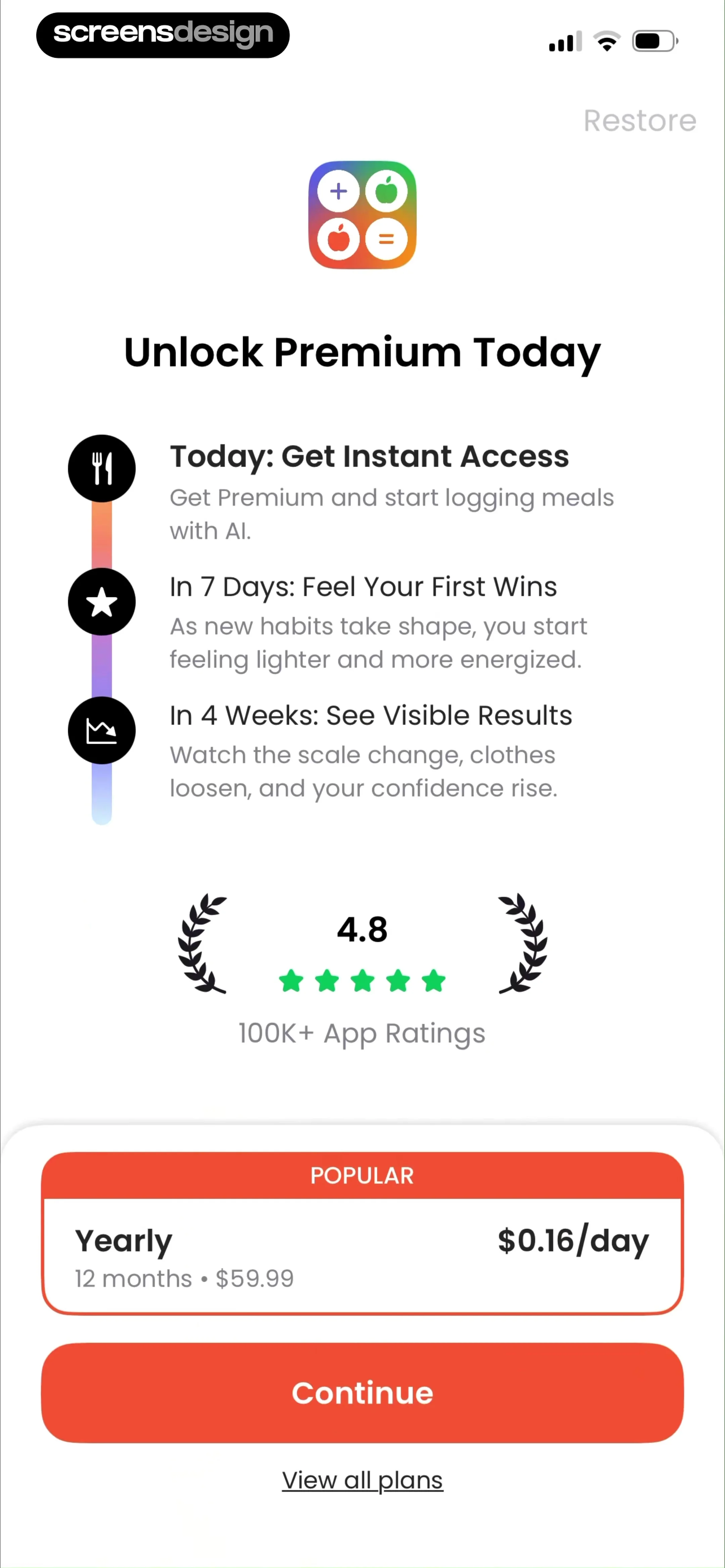
Calo lets the customer choose a seven-day free period or a paid month and exposes a reminder toggle before continuing. Calorie Tracker Diet describes today, the free interval, and the charge at day three. These patterns reduce temporal ambiguity when the dates, product price, and notification behavior are live and accurate.
A reminder control needs a persisted preference, a delivery channel, a scheduled time, and a fallback when push permission is unavailable. The subscription should still be manageable if the reminder fails. Link terms and restoration without forcing people to hunt through settings, and keep the dismiss path usable wherever the paywall is classified as soft.
Test eligibility changes, a trial started on another device, time-zone boundaries, revoked notification permission, app reinstall, price refresh, purchase cancellation, and an account that already owns access. After a successful purchase, verify the receipt before unlocking premium and return the customer to the meal or plan they were working on.


05. Proof and restraint
Use proof to clarify fit, not to promise a body outcome.
Testimonials and savings labels need a verifiable job in the decision.
BitePal combines locked nutrition tools with testimonials, an average rating, and a user count. CalScan emphasizes annual savings, a free trial, and the equivalent monthly amount. Both use familiar subscription proof, but health and weight language deserves extra restraint because individual outcomes depend on many factors outside the interface.
Prefer proof about product experience: logging effort, correction tools, recipe range, scan speed, support, or clarity of reports. If a testimonial includes weight change, preserve its status as one person's statement and do not convert it into a general prediction. Savings claims should identify the reference plan and use current storefront prices.
Review the hierarchy without badges, animation, or color. The product difference, total charge, trial condition, and action must still make sense to someone using large text or a screen reader. Do not use countdowns or preselection to manufacture urgency. A decision that produces fewer accidental starts is healthier than a short-lived increase in taps.


Implementation
Connect storefront truth to nutrition-product state.
The paywall is reliable only when pricing, entitlements, saved meals, and account state agree.
Create a server-readable offer model with product identifier, tier, billing period, introductory eligibility, trial duration, localized total, equivalent period, renewal behavior, and the entitlements it grants. The client can format the decision, but it should not invent pricing or access from static copy. Preserve the pending meal, image, corrections, and target before invoking the store sheet.
Define states for loading products, no products, eligible trial, ineligible trial, purchase pending, cancelled sheet, verified purchase, verification delay, restore success, restore nothing found, expired access, and network loss. Give every state a safe return destination. Health data should not be included in purchase analytics or support logs unless it is necessary and properly protected.
Accessibility review should cover long localized prices, dynamic type, screen-reader order, selected-plan announcements, non-color selection indicators, and a visible focus path. Trial timelines need text equivalents. If a comparison table scrolls, repeat enough row and column context for each item to remain understandable.
- The paid capability is tied to a task the person has already seen.
- Free limits name a unit, period, reset rule, and failure behavior.
- Trial length, first charge, full amount, cadence, and cancellation route agree.
- Declining or cancelling the purchase preserves the meal or plan in progress.
- Restoration and existing-subscriber paths are visible and tested.
- Health claims and testimonials do not become guaranteed outcomes.
Measurement
Measure paid continuity, not only trial starts.
A purchase is useful when the customer receives access and resumes the nutrition task they intended to complete.
Track paywall viewed, entry reason, plan displayed, plan selected, store sheet opened, purchase verified, entitlement granted, original task resumed, restore attempted, and error state. Join events through a privacy-safe journey identifier. Treat a button tap without verified access as an incomplete transaction, not a conversion.
Segment by entry moment, free allowance remaining, trial eligibility, plan, storefront, locale, device, app version, prior purchase, and whether a personalized result existed. Compare activation and later use of the paid capability with cancellation, refund, support contact, repeated purchase attempts, and uncorrected AI results. These observations describe behavior; they do not prove that a particular screen caused retention or revenue.
Review representative failures: a scan lost when the store sheet closes, a reminder that never arrives, a displayed price that changes at confirmation, and a verified subscriber who remains locked. The most useful improvement may remove friction after purchase rather than increase pressure before it.
Review checklist
Review the paywall inside a complete logging session.
Run new, returning, trial-ineligible, subscribed, expired, offline, and restored accounts through the same meal. Verify what is saved, what is limited, what the paywall promises, and where every exit leads.
Then test translated prices, large text, screen reader navigation, reduced motion, declined purchases, delayed verification, and plan changes. The free experience should remain coherent, and paid access should begin without asking the customer to repeat the meal.
- A real meal or plan survives every purchase outcome.
- The selected plan and store confirmation show the same product.
- The reminder preference produces a real scheduled reminder.
- Restore works from the paywall and account settings.
- Every price and saving remains readable at large text sizes.
- Analytics distinguish purchase intent from verified access.
Questions and answers
Calorie tracker paywall questions
When should a calorie tracker show a paywall?
After the person understands a useful result or reaches a clearly explained free limit. Preserve their meal, scan, corrections, and plan if they decline.
What should the paywall explain?
Name the paid capabilities, free limits, trial length, first charge, full price, renewal period, cancellation route, and restore option.
Should a calorie app offer monthly and annual plans?
Only when both are genuine products the audience needs. Keep the annual total visible if a monthly equivalent is used for comparison.
Are trial reminder toggles enough?
No. The preference must schedule a real notification or email and remain honest when permissions or delivery are unavailable.
How should health claims appear on a paywall?
Describe product capabilities and attribute individual testimonials. Do not promise a weight, health, or behavioral outcome the interface cannot guarantee.
Apps referenced in this page
Open the products behind the examples.
 Cal AI - Calorie TrackerFood & Macro Counter
 Lose It! - Calorie CounterFood Tracker for Weight Loss
 AI Calorie Counter - AppedietFood, Macro & Fitness Tracker
 Calz - Calorie Counter AIMy Meal Planner & Diet Manager
 Kalguroo: AI Calorie TrackerEasy Tracking & Habit Diary
 Calorie Counter by NumifyFood Tracker & Calculator App
 Calo: AI Food Calorie CounterMacro Tracker & Weight Loss
 Calorie Tracker・Diet: Food AIWeight Loss Planner・AI Counter
 BitePal: Food Calorie TrackerAI Scan Meals & Easy Tracking
 CalScan - AI Calorie TrackerTrack Food & Lose Weight
2,805 apps in the top charts.Ask them anything.
Compare recorded calorie tracker paywalls, inspect complete trial and purchase flows, and study how nutrition apps explain scans, limits, plans, and billing.