Workout tracker app design
10 Workout Tracker App Design Examples: Today’s Plan, Sets and Progress
A workout tracker should keep the next exercise, current set, previous performance, timer, and correction path understandable under physical effort.
Workout tracker design is not the same problem as fitness onboarding. Onboarding may collect goals, experience, schedule, equipment, and constraints to create a plan. The workout tracker begins after that plan exists. Its job is to turn the plan into a usable session while the person is moving, carrying equipment, watching a timer, and making adjustments in a busy environment.
The interface has to support both confidence and correction. A user should see what is next, record what actually happened, change weight or repetitions, substitute an unavailable exercise, pause, recover from an interruption, and finish without losing partial work. Previous values can speed logging, but they must not be mistaken for today’s completed set.
These ten recorded screens show today views, exercise lists, active sessions, set tables, volume summaries, rest timers, substitutions, notes, and completion actions. Together they define a practical loop: preview the plan, start deliberately, log one set with minimal input, rest with context, adjust the session, confirm completion, and return the record as progress the athlete can inspect later.
01. Today’s plan
Make the workout commitment inspectable before Start.
Exercise count, estimated duration, focus, order, and alternatives help the person decide whether today’s plan is realistic.
Stronger places Today’s Workout above a training plan, shows Full Body Power, four exercises, and about 45 minutes, then situates the session inside a seven-week foundation phase. Planfit opens a Today’s Workout list with seven exercises, 75 minutes, warm-up, sets, weights, repetitions, Edit order, and Get Started. One emphasizes program context, while the other exposes the session details.
Show the minimum information needed to commit: session purpose, expected duration, exercise count, major equipment, and any readiness constraint. Let users inspect the ordered exercises and edit or substitute before the timer begins. If the plan adapts automatically, say which input caused the change and keep the original available for comparison.
Avoid making Start a point of no return. The person may discover a busy machine, missing equipment, pain, or limited time. A shorter version, order change, and appropriate substitution should preserve the training intention. If a change affects programmed volume or progression, explain the consequence rather than silently rewriting the plan.


02. Active session
Keep elapsed effort and remaining work in the same view.
The session overview should answer where am I, what is next, and how do I safely stop or resume.
Fitness App shows elapsed time, 25 percent progress, an upper-body exercise list, completion marks, and a Finish Workout action. Befit shows a workout in progress at 77 percent, target muscles, a Continue Workout button, and logged exercise counts. Both make partial completion explicit rather than treating the session as either not started or done.
Choose progress that matches the program. Exercise count, completed sets, planned volume, or elapsed blocks can all work, but a single percentage should not mix them invisibly. Display paused state and elapsed time clearly. If users leave the app, return them to the active session rather than opening a generic home dashboard and making the workout appear lost.
Finish needs protection without punishment. Confirm when unlogged planned work remains and offer Finish anyway, save as partial, or return. Auto-completion based only on elapsed time can create false records. If a wearable or live activity continues independently, explain which timer and sensor data will stop when the phone session ends.


03. Set logging
Distinguish planned values, previous values, and completed values.
Fast entry matters, but the interface must not record a set before the athlete confirms what happened.
Gymverse presents a sample set, target repetitions, a Redo action, Log All Sets, and the next exercise with planned sets and repetitions. StrengthLog shows a live Leg Day session with weights, repetitions, a Heavy for me note, volume, total repetitions, average weight, and a persistent timer. The screens demonstrate two levels of density around the same job.
Label every value by status. Targets come from the plan, previous values come from history, and completed values belong to today. Pre-fill can speed entry, but the control should remain visibly unconfirmed. Support bodyweight, assisted load, time, distance, unilateral entry, rate of perceived exertion, pain notes, and warm-up sets without forcing every exercise into weight plus repetitions.
Make corrections cheap. A mistaken tap should support undo, edit, reorder, and delete without resetting the rest timer or session. When the same set is logged from a watch and phone, resolve duplicates visibly. Save locally first so a weak gym connection cannot turn completed work into an empty table.


04. Rest timing
Keep the timer attached to the set that started it.
Rest is part of the workout record, not an overlay that erases exercise context.
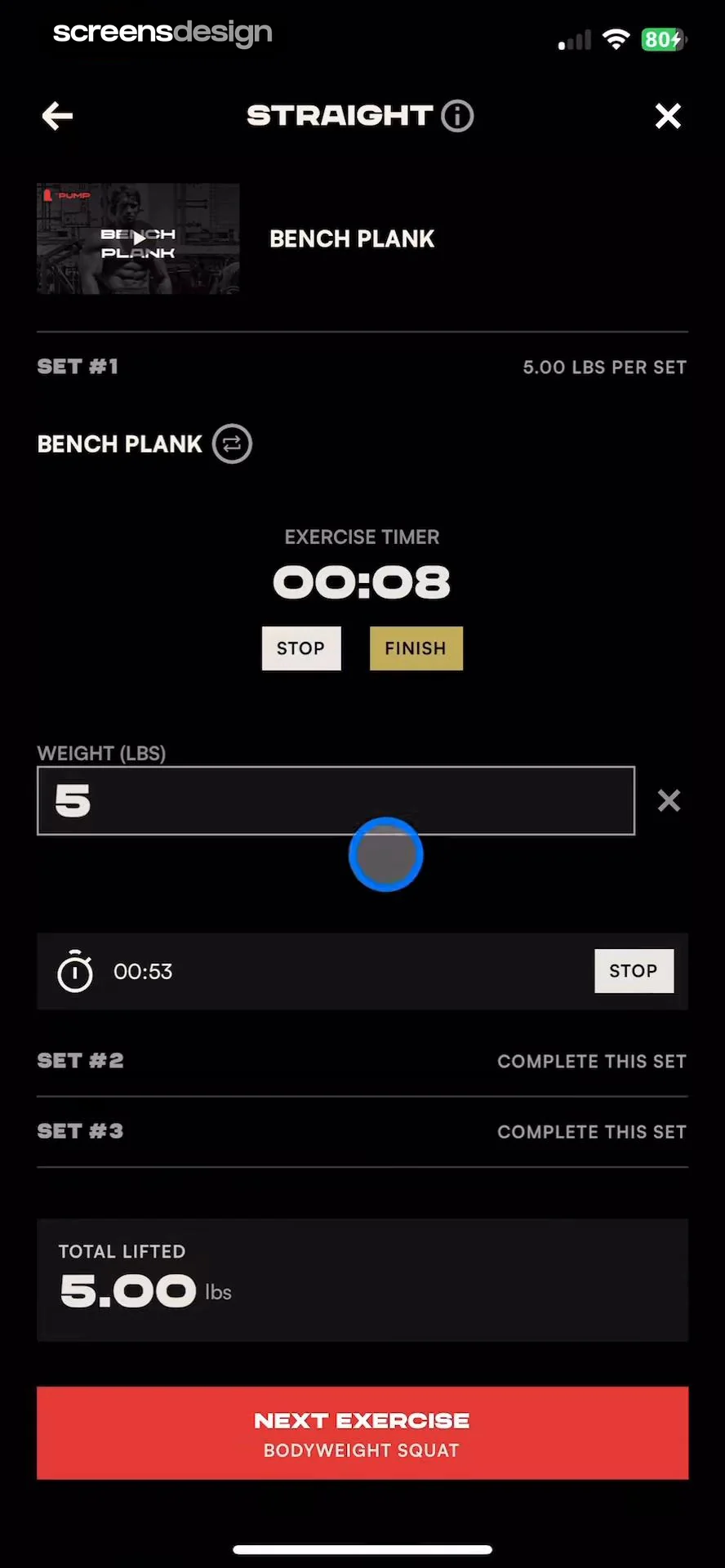
JEFIT shows the current set table above a large 59-second rest timer with Skip Rest, plus and minus 15 seconds, reset, pause, and a one-minute setting. Pump Club keeps an exercise timer, weight, completed set, total lifted, next exercise, and a second timer in the same active workout. Both prioritize timing while preserving enough exercise context to act.
Start rest from a confirmed set and show which set completed. Let users extend, shorten, skip, pause, or disable the timer. Notifications, Live Activities, watch surfaces, sound, vibration, and lock-screen behavior should share one timer source. If the app is backgrounded, calculate from a stored deadline rather than depending on a suspended countdown.
Avoid alerts that imply medical precision or force a start before the person is ready. A timer reaching zero can announce readiness while keeping the next-set action explicit. For circuits, supersets, timed intervals, and unilateral work, the model may need work and transition timers rather than one generic rest duration.

05. Session adjustment
Let the workout change without making the record unreliable.
Adding, replacing, reordering, or ending exercise should preserve what is already complete and explain program impact.
Befit shows three exercises, a logged-set count, Add exercise, Add set, Mark all sets, notes, and a rest timer. Planfit provides Edit Set, Add Set, Add Exercise, Finish Workout, and upcoming cool-down content. These controls acknowledge that the plan and the performed workout are not always identical.
Keep planned and actual session data separate. A substitution should record the original exercise, replacement, reason if useful, and whether progression carries over. When the user adds a set, update volume and remaining-work summaries immediately. Mark All Sets needs confirmation when it would convert unperformed targets into completed history.
Design the end state for partial sessions. Summarize completed exercises, skipped work, duration, volume, notes, and personal records, then allow corrections before save. Recommendations for the next workout should wait until the record is stable. If synchronization fails, keep the local completion and show pending status rather than asking the athlete to repeat the session.


06. Implementation
Model plan, live session, and completed record separately.
A durable data model lets the user change today without corrupting tomorrow’s program or yesterday’s history.
The plan contains intended exercises, order, targets, rest, and progression. The live session copies that plan into editable actual work with timers and device sync. The completed record freezes what happened while preserving links to the plan and substitutions. Avoid editing the plan directly every time the athlete changes one live set.
Handle foreground and background timing, crash recovery, duplicate watch events, offline entry, unit conversion, bodyweight, assisted weight, unilateral values, supersets, circuits, deleted exercises, and late corrections. Every set write should be idempotent and locally durable before cloud synchronization.
Health integrations need purpose and consent. Explain which workouts, heart-rate samples, calories, or body measurements are read or written. Provide manual operation when permission is denied. Large tap targets, high contrast, VoiceOver order, non-gesture input, and screen-awake behavior should be tested in realistic gym conditions.
07. Validation
Measure complete, trustworthy sessions rather than raw logging volume.
More recorded sets can reflect good usability, accidental confirmation, or duplicated device events.
Track plan preview, session start, first confirmed set, edit, substitution, timer use, pause, resume, partial finish, complete finish, correction, sync, and return to history. Measure lost-session and duplicate-set rates. Separate intentional skipped work from abandonment and technical failure.
Observe users during a real or simulated workout. Ask them to change weight, repeat a set, substitute equipment, extend rest, background the app, resume from the lock screen, and finish early. Check whether they can distinguish target, previous, and completed values without reading a tutorial.
Guardrails include incorrect volume, timer drift, battery drain, inaccessible controls, accidental finish, lost offline work, duplicated Health data, and unsafe encouragement to ignore pain or recovery. A faster session flow is only better when the resulting record still matches what the person did.
08. Review checklist
Review the tracker with movement, interruptions, and imperfect plans.
Test the session where it will be used, with sweaty hands, weak connectivity, background timers, and unavailable equipment.
Run complete, partial, paused, abandoned, restored, and edited workouts. Use weighted, bodyweight, timed, distance, unilateral, circuit, and superset exercises. Change units, deny Health access, disconnect the watch, kill the app during rest, and log offline.
Compare the final history with the actions performed. Verify exercise, order, set status, load, repetitions, duration, rest, notes, substitutions, volume, personal records, and sync. The most elegant workout screen still fails if the stored record is wrong.
- Today’s plan states purpose, duration, exercise count, order, and important equipment.
- Start remains reversible and the plan can adapt without losing its original context.
- Active session progress explains what is complete and what remains.
- Target, previous, pre-filled, and confirmed values are visually distinct.
- Set edits, undo, notes, substitutions, and added exercises preserve completed work.
- Rest timers survive backgrounding and remain attached to the correct set.
- Partial finish and resume states are supported without false completion.
- Local writes survive weak connectivity and reconcile duplicate device events.
- Health permissions have a clear purpose and a manual alternative.
- Controls remain usable with large text, screen readers, reduced motion, and limited dexterity.
Questions and answers
Workout tracker app design questions
What should a workout tracker show before the session starts?
Show the session purpose, estimated duration, exercise count and order, major equipment, targets, and an edit or substitution route. Users should be able to judge whether the plan fits today before starting the timer.
What belongs on an active exercise screen?
Keep the exercise, current set, target, previous value, today’s confirmed values, next action, rest state, edit path, and relevant technique support visible. Secondary summaries should not obscure logging.
Should set values be pre-filled?
Pre-fill targets or previous values only when their status remains clear. Require an intentional confirmation for completed work and support quick edit or undo so a tap cannot create a false training record.
How should a rest timer behave in the background?
Store a deadline, reconcile it on foreground, and use one timer source across phone, watch, notification, and Live Activity. Let users extend, shorten, pause, skip, or disable it.
How should exercise substitutions work?
Show alternatives that preserve the intended movement or training goal, record the original and replacement, explain progression impact, and keep completed sets. Avoid silently rewriting the underlying program.
Which workout-tracker metric matters most?
A complete and accurate session record is more meaningful than raw set taps. Measure successful start, confirmed work, recovery, finish, sync, and history accuracy alongside accidental logging and lost-session guardrails.
Apps referenced in this page
Open the products behind the examples.
 Stronger - Gym Workout PlannerWeight Lifting & Exercise Log
 Planfit AI Gym Workout PlannerPersonal Trainer Fitness Plans
 Fitness App: Gym Workout PlanExercise tracker, home routine
 Befit: Gym Workout TrackerStrength Log & Weightlifting
 Gymverse: Gym Workout PlannerWorkout & Fitness Trainer
 StrengthLog - Workout TrackerWorkout Log & Programs
 JEFIT Workout Plan Gym TrackerTraining Log Fitness Planner
 Pump Club: Fitness + NutritionYour all-in-one fitness app
2,805 apps in the top charts.Ask them anything.
Compare recorded workout tracker screens, inspect the surrounding session flows, and study how real apps handle sets, timers, changes, and completion.