Subscription renewal reminders
10 Subscription Renewal Reminder Design Examples
Subscribers need the plan, exact date, charge, billing owner, and management route in one understandable state.
Renewal communication begins inside the product, even when the final notification is email or push. Subscription settings should make the same facts available at any time: current status, next charge, renewal date, price, billing period, cancellation cutoff, and where management occurs.
This review studies ten exact recorded screens from ten apps. It includes annual trials, monthly plans, first billing dates, explicit renewal prices, reminder promises, user-selected lead times, and platform-managed cancellation. The interfaces do not prove that reminders reduce refunds or churn.
For the full exit flow after a reminder, use the subscription cancellation and win-back article.
01. Trial countdown
Keep trial status and cancellation timing together.
Days remaining are useful only when the billing consequence is also visible.
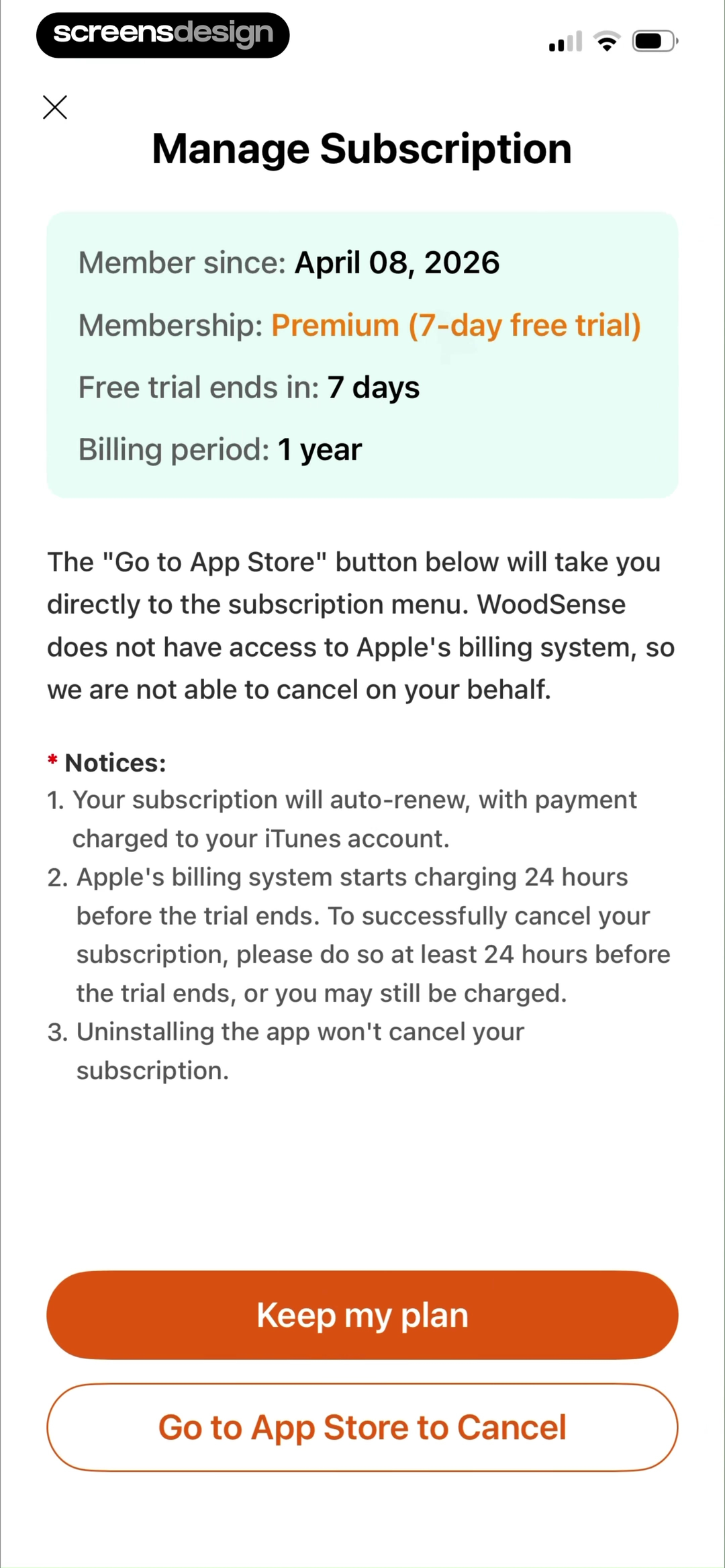
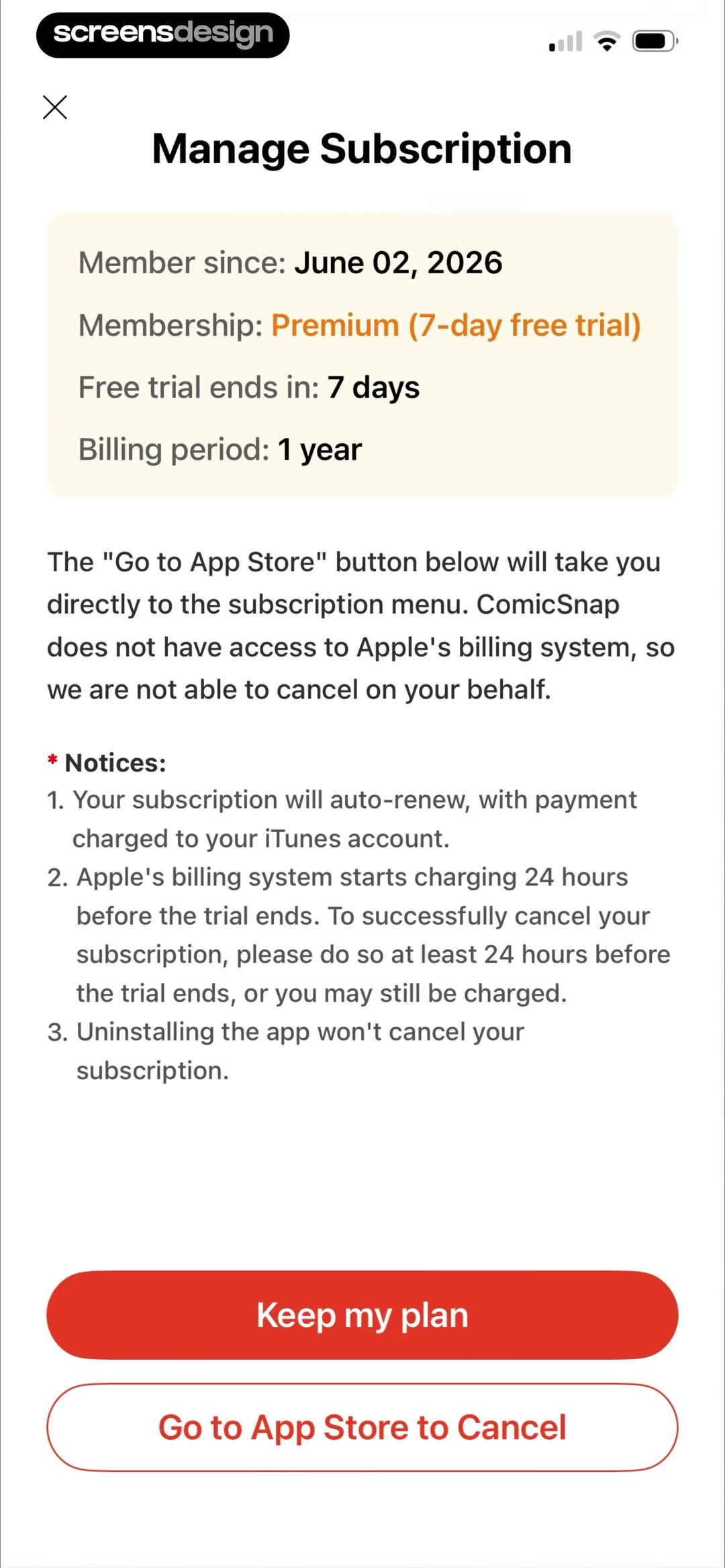
WoodSense and ComicSnap show membership type, seven-day trial status, billing period, auto-renewal notices, the 24-hour cutoff, and App Store cancellation access. The screens are dense, but they place operational facts in one management view.
Lead with current state, days remaining, and exact charge date. Move platform limitations and cancellation instructions into readable groups. Use concise labels before longer legal notes.
Do not calculate days left from the device clock alone. Use the subscription source of truth and account for pending cancellations, billing retries, and an offer already redeemed on another account.
02. Date and price
Replace soon with a date and an amount.
A renewal reminder without the next charge is incomplete.
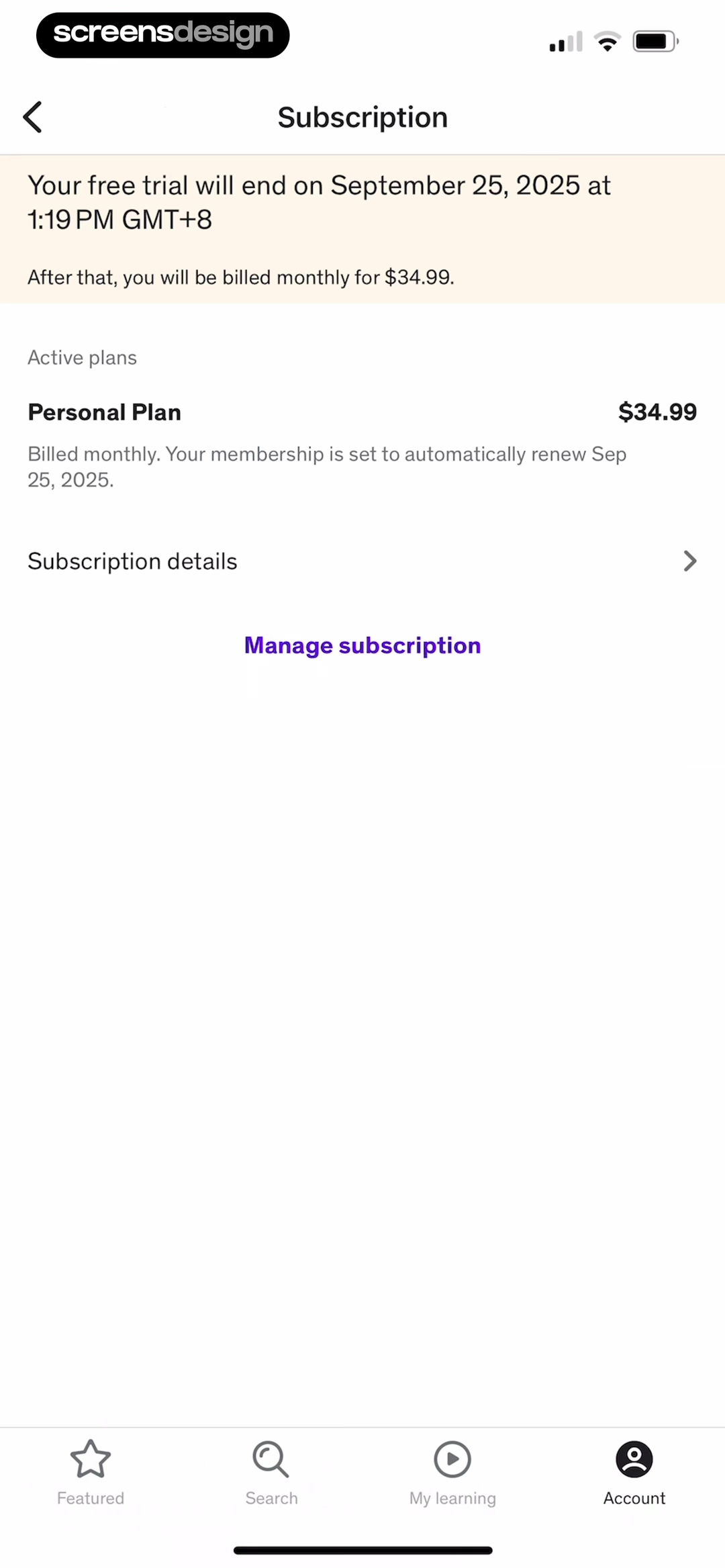
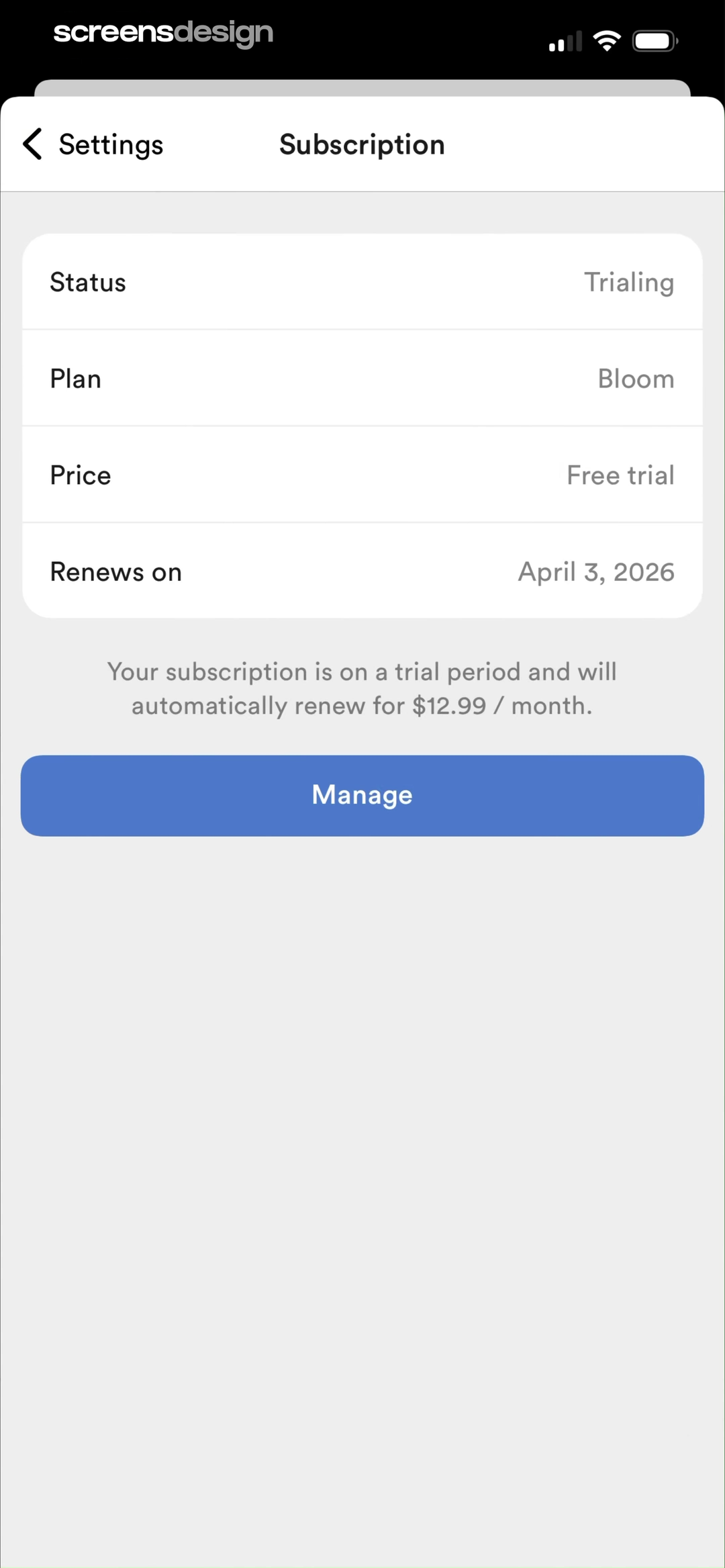
Udemy shows the exact trial end time, monthly price, automatic-renewal date, and management route. Rosebud labels the account Trialing, names the Bloom plan, gives the renewal date, and states the $12.99 monthly renewal.
Use the amount that will actually be charged and the billing interval. If tax or currency conversion can change it, say so. State the date in the user's locale and include time when same-day cancellation matters.
Test leap days, daylight saving changes, timezones, regional pricing, discounted first periods, and price increases. A cached plan price must not outlive an updated billing product.
03. Next payment
Connect renewal to the product period that follows.
People should understand what the next payment buys and for how long.
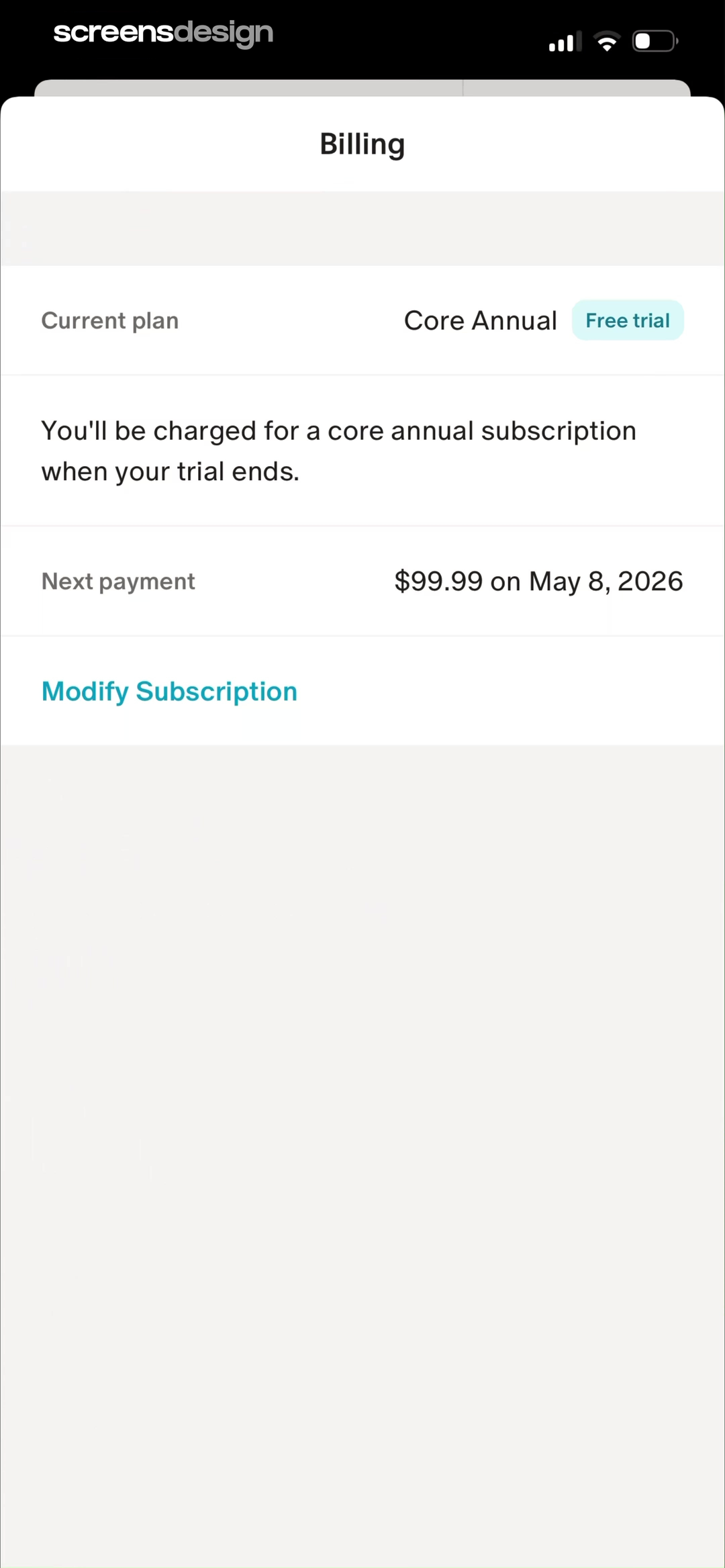
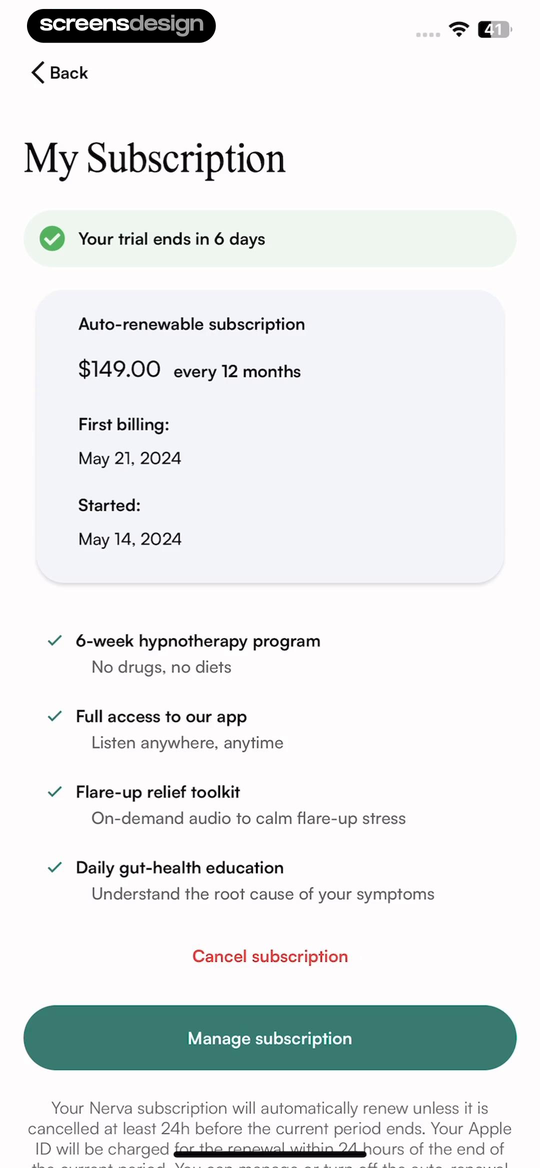
Monarch shows Core Annual, free-trial status, a $99.99 next payment, and the exact date. Nerva combines six trial days remaining, yearly price, first billing date, start date, program access, and its cancellation rule.
State the service period that follows the charge. For annual subscriptions, avoid presenting only a monthly equivalent. If an introductory period changes to a standard price, show both periods and when the transition occurs.
Handle paused service, partial refunds, family sharing, grandfathered prices, and a plan whose content period differs from billing. Medical or wellness claims should remain separate from the billing facts.
04. Management route
Make renewal control reachable from the reminder.
A reminder is more trustworthy when the next action is obvious.
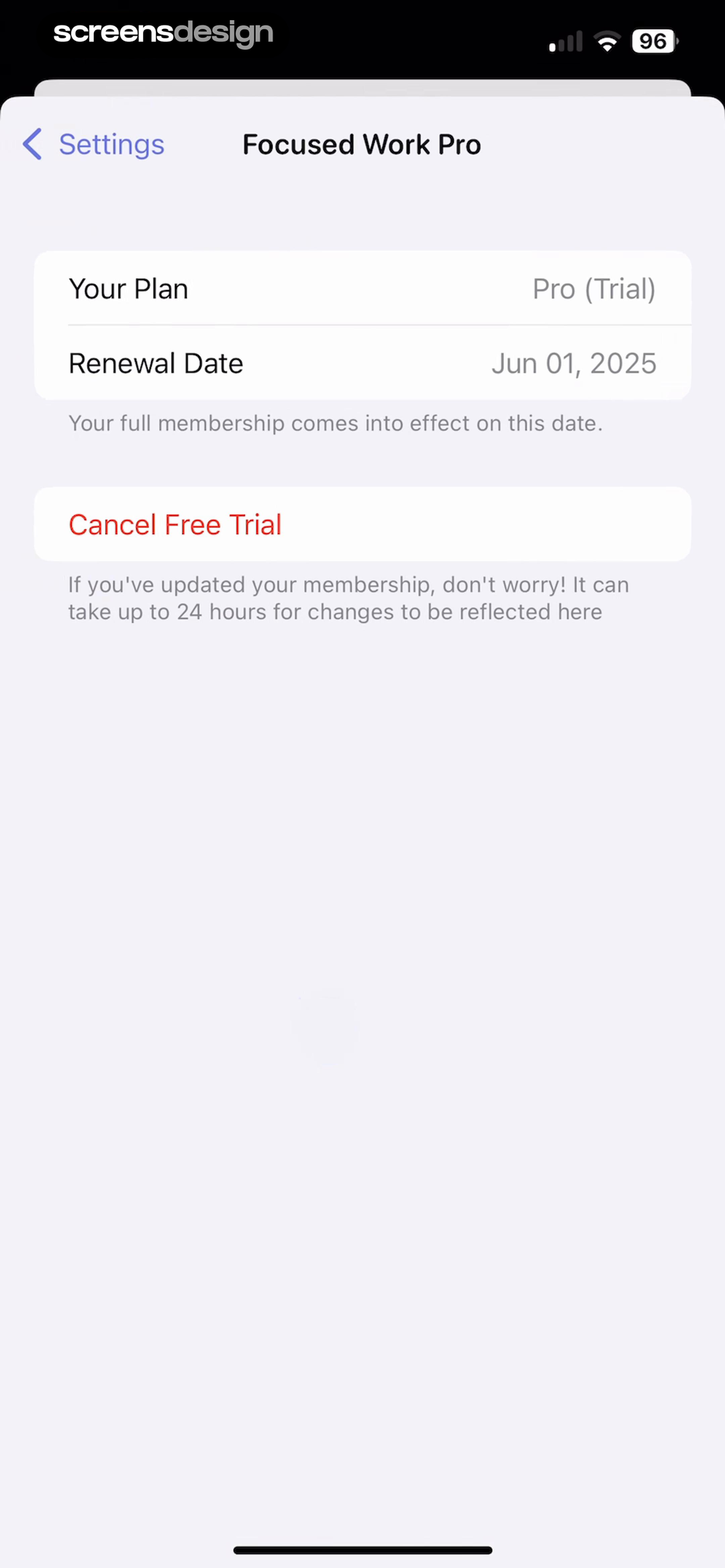
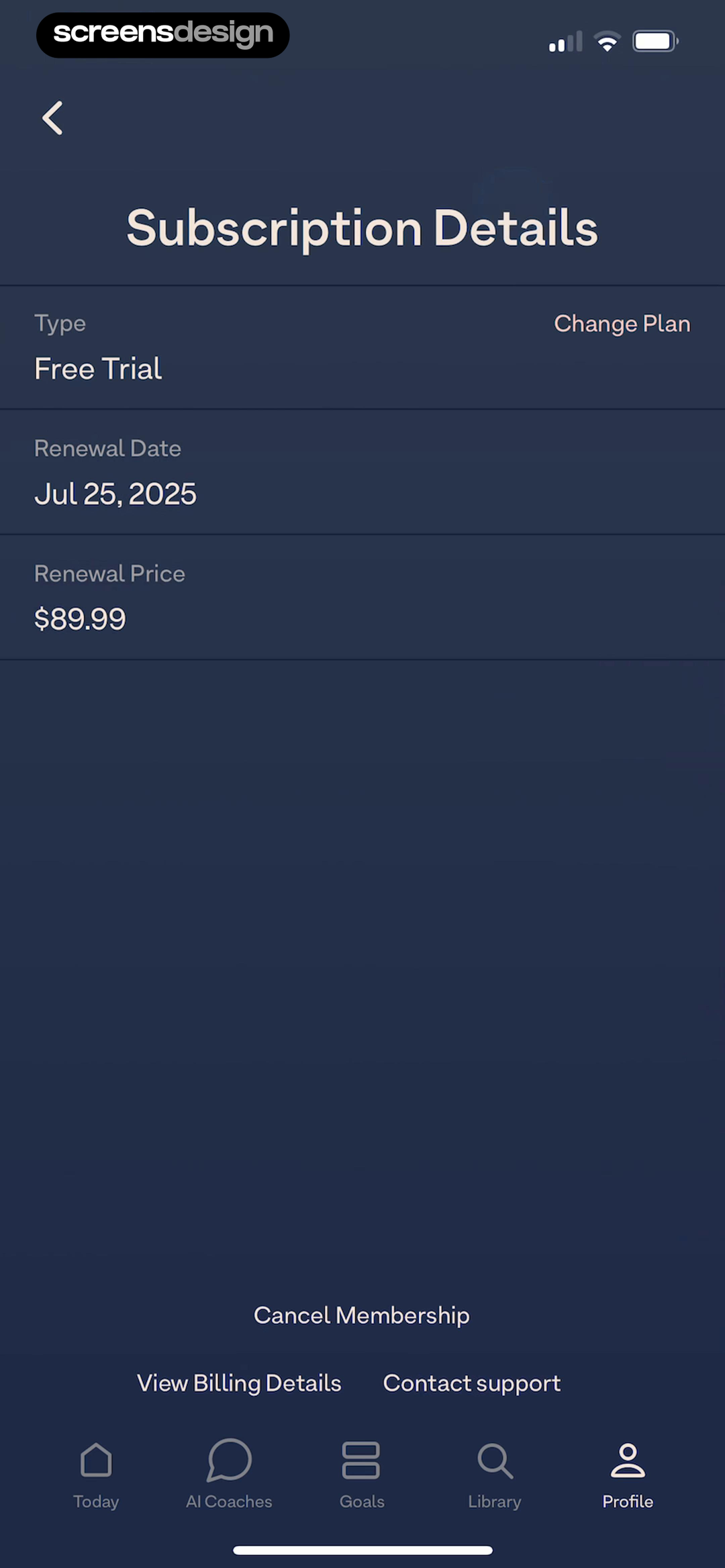
Focused Work shows Pro Trial, the renewal date, when full membership begins, and Cancel Free Trial. Breethe shows Free Trial, renewal date, $89.99 renewal price, Change Plan, Cancel Membership, billing details, and support.
Send the user to the exact subscription-management destination. Preserve the route back to the app and refresh entitlement afterward. If cancellation occurs on another platform, explain that before opening the external surface.
Test the return from App Store settings, stale entitlement, cancellation on another device, and a pending plan update. Do not show an active renewal prompt after cancellation has already been confirmed.
05. Reminder preference
Let the reminder promise become a setting.
Channel and lead time should be inspectable, not buried in paywall copy.
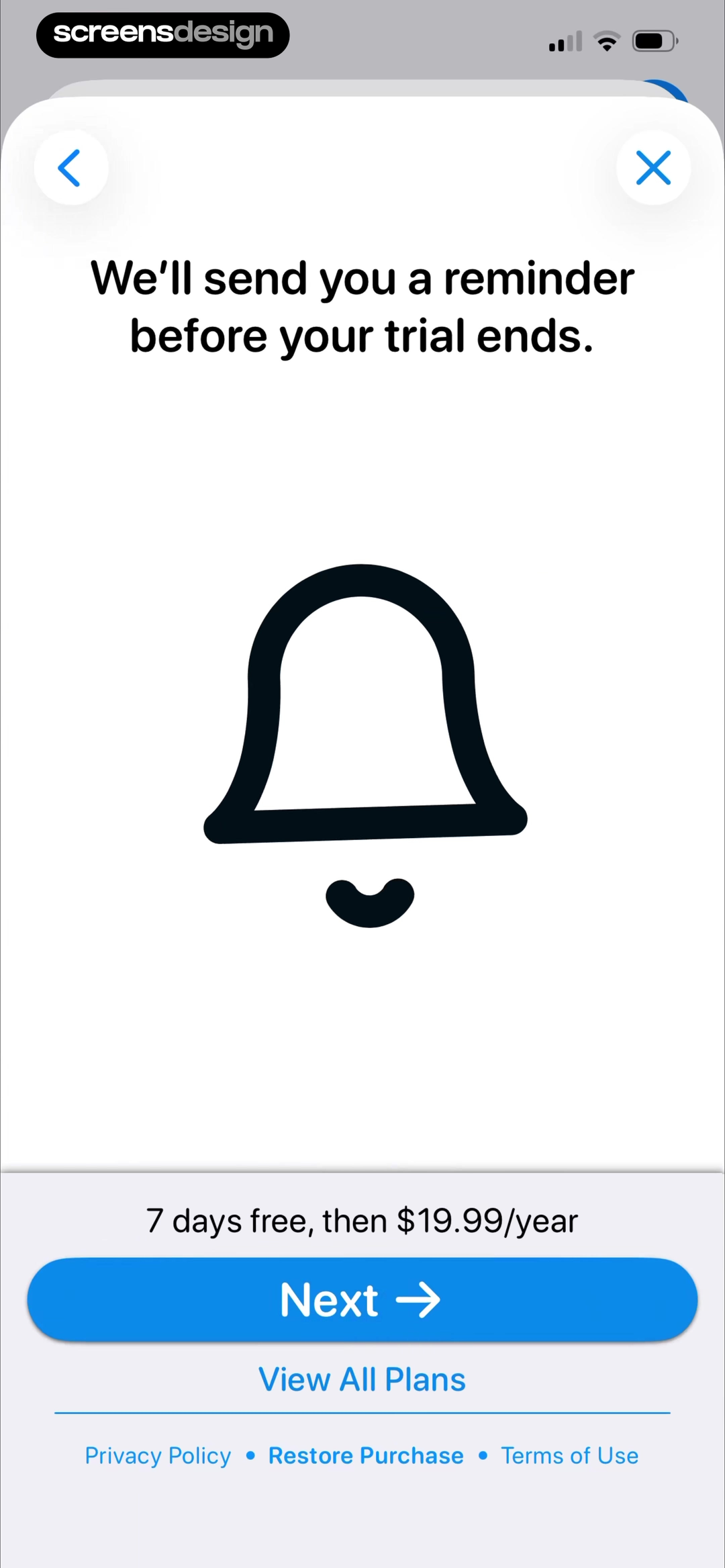
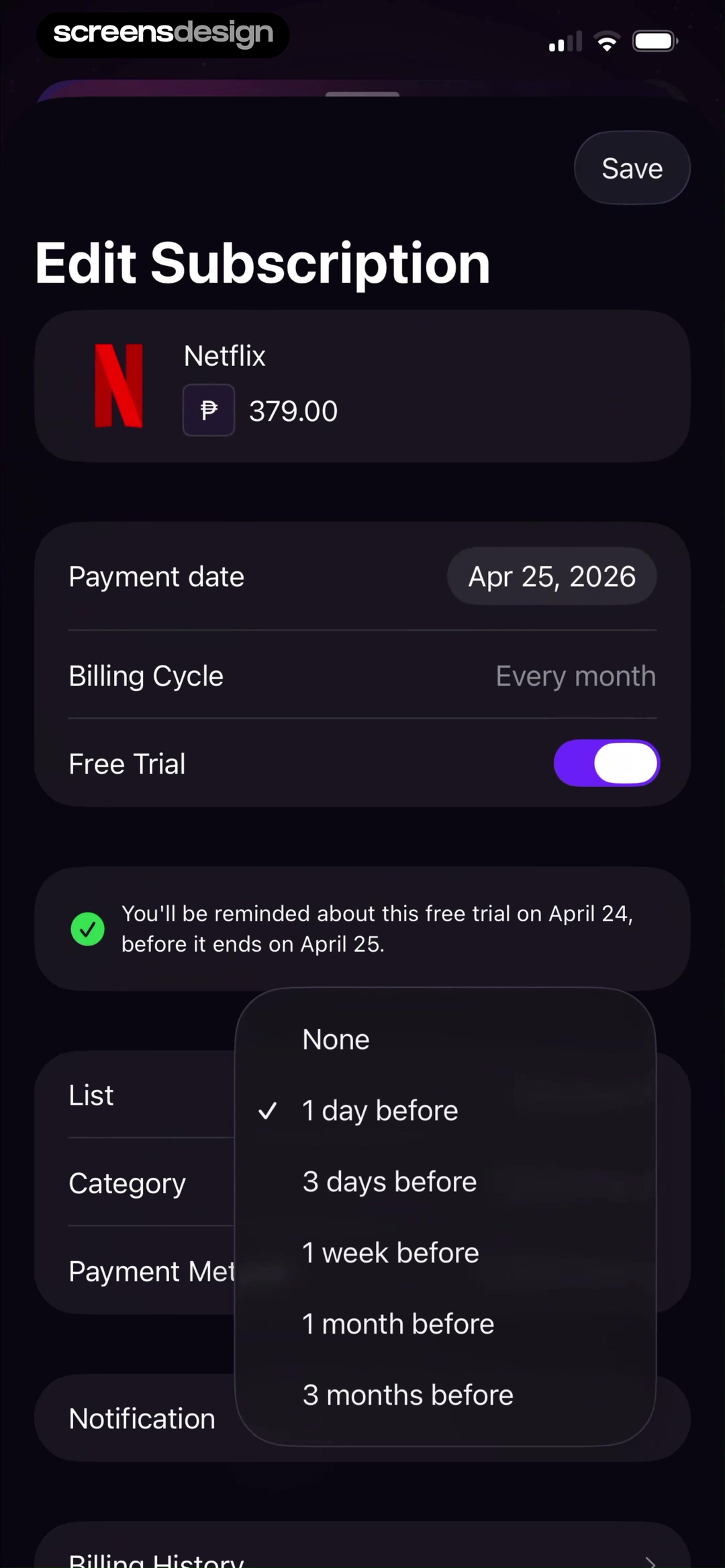
Widgetsmith promises a reminder before a seven-day trial ends and keeps price and plan access visible. Orbit lets users attach a one-day, three-day, one-week, one-month, or three-month notification to a subscription's payment date.
Offer lead times that match the decision and cancellation cutoff. Use email when push permission is unavailable and keep reminder preferences in subscription settings. Clearly distinguish a reminder created by the app from one guaranteed by the billing platform.
Notifications can be delayed or disabled. The in-app subscription screen must remain accurate without them. ScreensDesign Pro can help teams compare reminder, management, and cancellation moments across complete recorded flows.
Renewal lifecycle
Treat renewal communication as a product state, not one alert.
Dates, prices, entitlements, and management actions must remain consistent across the paywall, account page, reminder, store sheet, and receipt.
Create one source of truth for plan name, billing interval, next charge, currency, introductory pricing, and effective dates. Every surface should read from the same normalized subscription state. Copy written separately for email, push, account settings, and cancellation will drift as products add trials, discounts, pauses, upgrades, and regional prices.
Choose reminder timing according to the decision the customer can still make. An annual renewal may deserve more lead time than a weekly plan. A price increase, trial conversion, or ending discount needs a clearer explanation than an unchanged renewal. Do not imply that a reminder can cancel or change a plan when the destination only opens general settings.
After the reminder opens, show the exact subscription and the action that matters now. Preserve access details, renewal date, and management path. Handle already-cancelled, recently renewed, failed-payment, refunded, upgraded, downgraded, and App Store managed states so a stale notification cannot lead to contradictory instructions.
Use the broader subscription churn guide to find lifecycle confusion, and the cancellation examples for the decision after a renewal no longer fits.
- The next charge date, amount, currency, and interval come from one subscription state.
- Reminder timing leaves enough time for the action being offered.
- Tapping a reminder opens the exact subscription, not a generic home page.
- Cancelled and recently changed plans cannot receive stale renewal language.
- Support, refunds, involuntary renewal, and successful plan management are monitored.
Quality assurance
Test reminders against the live subscription state.
A reminder assembled from stale copy is dangerous because billing can change between scheduling, delivery, opening, and action.
Create fixtures for unchanged renewal, trial conversion, ending discount, price increase, cancellation scheduled, recent upgrade, recent downgrade, billing retry, grace period, refund, and expired access. Generate every channel from those fixtures and compare date, amount, currency, interval, plan name, and destination automatically.
At delivery and open time, resolve the current state again. If the plan has changed, suppress stale language or route to an updated account summary. Test delayed push delivery, email opened days later, time-zone shifts, multiple devices, logged-out sessions, and accounts with several subscriptions.
Monitor delivery, open, successful management, support contact, refund, charge dispute, and involuntary renewal reports. Use complaint language to find mismatches the event stream misses. A reminder program should improve informed control, not simply increase opens or reduce visits to cancellation settings.
Review checklist
Verify renewal communication against the billing source.
Create trialing, active, canceled, grace-period, billing-failed, paused, price-increase, and restored states. Compare every date and amount with the platform receipt or subscription API.
Test reminder delivery with push allowed, denied, disabled, and email-only accounts. Confirm that external cancellation returns to an updated in-app state and that no stale renewal prompt remains.
- Current subscription state is unambiguous.
- The next renewal uses an exact date.
- The total charge and billing period are visible.
- Trial end and paid start are distinguished.
- Cancellation cutoff is stated when relevant.
- Reminder channel and lead time are inspectable.
- Billing ownership and management route are named.
- Canceled subscriptions stop receiving renewal prompts.
Questions and answers
Subscription renewal reminder questions
What should a subscription renewal reminder include?
Include plan, current status, exact renewal date, total charge, billing period, cancellation cutoff, reminder channel, and the correct management route.
How early should an app send a renewal reminder?
The lead time should give a reasonable decision window and account for the billing platform's cancellation cutoff. The appropriate period depends on trial length, price, and local requirements.
Should renewal reminders use push notifications?
Push can help, but users may deny or disable it. Keep accurate renewal details in the app and use an available fallback such as email when promised.
Who owns subscription cancellation?
The billing platform may own cancellation even when the app shows status. State whether management occurs in the App Store, on the web, or through another provider.
What happens after a user cancels?
Show canceled-but-active status when access continues, the final access date, and any retained data or benefits. Stop presenting the subscription as renewing.
Apps referenced in this page
Open the products behind the examples.
 WoodSenseDIY craft tutorials, wood ID
 ComicSnapidentify, Value, Collect
 Udemy Online Video CoursesLearn Coding, Python & More
 RosebudDaily Self-Care & Habits
 MonarchSpending, Net Worth, Investing
 NervaIBS, FD, IBD, GERD, Bloating
 Focused WorkTime Management, Focus & ADHD
 BreetheBreathe to Calm Anxiety Stress
 WidgetsmithWidgets + Themes + Wallpapers
 Subscription ManagerSpending & Expense Tracker
2,715 apps in the top charts.Ask them anything.
Search real app flows, compare the screens around each decision, and turn stronger references into your own product.