Mobile referral program design
10 Mobile App Referral Program Examples and Reward Patterns
Users need to understand what they share, what a friend must do, what both parties receive, and when the reward appears.
Referral programs combine a product invitation with a financial or in-app incentive. That creates several trust questions: who qualifies, whether both people benefit, what action completes the referral, how rewards are limited, and what happens when a code or link fails.
This review examines ten exact recorded screens from ten apps. The examples include cash, points, credits, subscriptions, discounts, referral milestones, codes, links, and activation requirements. They show interface patterns, not evidence that a program produced growth.
For upgrade moments funded by credits or referrals, compare the contextual upsell examples.
01. Value exchange
Say what the inviter and friend each receive.
A vague earn rewards promise is not enough to motivate a trusted invitation.
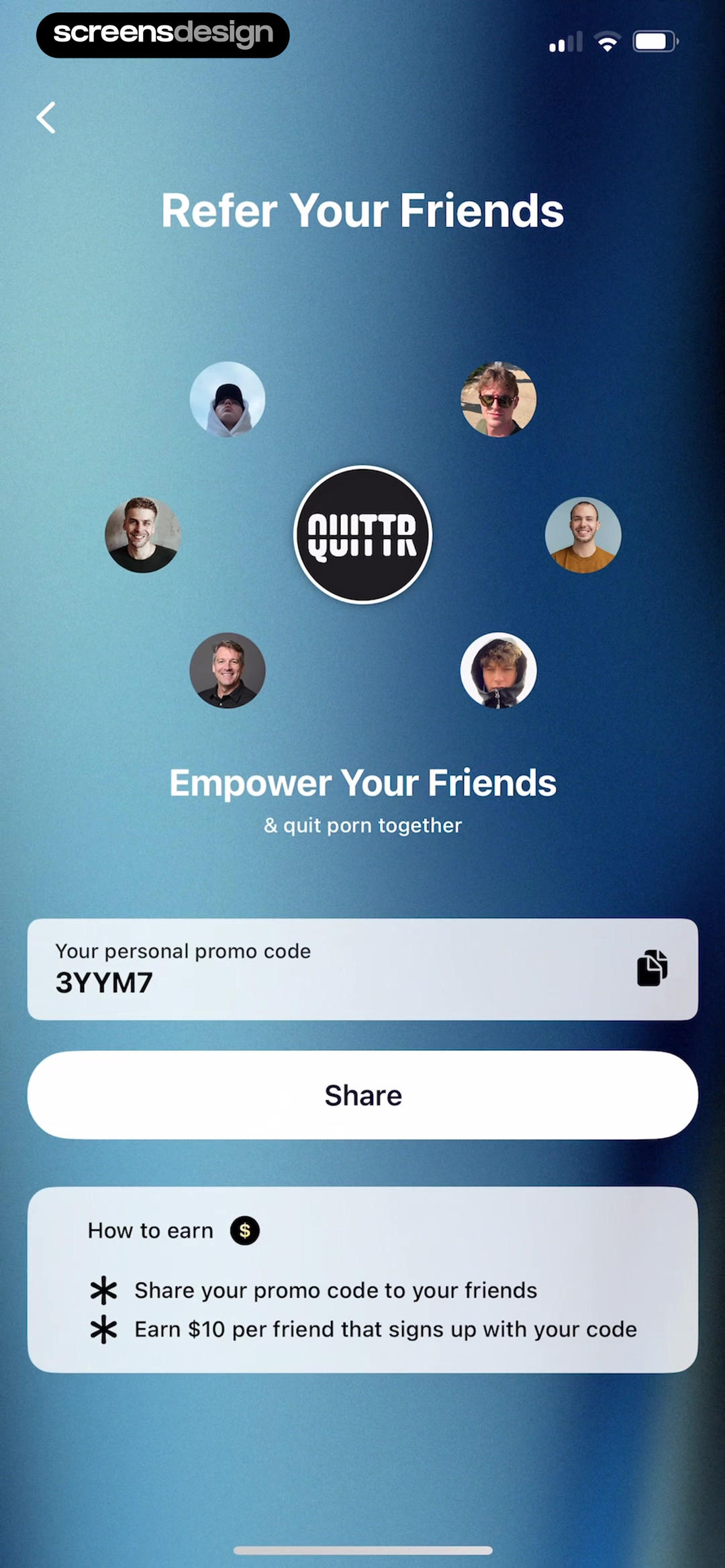
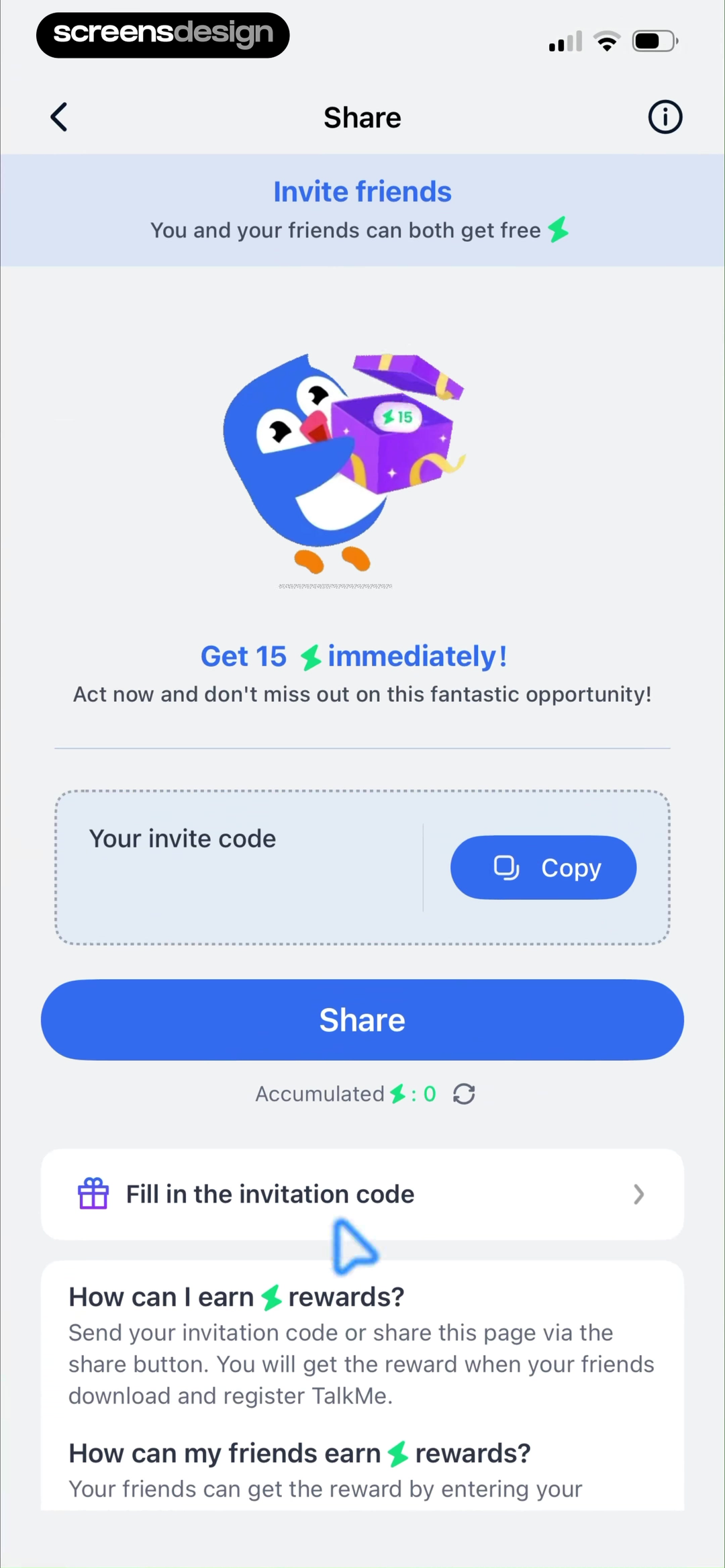
QUITTR states a personal code and a $10 reward for each friend who signs up. TalkMe says both sides receive a reward and keeps the invite code and accumulated balance on the same screen.
Use explicit units such as dollars, credits, days, points, or percentage discount. If rewards differ, show both sides separately. State whether a reward is cash, account credit, discount, or non-withdrawable currency.
Avoid presenting estimated affiliate earnings as guaranteed cash. Include payout threshold, expiry, region, tax, and maximum where relevant. A referral should never expose private progress or identity without consent.
02. Qualification
Turn the referral into a visible sequence.
Share, join, subscribe, and reward are separate states.
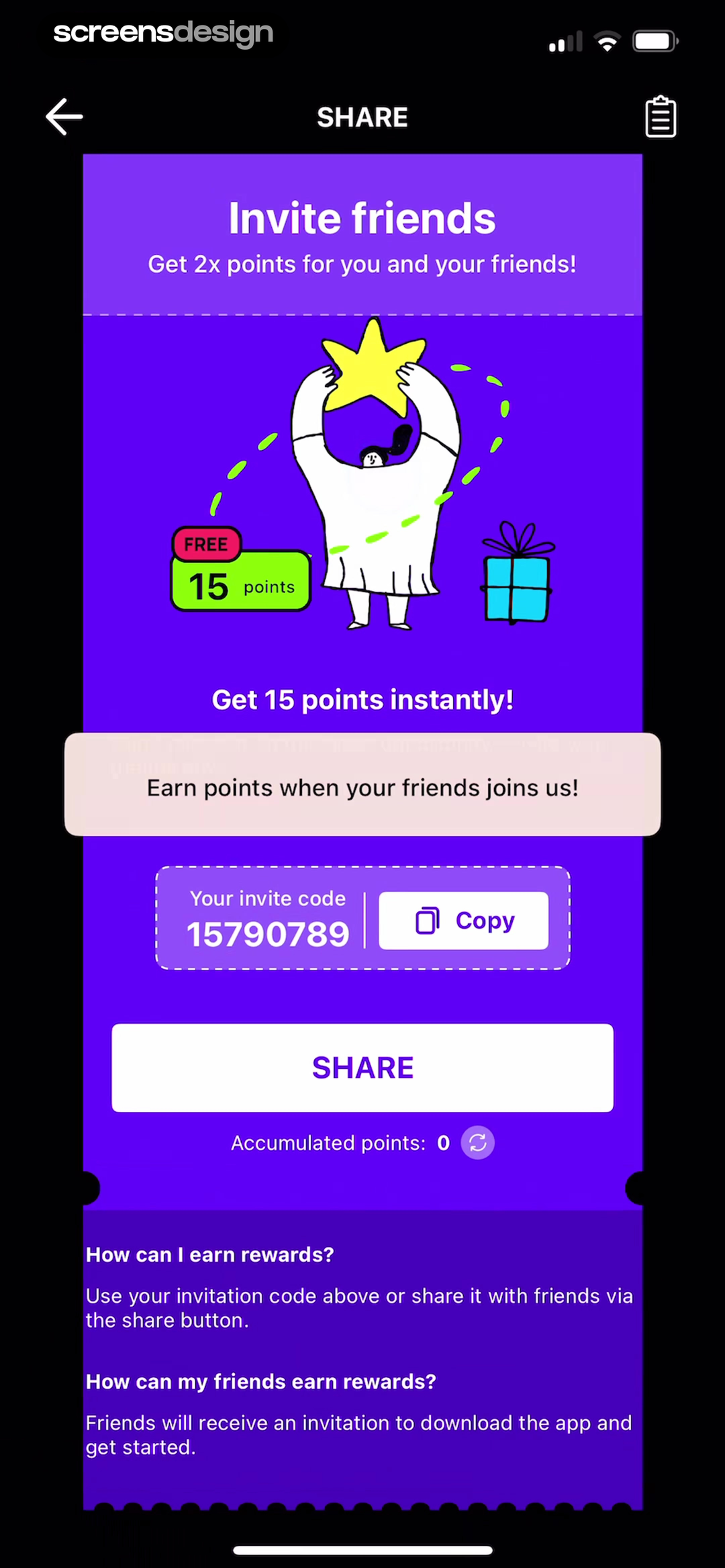
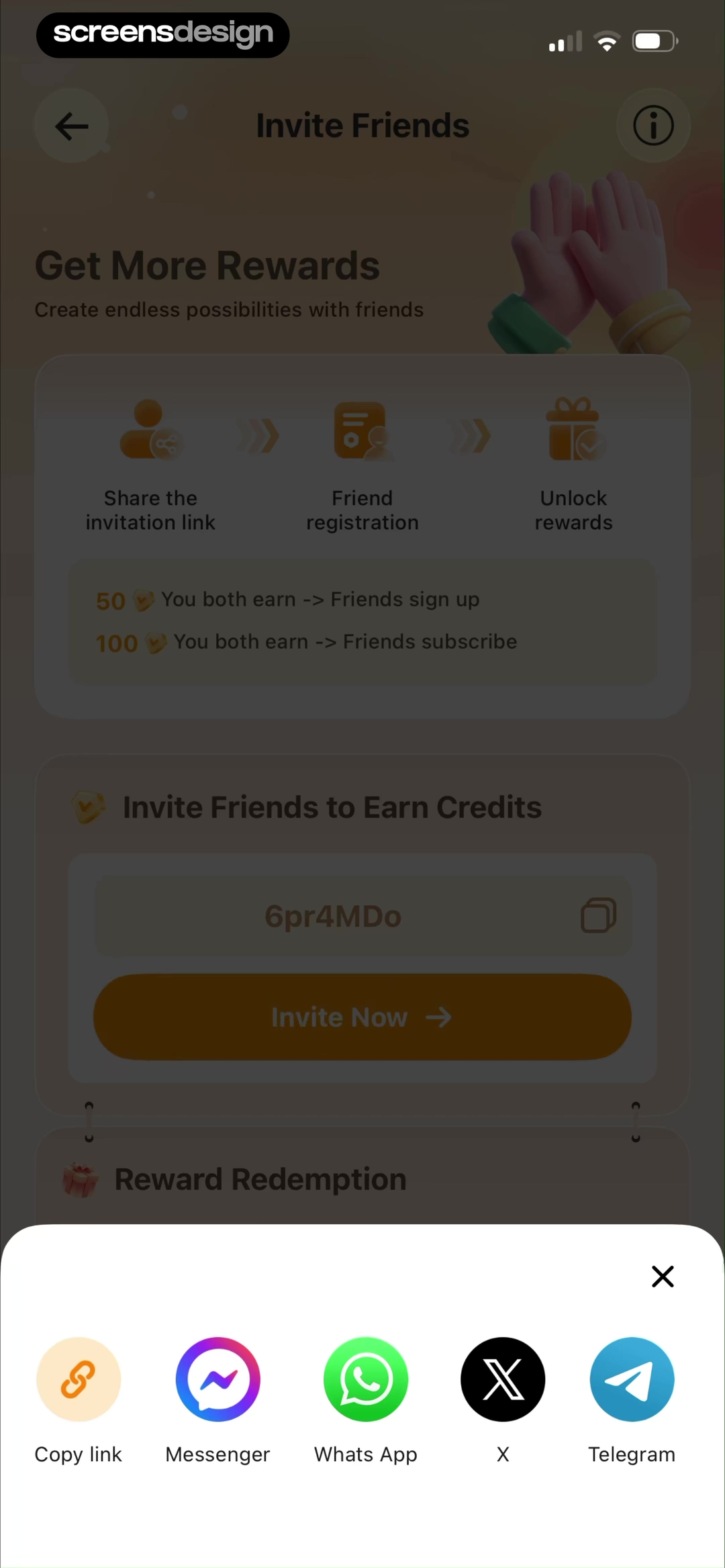
Answer.AI distinguishes the immediate points, friend benefit, invite code, and accumulated points. Photo Revive maps share link, friend registration, and reward unlock, then separates sign-up credits from subscription credits.
Use numbered steps when qualification has more than one action. State whether the friend must be new, use the same store region, enter a code, complete a trial, or make a non-refunded purchase. Do not hide the paid requirement behind registration language.
Handle duplicate installs, delayed attribution, privacy settings, refunds, chargebacks, and a friend who uses a different link or device. Preserve the code and support route when attribution fails.
03. Rules and progress
Make milestones and empty states understandable.
Users should see what has happened without guessing from a total balance.
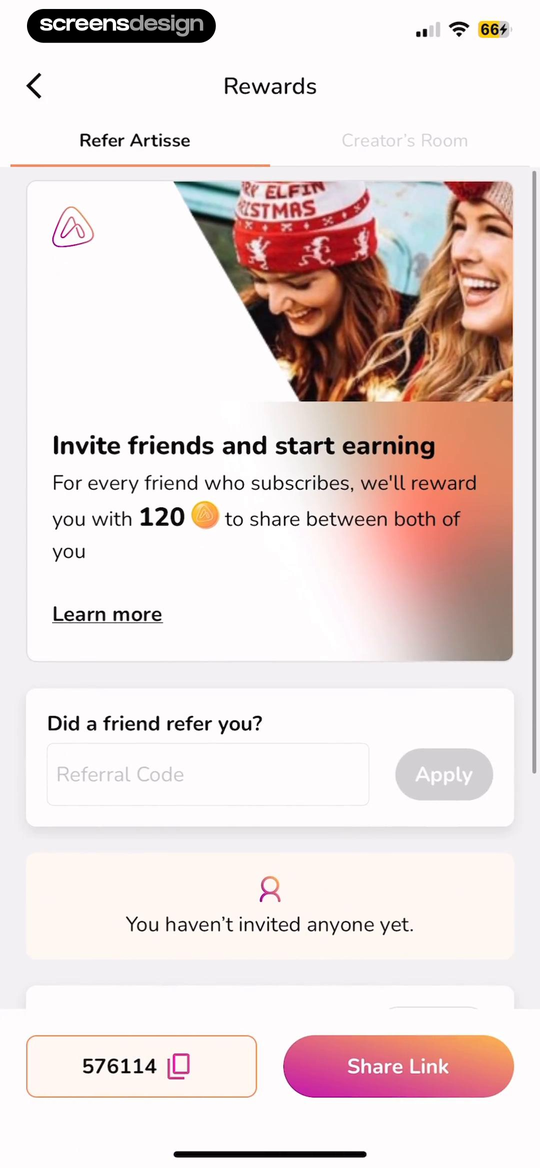
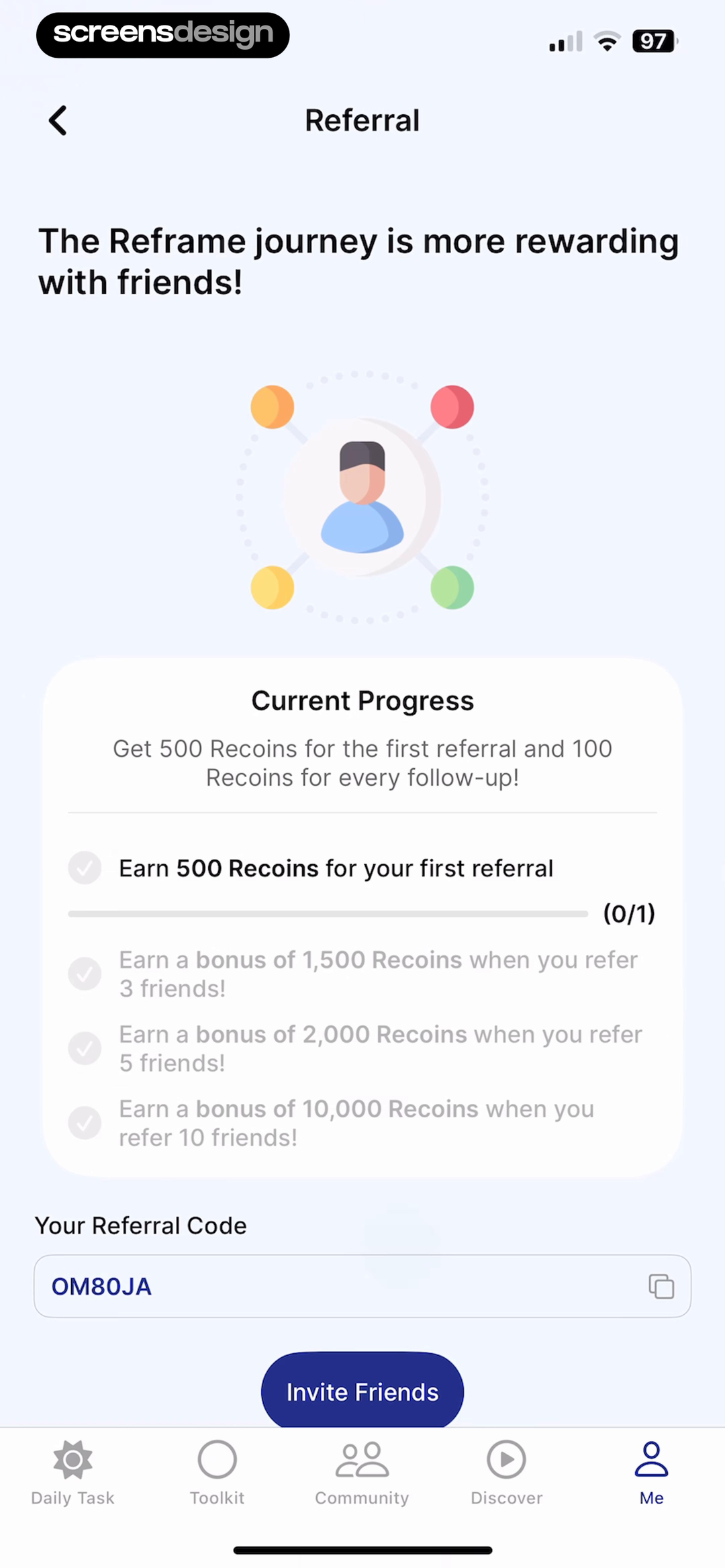
Artisse separates referring, reward sharing, code entry, and an empty invited-users state. Reframe shows milestone rewards for the first, third, fifth, and tenth referral alongside current progress.
Show each referral's status or at least counts for invited, joined, qualified, and rewarded. Explain how milestone bonuses combine with per-referral rewards. Empty states should teach the next action, not imply that tracking failed.
If privacy prevents naming friends, use anonymized status and timestamps. Keep rejected and expired referrals explainable through support without revealing another person's account details.
04. Share and redeem
Support links, codes, copying, and receiving.
A program needs a route for both the inviter and the invited person.
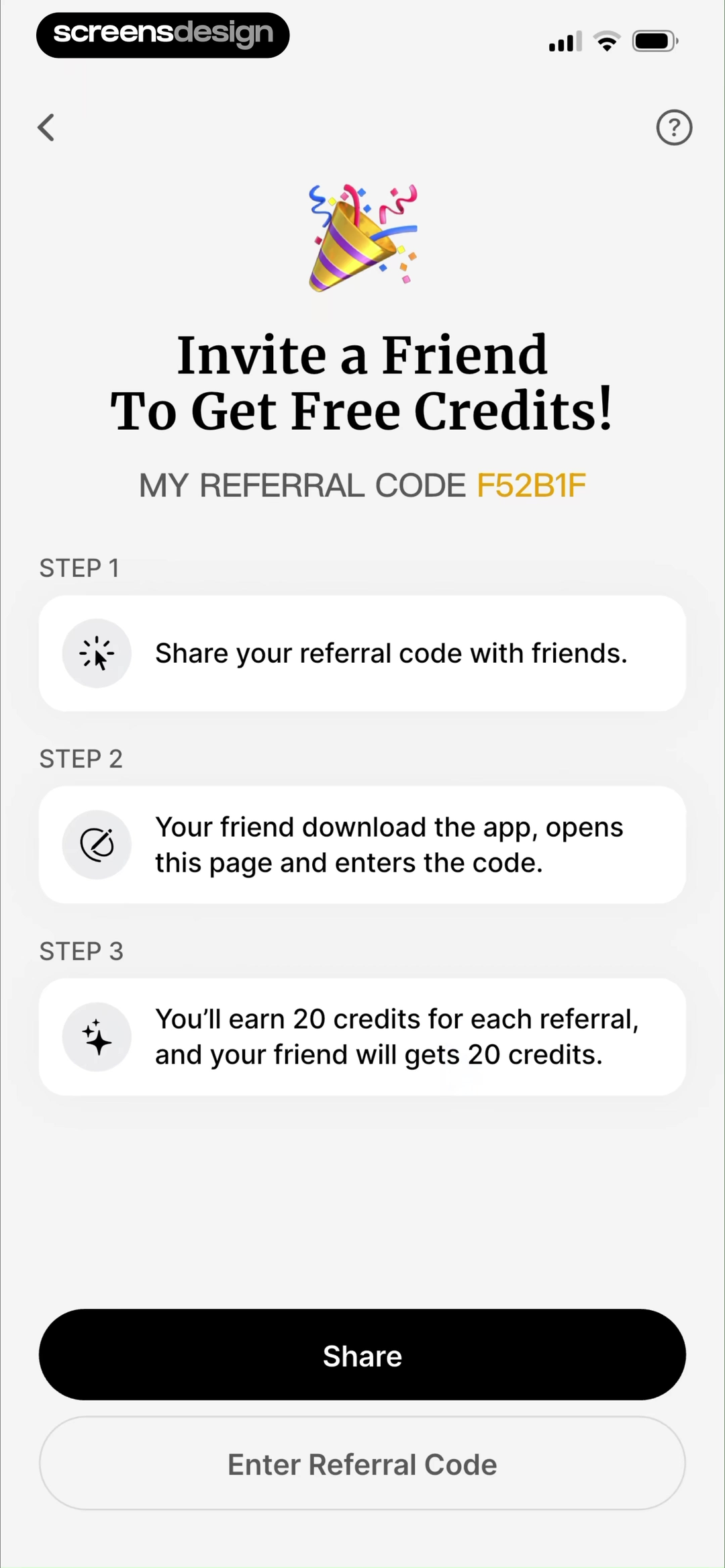
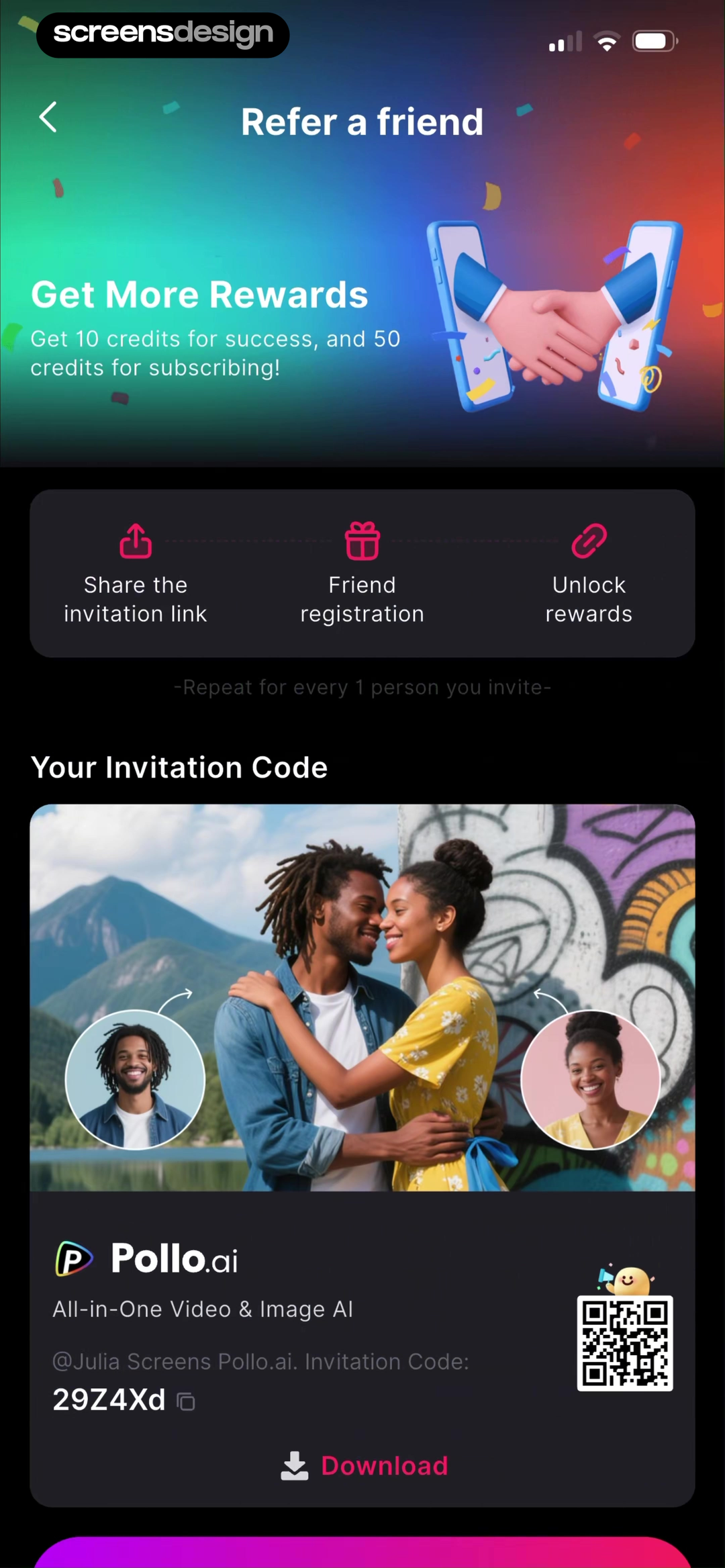
HyNote explains three steps, a 20-credit reward for both parties, code sharing, and code entry. Pollo separates invitation sharing, friend registration, repeatable rewards, and the code a friend redeems.
Offer copy, native share, and a readable code. Generate a deep link that can survive store installation and sign-in. Give the recipient a visible Redeem route and confirm the account before applying the reward.
Test expired links, unsupported apps, attribution after installation, logged-in and logged-out recipients, clipboard denial, and codes entered with different case or whitespace. Never put sensitive account tokens in referral URLs.
05. Completion state
Close the loop with status and limits.
A share confirmation is not the same as a qualified referral.
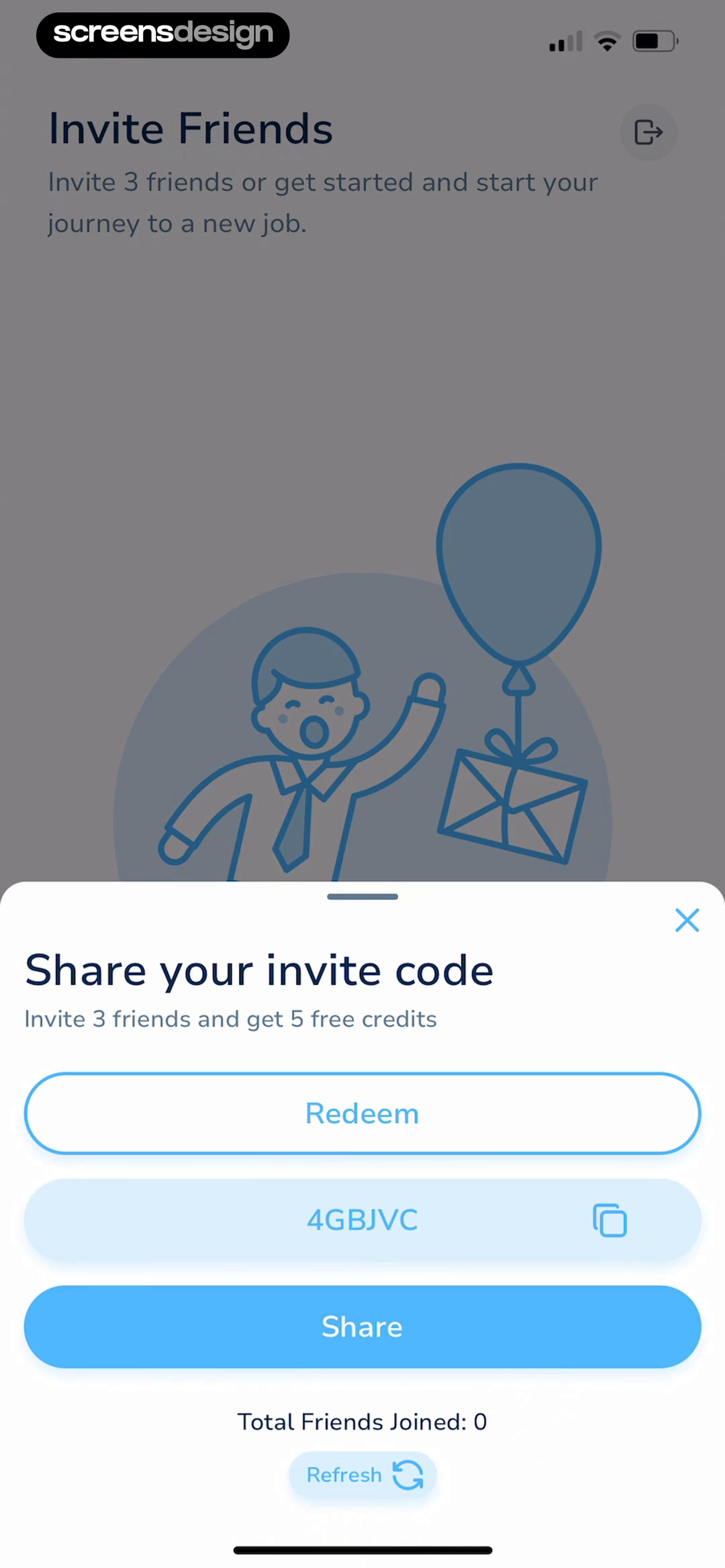
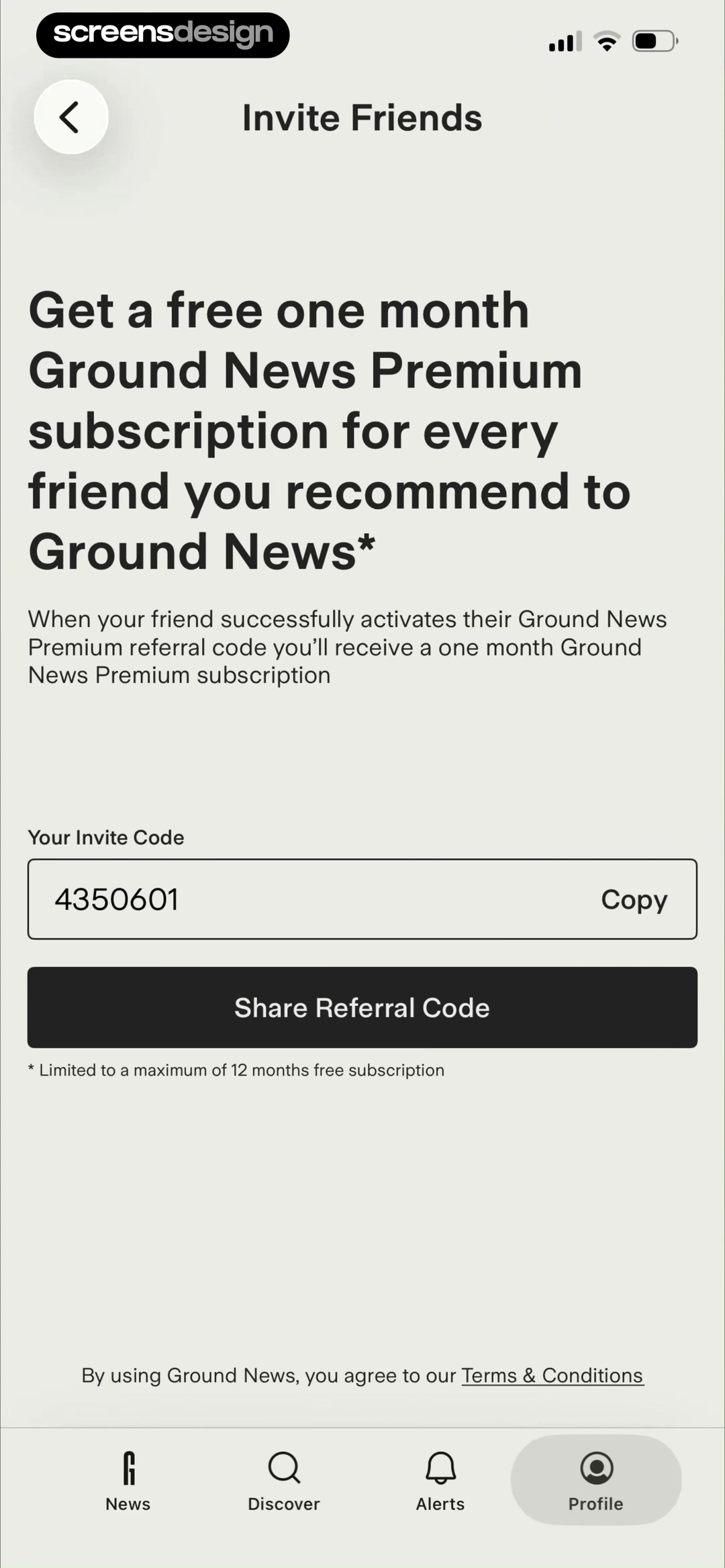
Sprout shows its code, five-credit three-friend target, total friends joined, refresh action, and a copied confirmation. Ground News explains that each activated referral grants one Premium month and caps the benefit at twelve months.
Confirm copy and share actions separately from join and reward. State pending time, qualification date, credited value, and maximum. If users can refresh, explain what data is being updated and avoid making manual refresh the only way status changes.
Keep reward reversals and fraud review visible without accusatory language. ScreensDesign Pro can help teams inspect referral entry, share, recipient onboarding, and reward states across complete recorded flows.
Referral loop
Design the whole invitation loop, including the recipient side.
The sender needs a clear reward and status; the recipient needs a trustworthy landing path that preserves the referral through install and signup.
Write the referral contract before the interface. Define who qualifies, what each person receives, when rewards become valid, expiration, geographic or plan restrictions, and what happens after cancellation or refund. Put the terms closest to the claim most likely to be misunderstood. A prominent reward amount with hidden eligibility creates support work and distrust.
Keep sender state visible after sharing. Show pending, accepted, qualified, rewarded, expired, and ineligible referrals with dates and plain explanations. Let the sender copy a link or code again without recreating an invitation. Avoid exposing a recipient's private account details merely to prove progress.
Test the recipient journey across messaging apps, web, App Store, install, deferred deep linking, existing accounts, already-installed apps, and multiple devices. Preserve the referral token until eligibility is decided, and explain when attribution cannot be recovered. Fraud controls should not make ordinary household, team, or classroom sharing appear broken.
If reminders are part of the loop, apply the timing rules from the notification pre-permission examples. For progressive reward milestones, compare the clarity principles in the streak examples.
- Reward, eligibility, timing, expiration, and limits are visible before sharing.
- The recipient path preserves attribution through install and account creation.
- Pending and completed referral states explain what happens next.
- Existing users, multiple devices, refunds, and fraud review have explicit outcomes.
- Share attempts, recipient landings, qualified referrals, rewards, failures, and support cases are measured separately.
Measurement
Separate sharing, attribution, qualification, and reward.
A referral funnel fails in several distinct places, and one blended conversion number hides which interface needs work.
Track invite surface viewed, share method selected, link or code created, recipient landing, install or app open, account association, qualification, sender reward, recipient reward, rejection, and appeal. Preserve privacy by using referral identifiers rather than exposing recipient details to the sender.
Measure deferred deep-link loss, duplicate accounts, already-existing users, unsupported regions, expired links, store handoff, and reward delays. Review support contacts by failure code. If many recipients qualify but rewards remain pending, changing invitation copy will not solve the operational problem.
Balance growth metrics with abuse and trust guardrails. Monitor self-referral, device farms, payment reversal, household sharing, false-positive review, and time to resolution. Explain review states without publishing rules that make abuse easier. Legitimate users should always have a visible route to understand or challenge an ineligible result.
Compare reward cost and retained product use by referral state so a large number of low-quality claims cannot hide weak recipient value or delayed fulfillment.
Review checklist
Test attribution from share to credited reward.
Create inviter and recipient accounts across installed, not-installed, signed-out, signed-in, ineligible, refunded, and delayed-attribution states. Follow the same referral through each transition.
Verify reward units, limits, expiry, qualification, and reversal against the backend. Test deep links, codes, native share, copy, support, privacy, and recipient consent on real devices.
- Both sides of the reward are stated.
- The qualifying action is explicit.
- Codes and links survive install and sign-in.
- Recipient redemption has a visible route.
- Pending, qualified, credited, and rejected states are distinguishable.
- Milestone and per-referral rewards do not conflict.
- Limits, expiry, and geography are reachable.
- Refunds and attribution failures have a support path.
Questions and answers
Mobile app referral program questions
What should a mobile referral screen include?
Include the inviter reward, friend reward, qualifying action, code or link, share controls, redemption route, current progress, reward timing, limits, and terms.
Should both people receive a referral reward?
Two-sided rewards can make the exchange clearer, but the product must state the exact value and qualification for each person. The rewards do not need to be identical.
When is a referral complete?
Define completion precisely, such as verified registration, trial start, first purchase, paid renewal, or another eligible event. A link click alone is rarely the final state.
How should apps show referral progress?
Show invited, joined, pending, qualified, credited, rejected, and expired states where possible, plus milestone progress and maximum rewards.
How can referral links work after installation?
Use deferred deep linking or another supported attribution method, preserve the referral through sign-in, and provide manual code redemption when automatic attribution fails.
Apps referenced in this page
Open the products behind the examples.
 QUITTRBecome your best self again
 TalkMeLanguage Learning & Practice
 Answer.AIScan and ask AI
 Photo Revive:AI Photo to VideoRestore. Animate. Relive.
 ArtisseProfile photos & social media
 ReframeCut Back or Quit Alcohol Habit
 HyNoteAI Notebook, AI Meeting Notes
 Pollo AIMarketing, Story & Design
 SproutLand Your Dream Job
 Ground NewsSee every side of every story
2,715 apps in the top charts.Ask them anything.
Search real app flows, compare the screens around each decision, and turn stronger references into your own product.