Mobile app streak design
10 Mobile App Streak Design Examples: Progress, Freezes, and Repair
People need to know what action counts, which period applies, how missed days behave, and whether repair changes the record.
Streak design turns repeated behavior into a visible state. That can help people understand routine, but it can also create anxiety when the rule is vague or a missed day erases months of effort. The interface should make qualification, timezone, freezes, repair, milestones, and history understandable.
This review examines ten exact recorded screens from ten apps. The examples cover individual and shared streaks, activity calendars, empty states, freezes, repair items, paid recovery, milestones, and monthly limits. They show current product patterns, not proof that streaks improve retention or wellbeing.
For the broader return experience around a streak, compare the learning app re-engagement examples.
01. Current state
Pair the count with a calendar and a purpose.
One large number needs enough context to be meaningful.
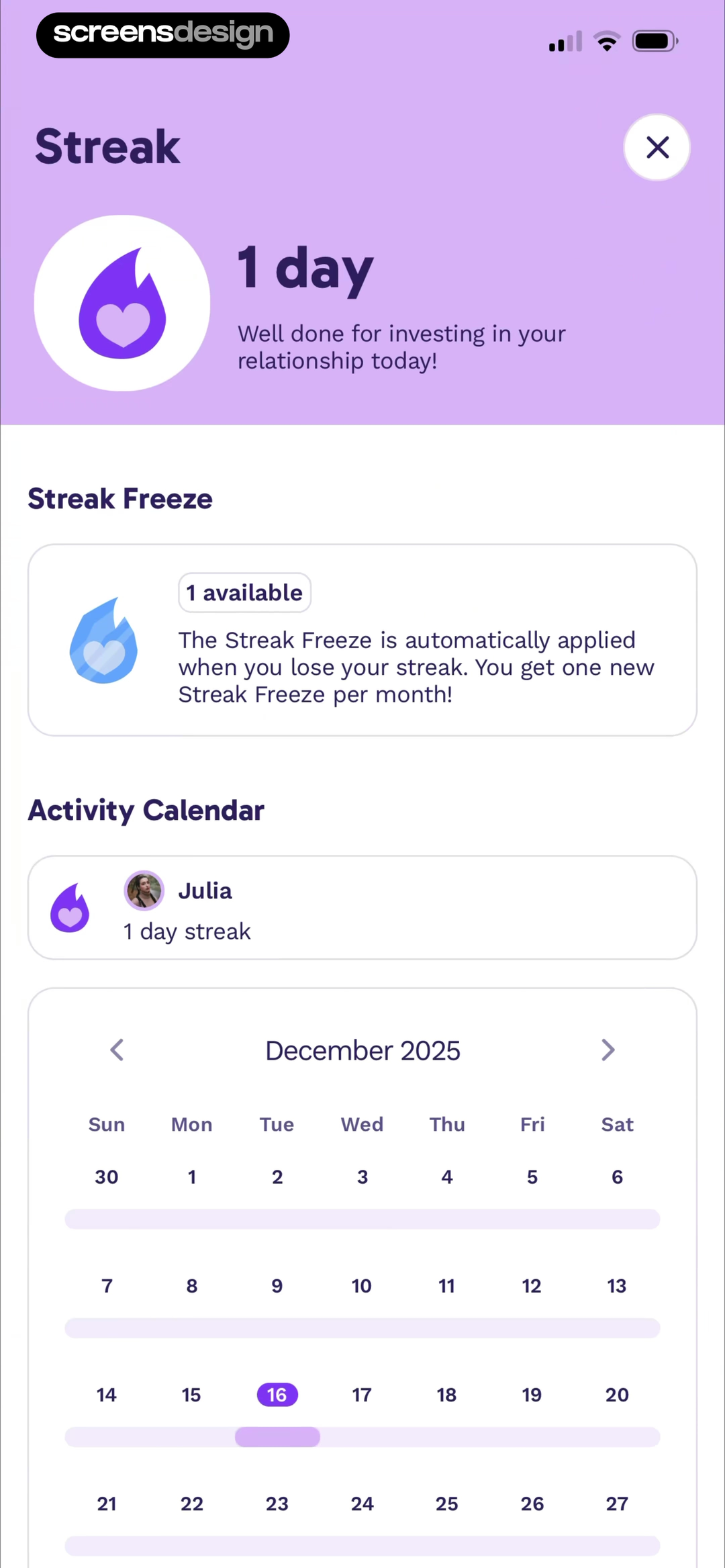
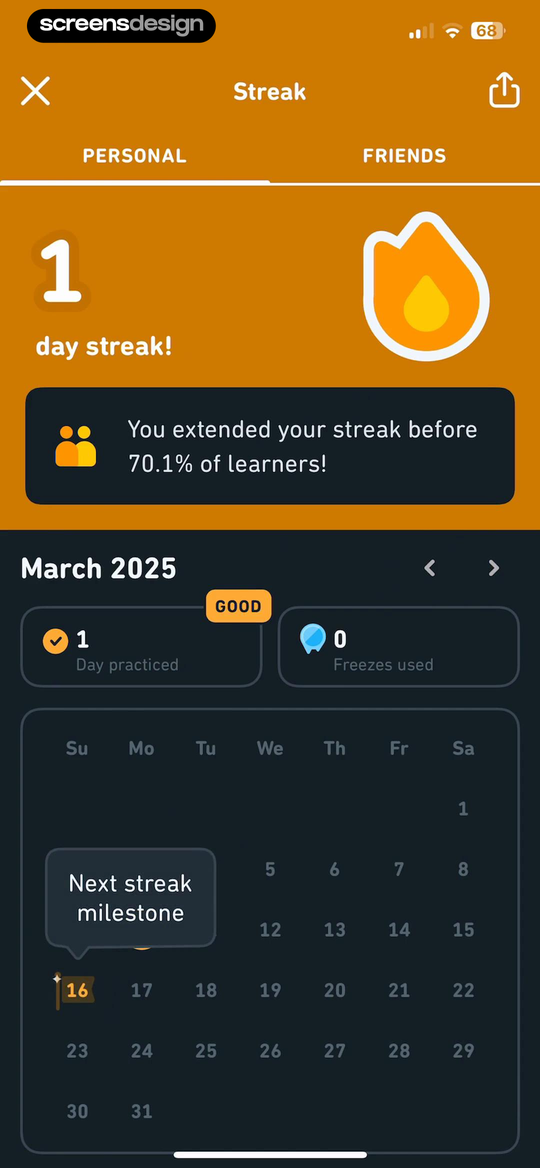
Paired shows a one-day relationship streak, available freeze, automatic-use rule, and activity calendar for both partners. Duolingo separates personal and friends views, shows the March calendar, days practiced, and freezes used.
Label the action that qualifies and the period being displayed. Show current streak, best streak, and completed days separately. A shared streak should clarify whether both people must act and how timezones are resolved.
Do not expose a partner's activity beyond the agreed shared context. Test users who travel, complete near midnight, use multiple devices, or perform an action offline.
02. Starting state
Teach how to begin before celebrating continuity.
A zero or first-day state should explain the next qualifying action.
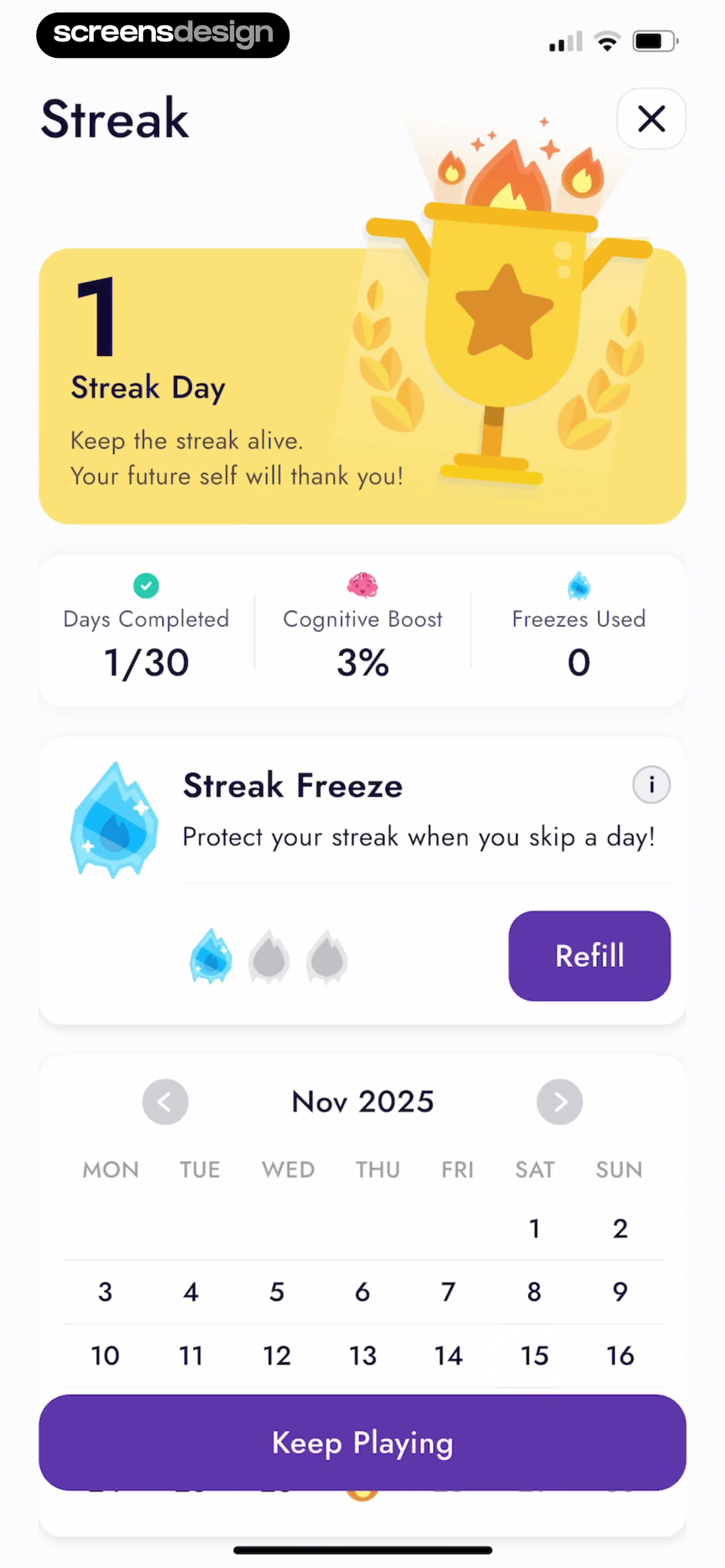
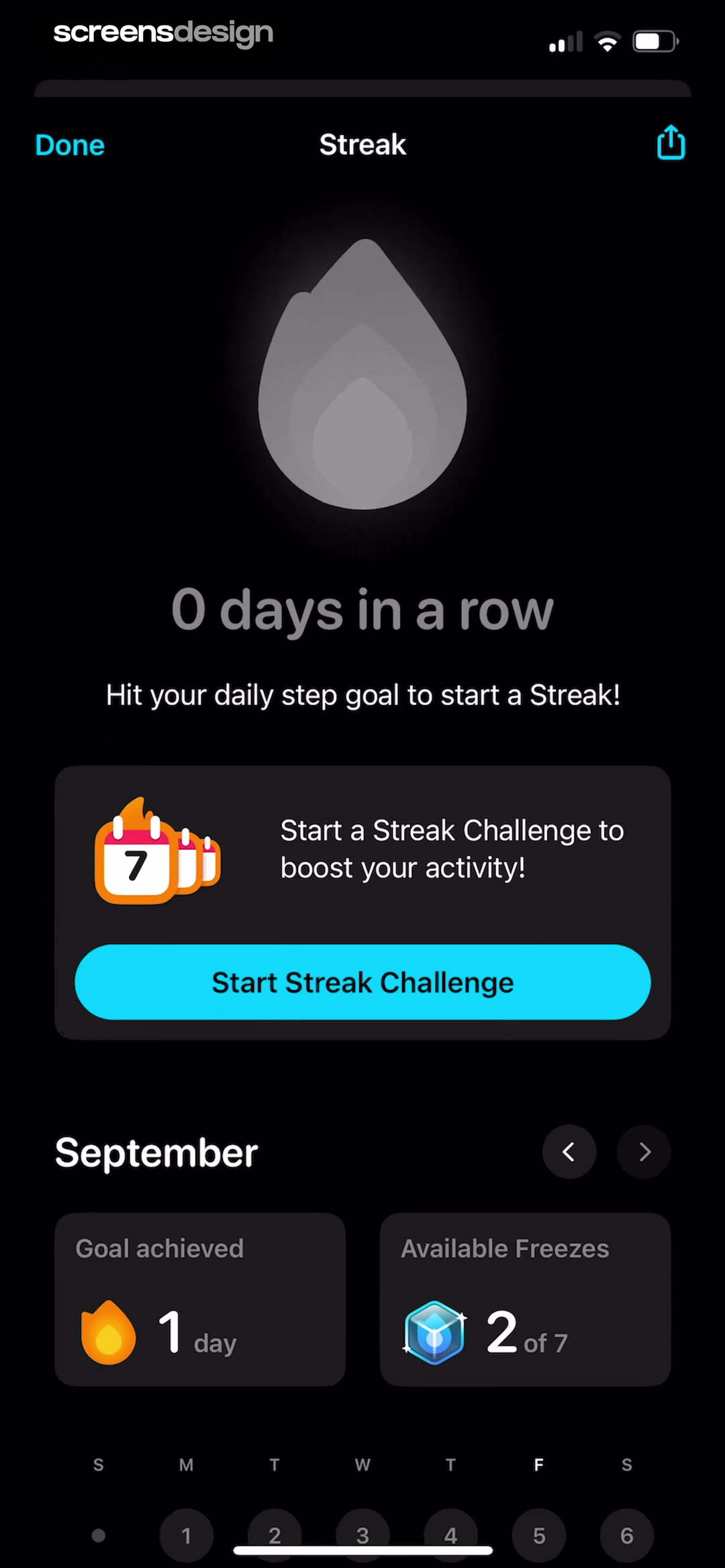
IQ Masters connects one streak day to days completed, cognitive-boost progress, and freezes used. StepsApp shows zero days, explains that reaching the daily step goal starts a streak, and offers a separate streak challenge.
At zero, prioritize the first achievable task. At one, explain what keeps the streak alive tomorrow. Avoid fireworks that suggest a long-term habit after a single tap.
Separate ordinary task completion from a challenge the user deliberately joins. If health or activity data arrives late, update the streak without accusing the user of failure.
03. Freeze and repair
Show what protection changes and what it preserves.
A freeze is a product rule, not a magic icon.
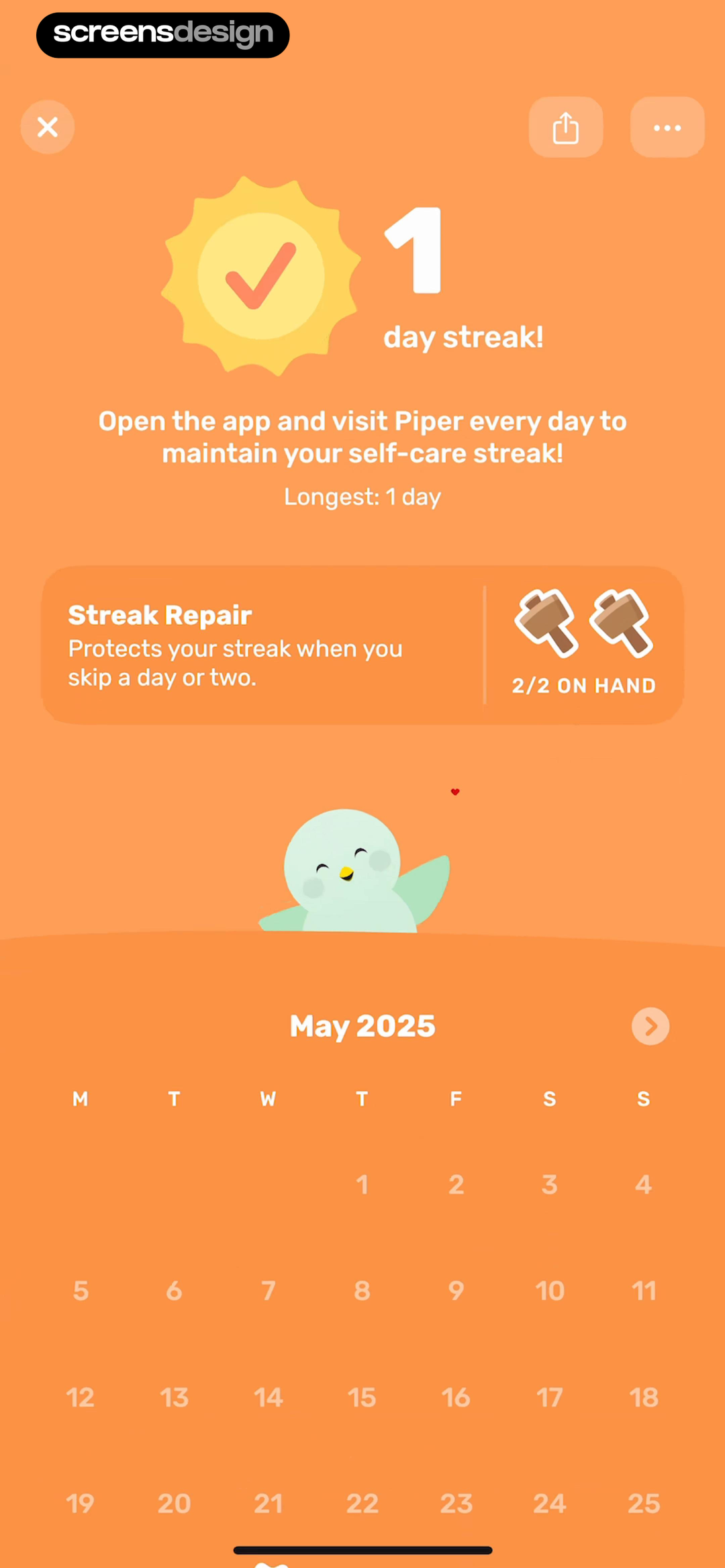
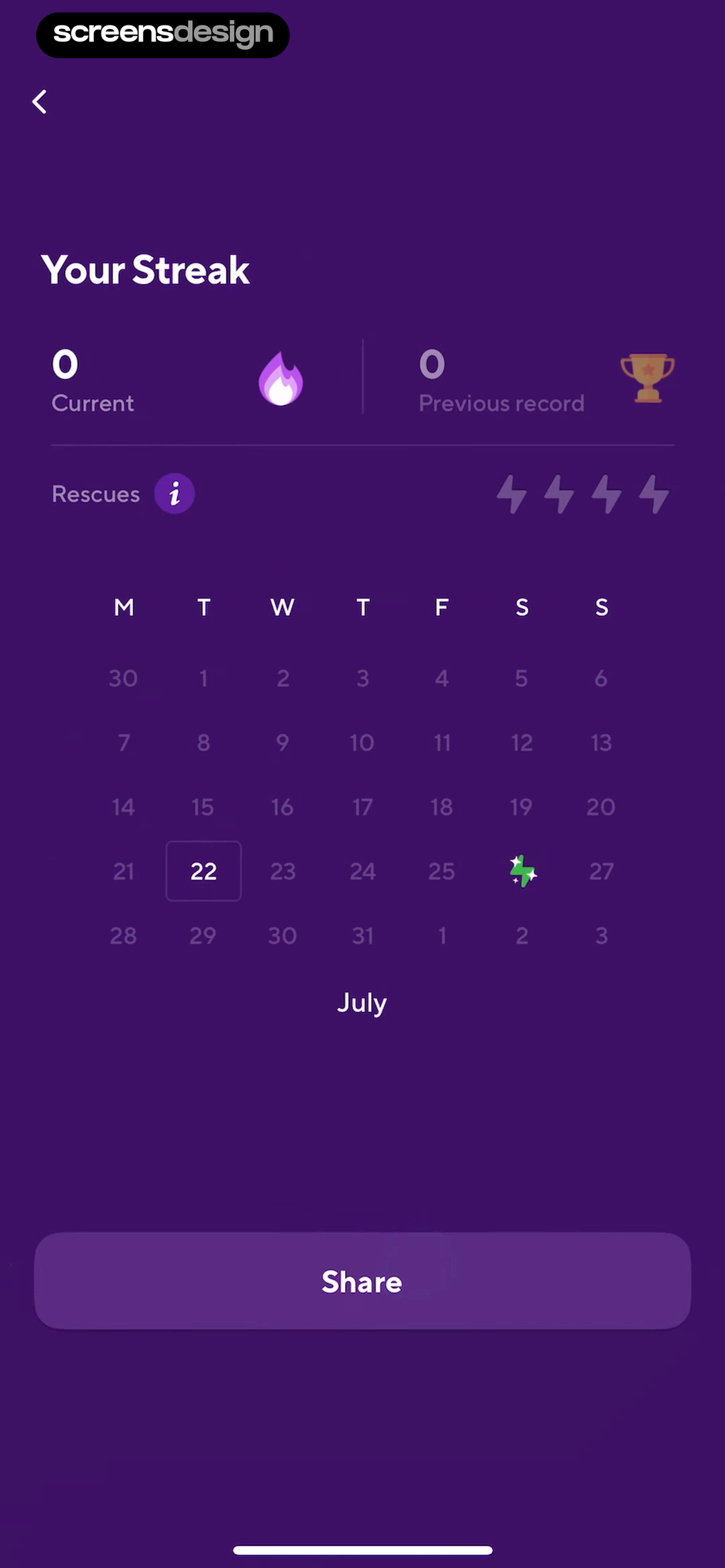
Finch explains that Streak Repair protects one or two skipped days and shows two items on hand. Drops distinguishes current streak, previous record, and available rescues, making recovery a separate resource.
State whether protection is automatic or manual, how many items remain, which missed day it covers, and whether the current count continues. If repair is paid or earned, show the cost or earning rule before the deadline.
Test consecutive missed days, retroactive data, timezone changes, no items available, purchase failure, and account restoration. A repaired calendar should not silently rewrite unrelated history.
04. Milestones
Use milestones as orientation, not pressure.
The next target should complement the record rather than devalue it.
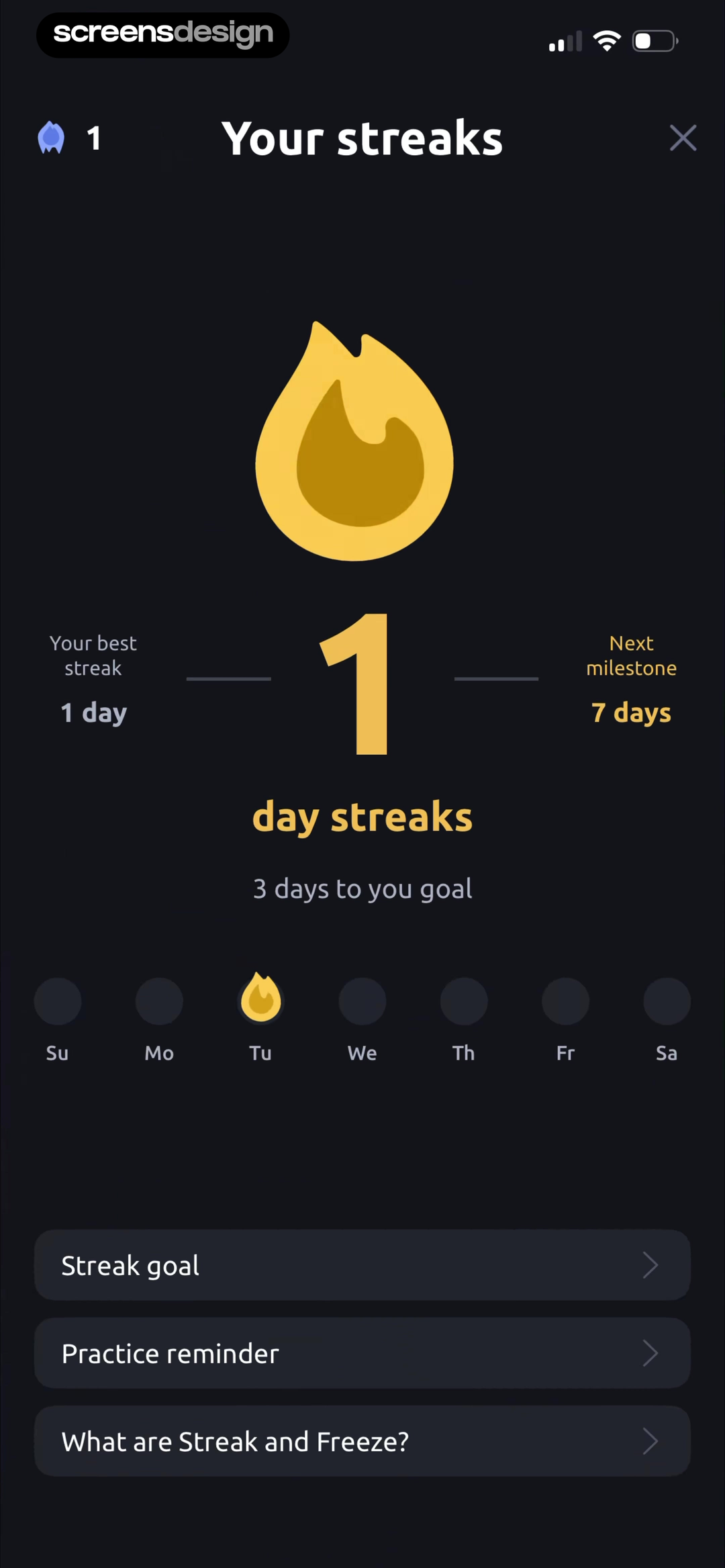
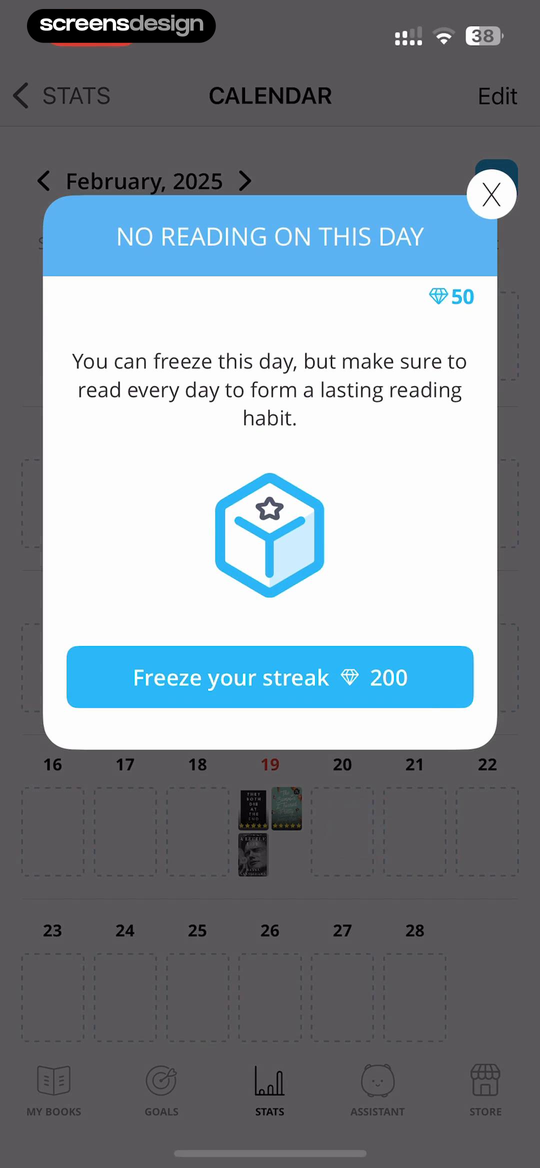
Vocal Image shows current and best streaks, the next seven-day milestone, and days remaining. Bookly marks a day with no reading, explains that it can be frozen, and keeps the monthly calendar visible.
Use milestones that match meaningful product cadence. Show the current achievement and next step, not an endless ladder of distant targets. Preserve past bests after the current streak ends.
Avoid copy that frames rest or illness as failure. Let users disable streak prompts where appropriate. For reading, fitness, and wellbeing products, the routine should remain subordinate to the user's actual goal.
05. Rules and limits
Keep repair limits and reset behavior inspectable.
Users should not discover a monthly cap only after losing the streak.
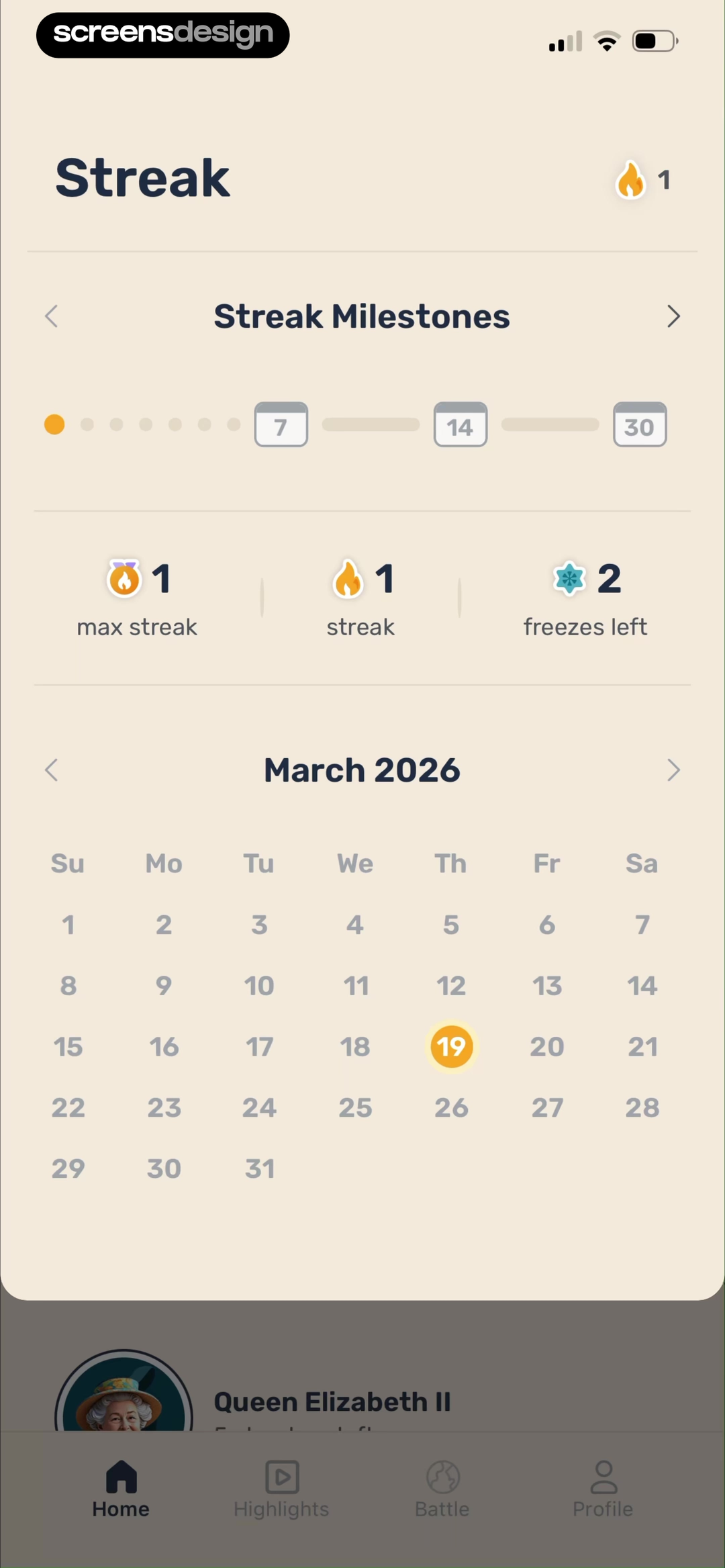
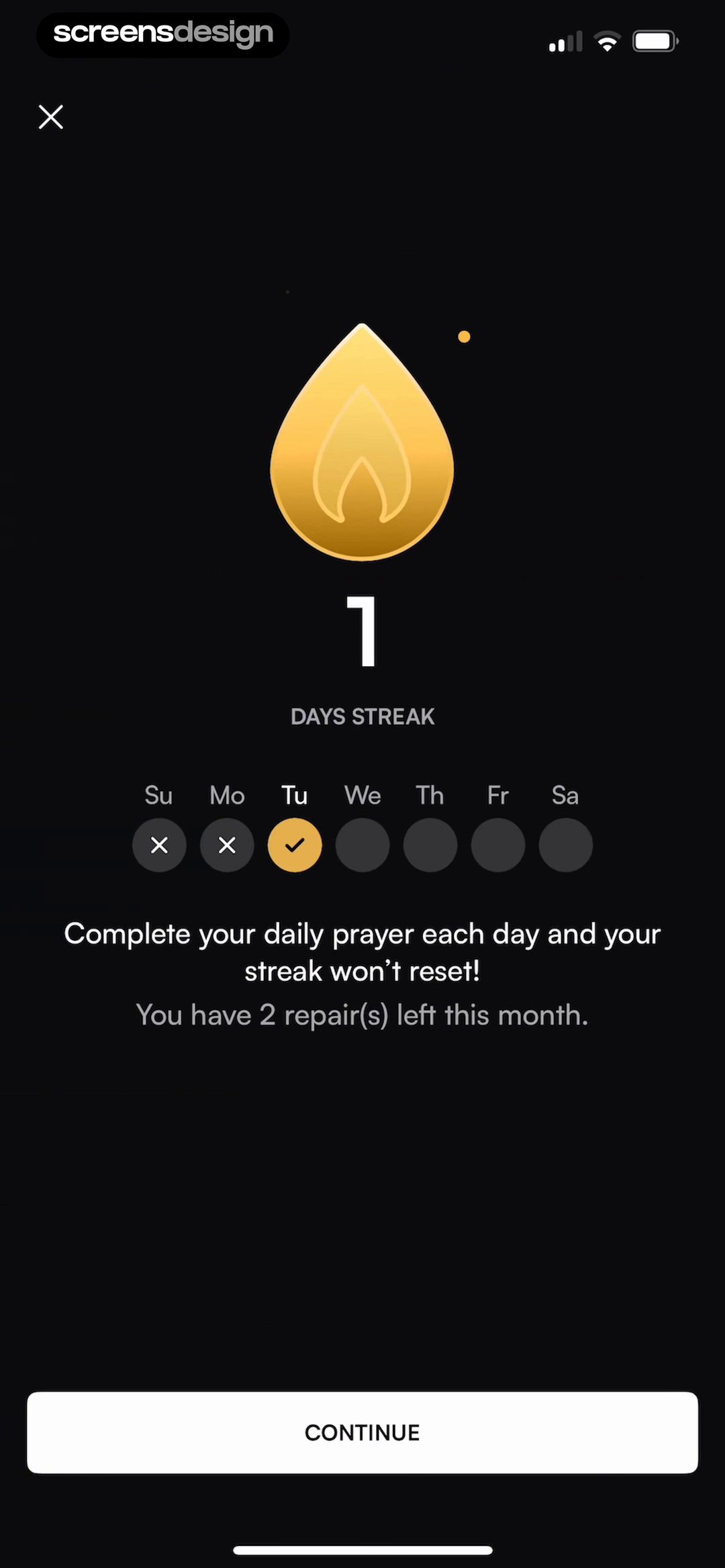
Paladin shows current streak, milestones, maximum streak, and two freezes left. Pray.com states the daily prayer rule and that two repairs remain for the month.
Publish the reset interval, monthly allowance, expiry, earning rule, and behavior when protection runs out. Place the rule near the calendar and again before any repair purchase.
A streak is a record, not evidence of learning, faith, health, or relationship quality. ScreensDesign Pro can help teams compare complete streak build, miss, repair, and return sequences rather than isolated celebration screens.
Streak state model
Protect the habit when continuity breaks.
A streak is a calendar rule wrapped around meaningful activity, so the product must explain qualification, time boundaries, recovery, and the task itself.
Define qualifying activity precisely. Opening the app, starting a lesson, completing a task, logging data, and reaching a duration threshold create different habits. Show progress toward today's requirement before celebrating completion. If several activities qualify, explain the simplest next action instead of making users reverse-engineer an invisible rule.
Model active, completed-today, at-risk, frozen, recovered, missed, and reset states. Account for local time, travel, daylight-saving changes, offline completion, delayed sync, and activity on another device. The interface should never show both completed and at risk because separate services disagree about the day boundary.
Recovery should support the underlying behavior. A freeze, grace day, or repair task can reduce all-or-nothing abandonment, but the terms must be visible before loss. Avoid shame, fake urgency, and celebrations that obscure the real task. For health, learning, and wellbeing products, returning safely matters more than preserving a perfect number.
When the user comes back after a gap, use the learning re-engagement examples to restore context. If alerts support the habit, earn permission with the notification pre-permission patterns.
- Qualifying activity and today's remaining requirement are understandable.
- Time zone, offline use, delayed sync, and multiple devices cannot create contradictory states.
- Freeze and recovery terms appear before the streak is lost.
- A broken streak still offers a useful next task without shame.
- Habit completion, return rate, notification opt-out, recovery use, and support reports are reviewed together.
Measurement
Measure the habit separately from the number.
A longer displayed streak is not useful if people perform meaningless activity, disable reminders, or abandon the product after one missed day.
Track qualifying activity, meaningful task completion, days active, recovery use, reminders sent, notification disables, streak repair, reset, and return after a break. Compare the behavior the product exists to support with the minimum action that increments the counter. A widening gap can reveal that users are gaming or misunderstanding the rule.
Study the first miss as closely as the first success. Measure whether people understand why the streak changed, find recovery, complete a useful task, and return over the following weeks. Review support reports for time-zone, sync, and offline errors before treating resets as motivational behavior.
Experiment with reminders, grace, and celebration using wellbeing guardrails. Watch compulsive use signals, late-night activity, shame language, reminder opt-out, and accessibility feedback. For health or learning products, prioritize safe sustained participation over maximizing consecutive-day counts at any cost.
Review streak copy with support and research teams after rule changes so older screens, notifications, and help content never promise a different day boundary.
Review checklist
Test the streak across time, devices, and missed days.
Create zero, first-day, active, best-record, protected, missed, repairable, expired-repair, and restarted states. Verify the count and calendar against the event history.
Test midnight boundaries, travel, offline completion, delayed health data, shared accounts, subscription expiry, and restored purchases. Confirm that copy never invents an outcome beyond the recorded behavior.
- The qualifying action is written plainly.
- Timezone and day-close behavior are consistent.
- Current, best, and completed-day metrics are distinct.
- Zero and first-day states explain the next action.
- Freeze inventory and automatic use are visible.
- Repair cost, deadline, and effect are stated.
- Missed days preserve honest history.
- Streak prompts can be reduced or disabled where appropriate.
Questions and answers
Mobile app streak design questions
What should a streak screen show?
Show the qualifying action, current streak, best streak, calendar period, completed and missed days, timezone behavior, freezes or repairs, and the next useful action.
What is a streak freeze?
A freeze protects continuity after a missed qualifying period. The interface should state whether it is automatic, how many remain, and what history it changes.
Should users be able to repair a streak?
Repair can support recovery, but it must have clear limits, cost, deadline, and record behavior. It should not disguise missing activity as completed work.
How should an app handle a broken streak?
Preserve past achievements, explain the reset, and offer a useful next task. Avoid shame or copy that treats a missed day as total failure.
Do streaks improve retention?
A recorded streak interface does not prove retention. Teams need product analytics and user research to understand effects, including anxiety, disengagement, and return behavior.
Apps referenced in this page
Open the products behind the examples.
 PairedQuestions, Long Distance Games
 DuolingoLanguages, Math, Music & Chess
 IQ MastersMemory Training for Adults
 StepsApp PedometerStep Counter, Walking Tracker
 FinchDaily Journal & Habit Tracker
 DropsLearn Spanish, French, German
 Vocal ImageVoice, Accent & Social Skills
 BooklyBooktok Reading Log
 PaladinInteractive & Fun Lessons
 Pray.comChristian Meditation & Sleep
2,715 apps in the top charts.Ask them anything.
Search real app flows, compare the screens around each decision, and turn stronger references into your own product.