Payment methods
10 Mobile App Payment Method Screen Examples
A method screen should clarify available instruments, account state, and the next authorization step.
A payment method screen sits between an understood purchase and financial authorization. It may list saved cards, Apple Pay, PayPal, bank accounts, buy-now-pay-later providers, gift value, or a new-card form. The interface should keep those methods distinct from promotions, product plans, and the final order action.
These ten recorded screens show broad wallet menus, minimal method lists, saved-payment areas, secure card entry, subscription funding, gift cards, and processor handoffs. Each example is useful as visible interface evidence, but it cannot prove that a method or arrangement caused a conversion outcome.
Start with eligibility. Show only methods that can fund the current product, amount, currency, country, and customer. Explain when a method sends the customer to another app or site, when billing information is required, and where final review occurs. Preserve the order if the external authorization is cancelled.
For the wider order context, study the mobile app checkout design examples.
01. Method range
Offer methods the order can actually use.
A long logo list is useful only when eligibility, currency, and return behavior are correct.
FARFETCH presents PayPal, Klarna, cryptocurrency, Afterpay, and Apple Pay in one payment selector. GOAT keeps the choice compact with credit card and GOAT gift card. The contrast shows that method breadth should follow the market and purchase, not a desire to make the checkout look comprehensive.
Order methods by customer relevance, availability, and prior use while avoiding a default that hides important costs or credit terms. Label deferred-payment products clearly. If a gift card cannot cover the total, explain whether another method can pay the remainder and in which order balances are applied.
Calculate eligibility on the priced order. Shipping destination, cart contents, amount, currency, device wallet, age, and risk review can change the list. When a method disappears after another checkout edit, explain why and retain the customer's other valid choices.


02. Saved and new methods
Separate recognition from credential entry.
A returning customer should identify a saved method without exposing sensitive details.
Hollister distinguishes saved payments from new credit or debit cards and other available options. Rent the Runway leads with Apple Pay and a route to add billing information. Both screens let the customer recognize the current method and understand how to provide another one.
Show brand, masked ending digits, expiry, and a useful billing label. Never display full credentials. Let customers add, edit, or remove a method in a clear context, and explain when removal is unavailable because it funds an active subscription or unresolved order. Avoid asking for billing fields the selected wallet already supplies.
Tokenize credentials with the payment provider and keep raw card data out of application logs and analytics. New-card validation should be field-specific and preserve non-sensitive values after a correctable error. If a card is declined, do not mark the saved method invalid for every future order without processor evidence.


03. Purchase context
Keep the product, amount, and method connected.
Method choice becomes ambiguous when the customer cannot see what the authorization will fund.
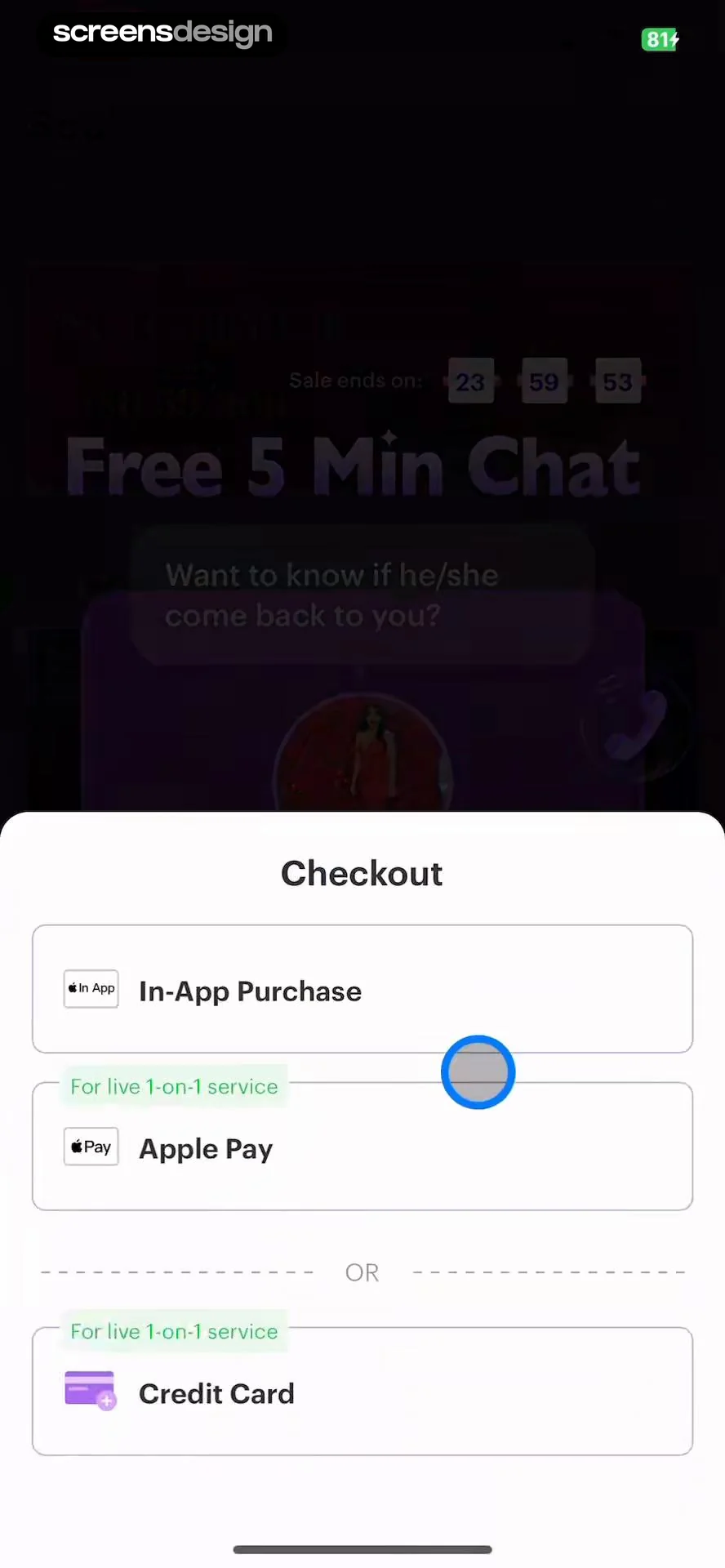
Soulight labels the purchase as in-app access for a live one-to-one service and offers Apple Pay or credit card. Houzz lists credit card, PayPal, and Apple Pay, then explains that PayPal returns to Houzz for order review. Both screens clarify the commercial object and the next step around the payment method.
Keep a compact product and total summary available. For timed services or variable credit use, say what the initial charge covers and how later consumption is handled. For physical orders, explain that method selection precedes final review when tax, shipping, or wallet address may still change the total.
External handoffs need a durable return URL and order version. On cancellation or authentication failure, restore the same cart or service request and selected method where safe. Do not interpret closing a wallet sheet as a declined card or submit another authorization automatically.

04. Card and billing
Make secure card entry concrete and recoverable.
Security reassurance is useful when labels, validation, and data handling support it.
Zalando offers PayPal and credit or debit card, then expands cardholder, number, expiry, security code, and save-for-later controls. The Coach presents an encrypted-payment statement with card and billing fields. These examples show the information customers expect when a wallet is not used.
Use persistent labels, appropriate input modes, paste support, card-brand feedback, and specific errors. Explain optional card saving and do not preselect it without a valid basis. Security code help should be accessible without erasing the form. Billing-address reuse needs a clear checkbox and editable destination.
Validate locally only for format and completeness, then present provider responses in customer language. Preserve the order and safe form state after correctable errors. Rate-limit repeated attempts without trapping a legitimate customer, and route suspicious or unsupported outcomes to a useful alternative.


05. Account funding
Explain when the method belongs to an account, subscription, or single order.
The same card can have different replacement and removal rules in each context.
Bloom asks customers to add a bank account or credit or debit card for a subscription and keeps the selected plan nearby. Nike SNKRS offers credit card, gift card, and PayPal from an account-level add-method screen. These contexts imply different future use and should say whether the method is saved.
For recurring billing, explain which subscription the method funds and what happens when it expires. For account wallets, show where a default is used and how to change it. For a single order, do not imply permanent storage. Gift value needs balance, application order, and remaining-balance behavior.
ScreensDesign Pro can help teams search recorded account, checkout, and subscription flows around the method selector. Compare the full context before borrowing the visible list, because the same row can represent a one-time authorization, stored credential, or recurring mandate.


Implementation
Derive available methods from the current payment intent.
A static method list cannot account for order, region, device, and account changes.
Build a payment intent or equivalent server object with order version, amount, currency, customer, eligible methods, saved tokens, billing requirements, return route, and authorization state. The client should render those methods and create secure provider elements without receiving raw credentials. Each attempt needs an idempotency key and a durable relationship to the order.
Define method loading, none available, wallet unavailable, new card invalid, card declined, authentication required, external handoff, customer cancelled, authorization pending, authorized, duplicate callback, and expired intent. Keep cancellation separate from failure, and keep authorization separate from order acceptance.
Accessibility review should cover descriptive method names, selected-state announcements, keyboard and screen-reader movement, large text, brand marks with text alternatives, form error association, focus after external return, and a path that does not depend on a specific wallet. Keep credentials, full addresses, and financial identifiers out of routine logs and session replay.
- Every method is eligible for the current order and region.
- The purchase and amount remain visible during selection.
- Saved methods expose only safe identifying details.
- External cancellation returns to the intact order.
- Authorization attempts are idempotent.
- Sensitive credentials never enter analytics or application logs.
Measurement
Measure successful authorization and recovery.
A method tap is only the start of a financial state transition.
Track method list shown, eligible method set, method selected, new method started, validation error, external handoff, authentication result, authorization result, order acceptance, return to checkout, and recovery action. Use provider-safe method categories rather than sensitive financial details.
Segment by amount range, currency, country, device capability, guest or signed-in state, saved or new method, and error class. Monitor cancellation, decline, repeated attempts, duplicate authorization, amount mismatch, support contact, and successful alternate-method recovery. Never claim that a screen arrangement caused conversion without a controlled analysis.
Review failures with the full order state. A wallet can look successful while the app loses its callback, or a card can authorize while the order fails to finalize. Count the customer outcome, reconcile asynchronous states, and give support a safe reference that does not expose credentials.
Review checklist
Test each method through return, failure, and replacement.
Use new and returning customers, saved and expired cards, gift value below the total, wallet cancellation, authentication, a declined card, and an unsupported country. Verify the order and total after every return.
Repeat with large text, screen reader, slow network, duplicate taps, app backgrounding, and a long localized method name. The customer should always know whether they selected, authorized, or completed payment.
- Method selection is distinct from final authorization.
- The list updates when order eligibility changes.
- New-card fields retain safe input after correctable errors.
- Gift and split-payment rules are explicit.
- External handoffs restore focus and order context.
- Failure offers a credible alternate method or retry.
Questions and answers
Payment method screen questions
What should a payment method screen show?
Show only eligible methods, the purchase and amount, saved-method identifiers, required billing information, external handoff behavior, and the next review or authorization step.
How should saved cards be displayed?
Use brand, masked ending digits, expiry, and a useful label. Never expose full credentials and explain where the method is used or can be changed.
Should Apple Pay be the default?
Only when it is eligible and the customer chooses or has a meaningful prior preference. Always keep an accessible alternative route.
What happens when a wallet is cancelled?
Return to the same order with the cart and safe input intact. Treat cancellation separately from a decline and do not retry automatically.
How should payment methods be measured?
Follow selection through authorization, order acceptance, recovery, duplication, mismatch, support, and the original task rather than counting method taps alone.
Apps referenced in this page
Open the products behind the examples.
 FARFETCH - Shop Luxury FashionFind luxury clothing online
 GOAT - Sneakers & ApparelPast, Present, Future
 Hollister Co.Shop With Us
 Rent the Runway (RTR)Designer Clothing Rental
 Soulight-Online Psychic AdvicePsychic Readings & Tarot
 Houzz - Home Design & RemodelRemodeling Ideas & Local Pros
 Zalando - Online fashionBekleidung, Schuhe & Beauty
 The Coach: Mens Health & KegelMen's Health, Pelvic Floor
 Bloom: Learn to InvestBuy Stocks. Earn Rewards.
 Nike SNKRS: Sneakers & ApparelShopping, Streetwear & Fashion
2,805 apps in the top charts.Ask them anything.
Compare recorded payment method screens, inspect complete authorization paths, and study how apps present wallets, cards, alternatives, failures, and recovery.