Account deletion flow design
10 Mobile App Account Deletion Flow Examples
The flow should explain what is removed, when deletion happens, what remains, and whether payment requires a separate action.
Deleting an account is a destructive data operation. Canceling a subscription is a billing operation. Logging out, resetting progress, removing a profile, and erasing specific records are different again. A safe interface distinguishes these jobs and gives the user enough information to choose the intended one.
This review examines ten exact recorded deletion screens from ten apps. The examples cover progress, recordings, body measurements, health history, search threads, generated songs, synced game data, subscriptions, export, delayed deletion, checkboxes, typed phrases, and platform billing.
For the billing exit itself, compare the subscription cancellation and win-back examples.
01. Deletion scope
Describe the records that will disappear.
All data is too vague when users have created meaningful work.
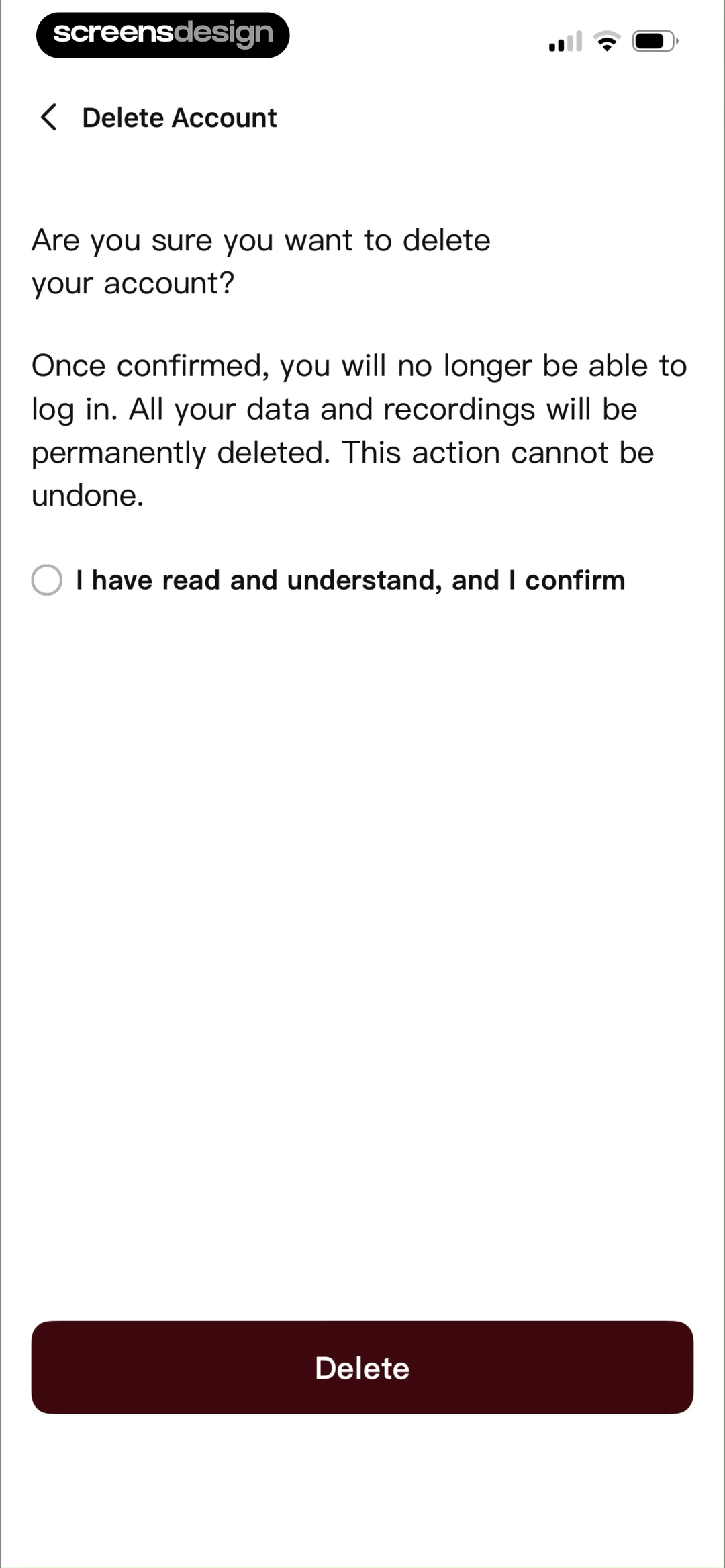
Elevate says history, progress, and achievements disappear forever. HiNoter names login access, all data, and recordings and requires the user to acknowledge understanding before Delete.
Use categories people recognize: profile, uploads, notes, recordings, health history, saved items, settings, purchases, and social content. Clarify anonymized public contributions and records retained for legal obligations when applicable.
Do not promise immediate deletion when backups or statutory retention apply. Link to a concise explanation of timing without moving the main consequence off screen.

02. Sensitive data
Call out health, measurements, and personal history.
The consequence should reflect the sensitivity and usefulness of the stored record.
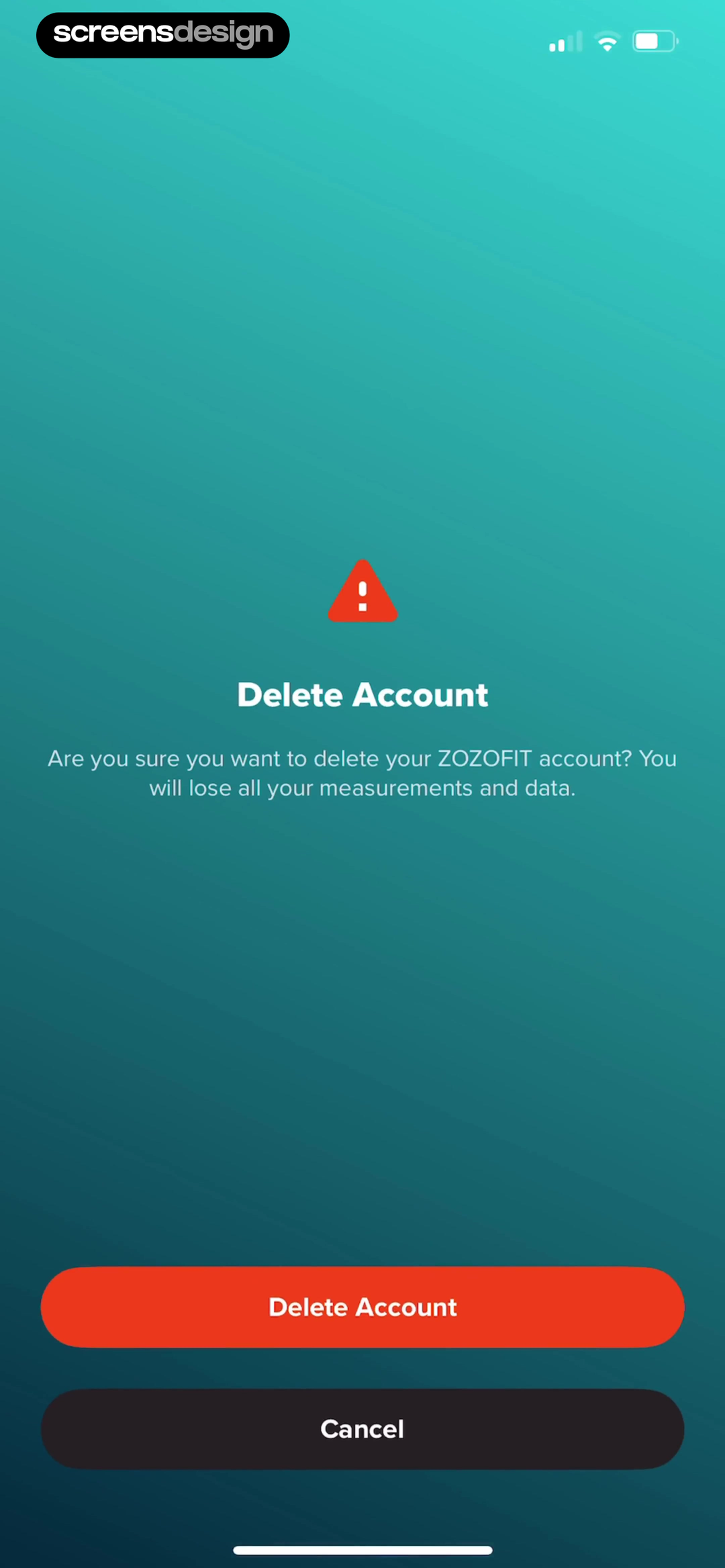
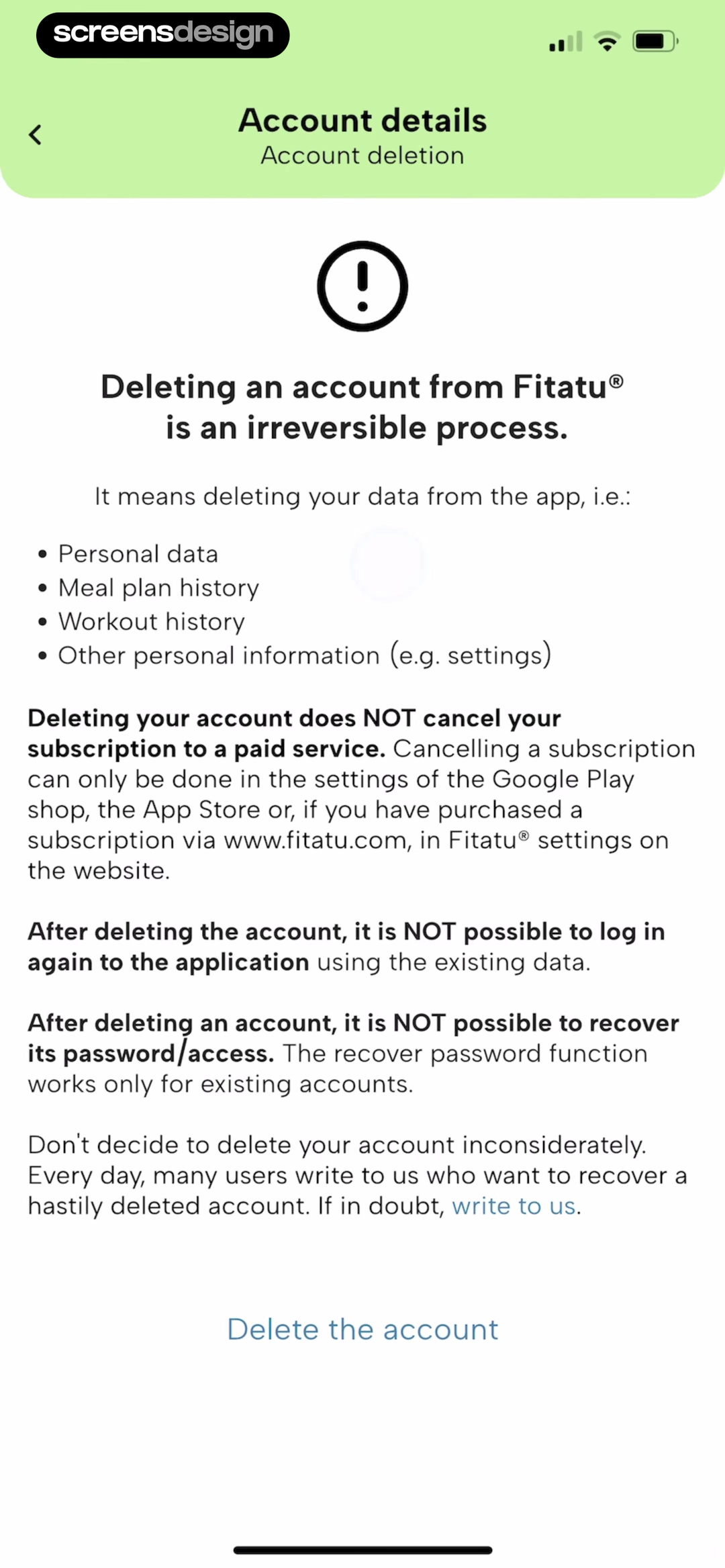
ZOZOFIT states that all measurements and data will be lost. Fitatu lists personal data, meal-plan history, workout history, settings, login loss, and the fact that deletion does not cancel a paid subscription.
Offer export before deletion when the product supports it. Distinguish account deletion from clearing a history category. Use neutral language and avoid guilt, especially for health and wellbeing data.
Test data export completion, linked devices, provider integrations, backups, and a pending support request. Explain what happens to data shared with third parties.
03. Billing separation
Put subscription management beside deletion when billing survives.
Deleting the login must not imply that App Store payment ends.
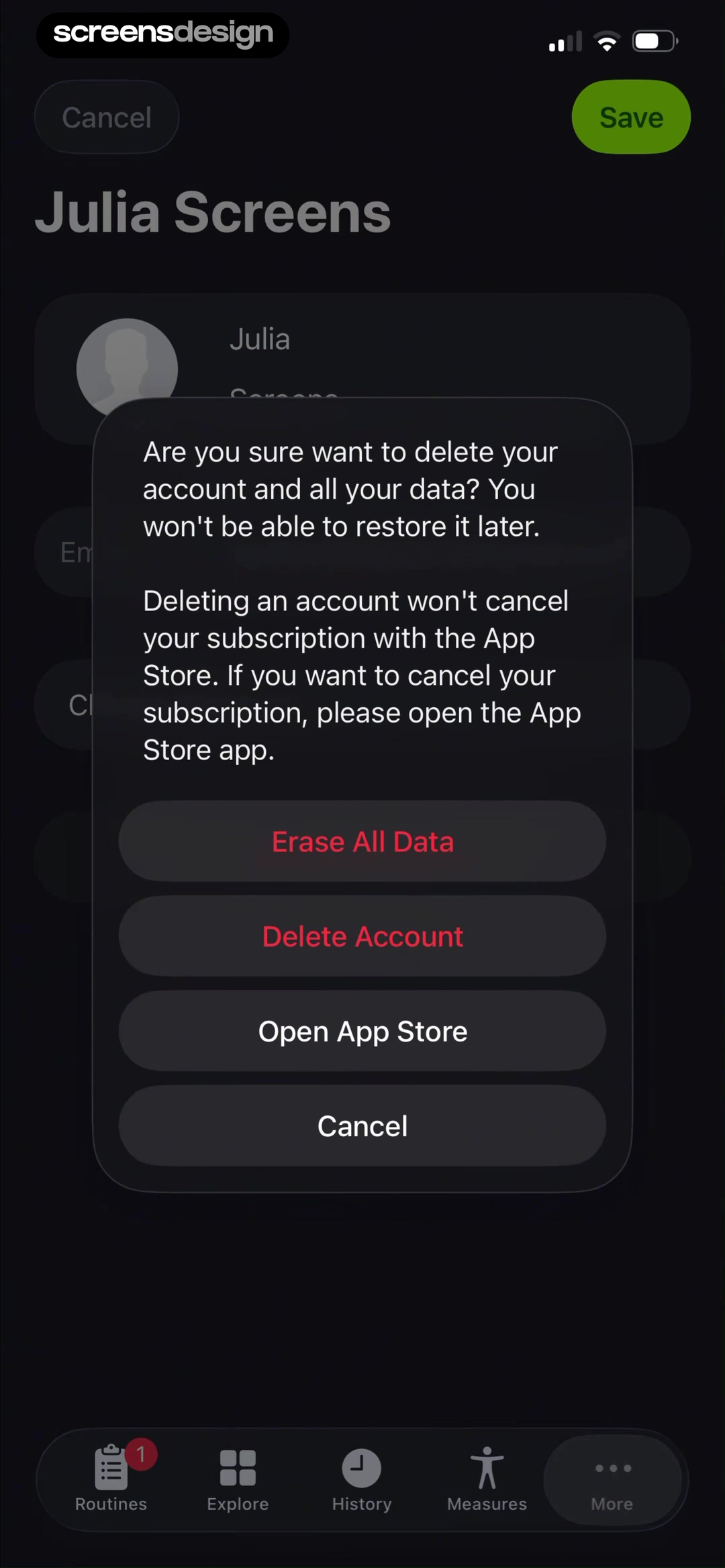
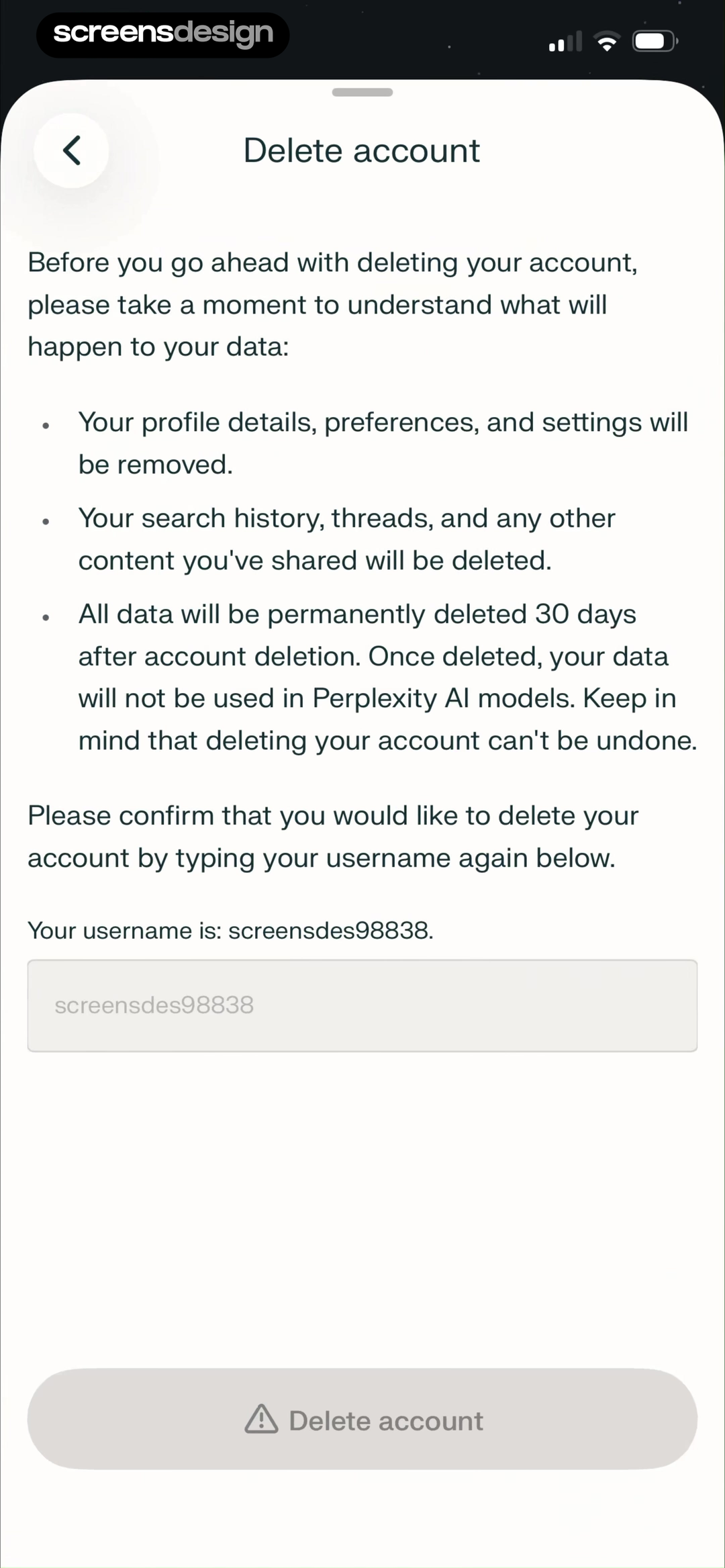
SmartGym warns that account deletion cannot be restored and does not cancel the App Store subscription, then offers Open App Store. Comet explains the categories removed, a 30-day deletion window, model-use consequence, and username confirmation.
Detect active subscriptions when possible and provide the correct management route before final deletion. State whether access continues, whether the user can cancel after account removal, and how refunds are handled.
Support web, App Store, family, promotional, and already-canceled subscriptions. If deleting the account would make future billing management harder, require the user to review that state first.
04. Deliberate confirmation
Use confirmation that proves intent without becoming punitive.
The final action should be difficult to trigger accidentally and easy to understand.
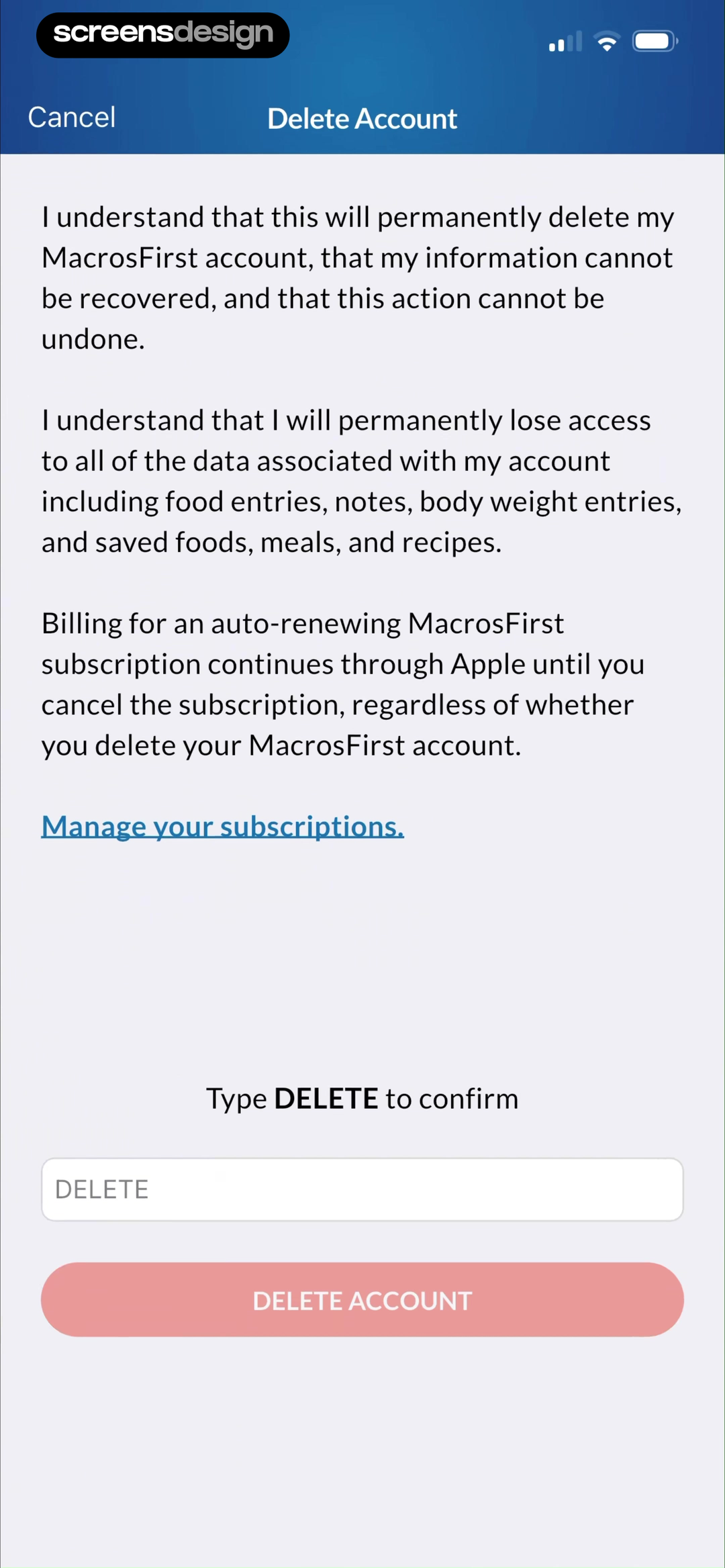
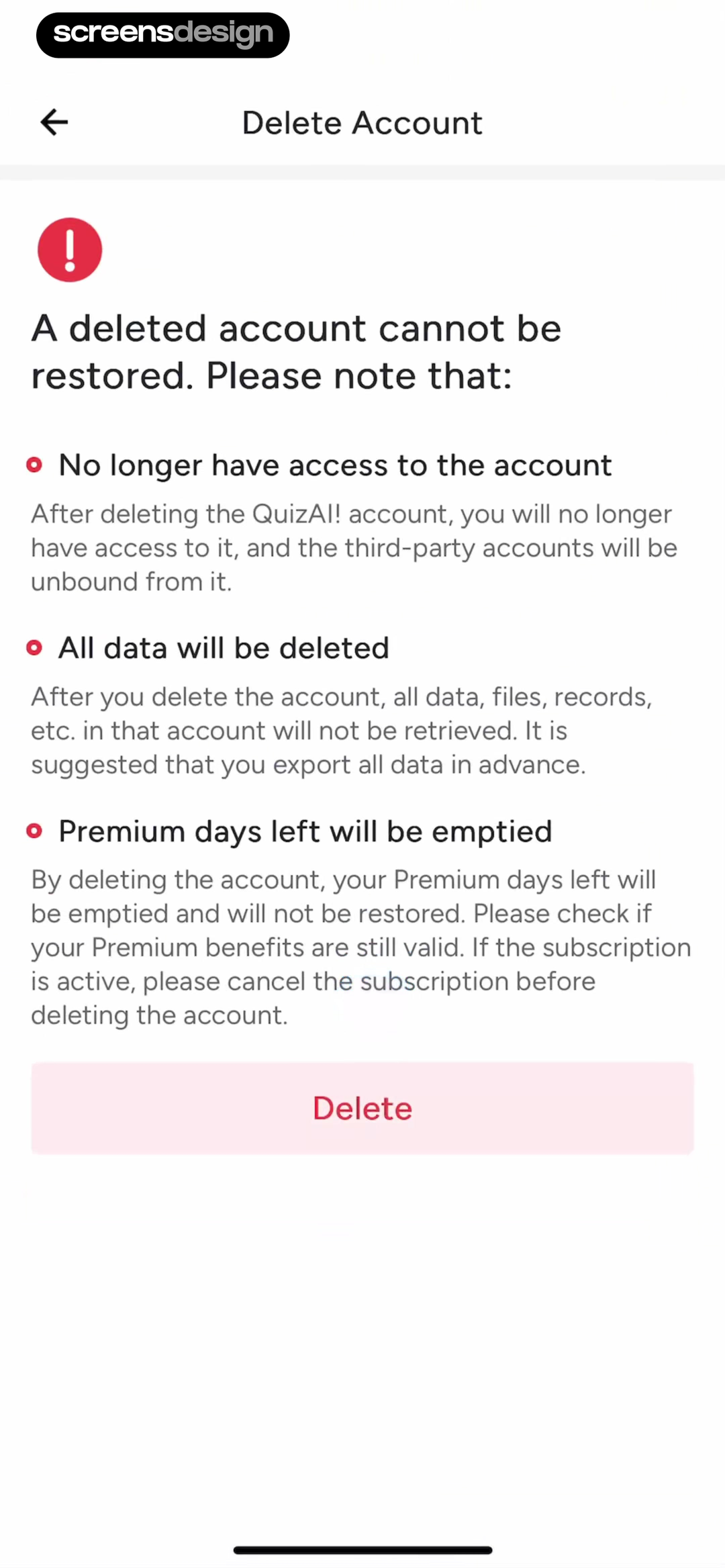
MacrosFirst requires multiple acknowledgments, explains lost food and body-weight data, warns that Apple billing continues, and asks the user to type DELETE. Quiz AI lists account access, data, files, third-party unbinding, and remaining Premium days before Delete.
Use one deliberate confirmation method appropriate to the risk. Typed phrases help when data is extensive; a checkbox can confirm comprehension. Avoid multiple ambiguous buttons or dark patterns that hide the destructive choice.
Disable the final action until validation is complete, preserve accessibility for voice and switch users, and prevent double submission. Show a clear queued or completed state after confirmation.
05. Created and synced work
Name the work that cannot be reconstructed.
Generated content, progress, and cross-device saves often matter more than the account profile.
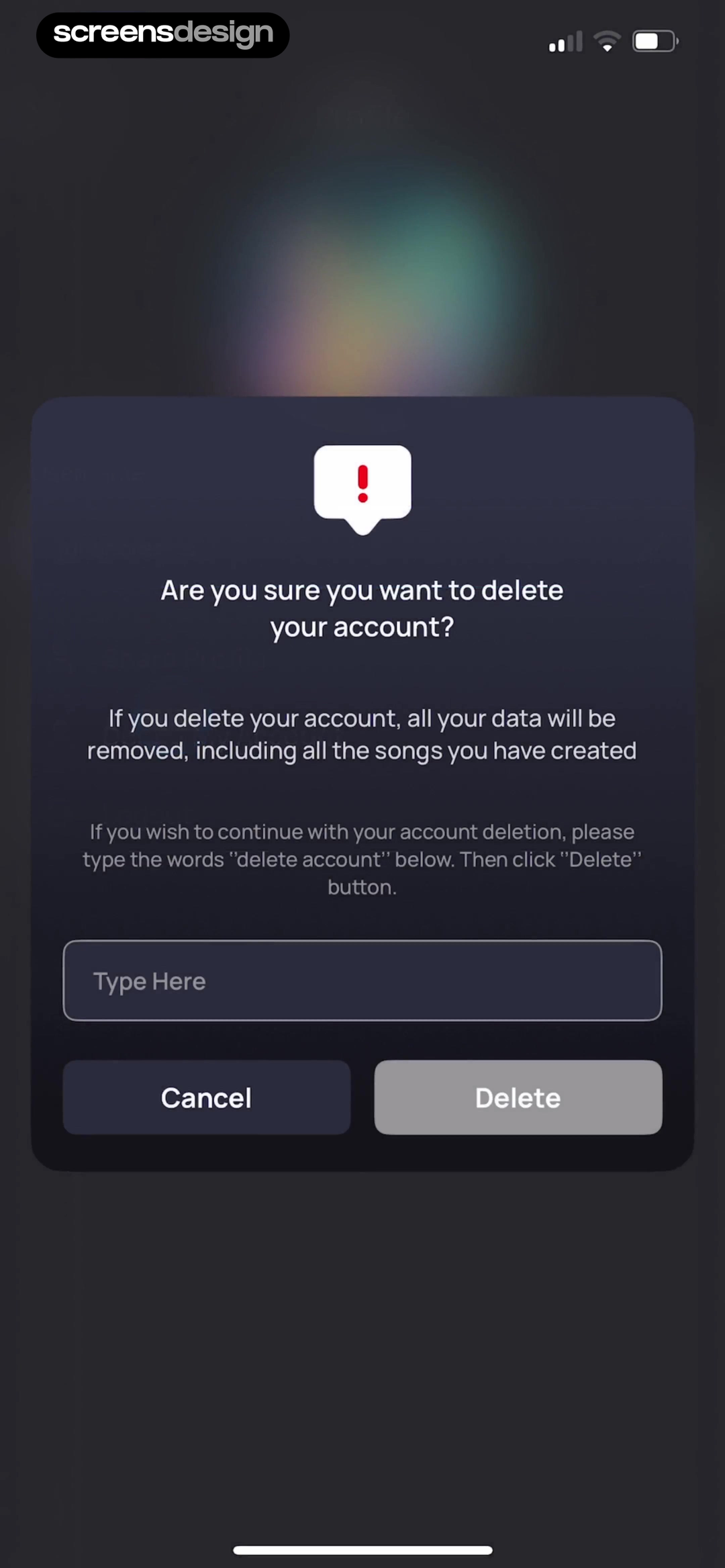
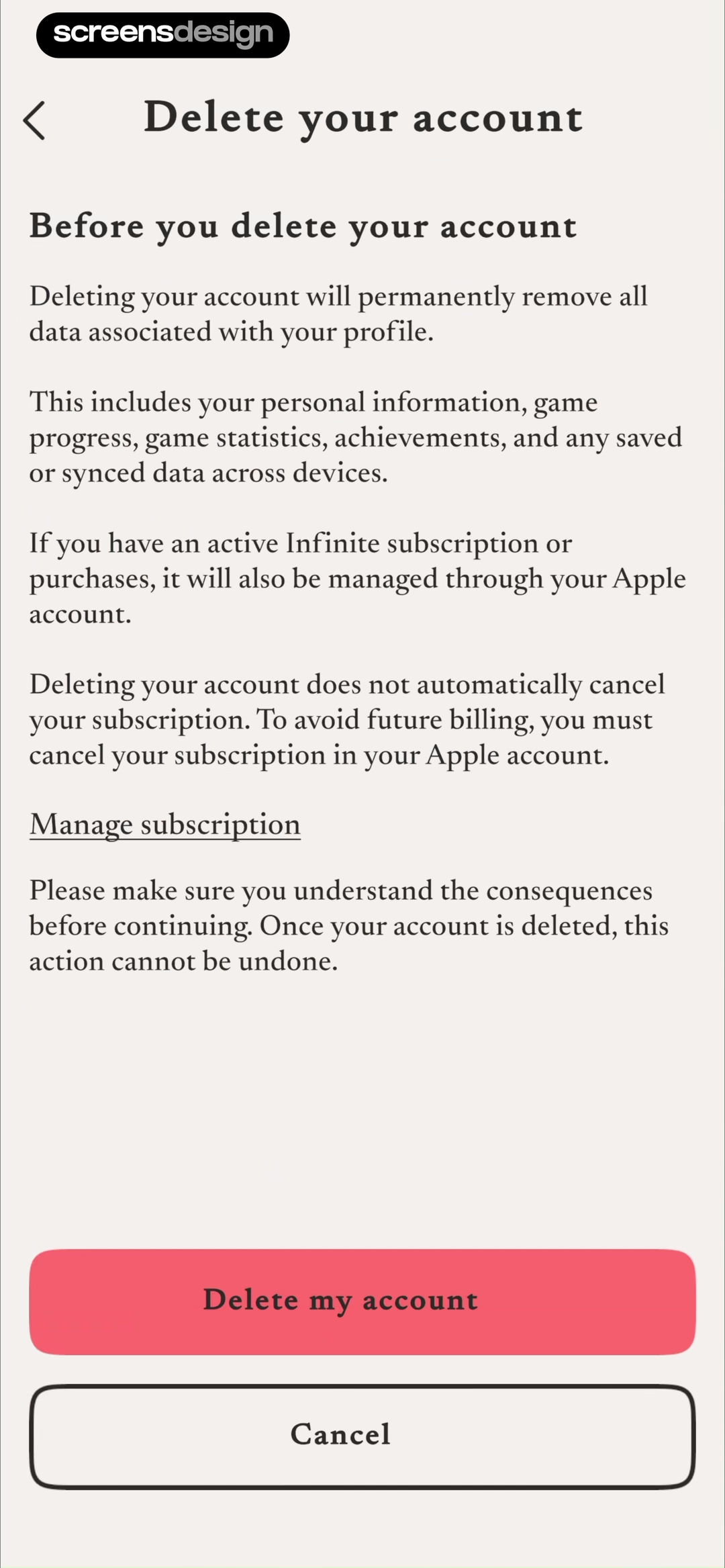
Donna says created songs will be removed and asks users to type delete account. The Almanac lists personal information, game progress, statistics, achievements, and synced data, then explains that Apple manages the active subscription.
Offer download, transfer, or export before the point of no return. State whether shared content remains visible, becomes anonymous, or disappears. Keep purchase restoration and subscription billing separate.
Test a user who owns paid content, shares collaborative work, or has deletion queued on another device. ScreensDesign Pro can help teams inspect settings entry, warning, export, confirmation, and post-deletion states across complete recordings.
Deletion boundaries
Separate the account, stored data, subscription, and device state.
Deletion copy is only trustworthy when the product knows exactly which records disappear, what must be retained, and which billing system remains outside the app account.
Inventory the objects connected to the account: profile, uploaded files, generated content, messages, purchases, subscription, team membership, shared projects, backups, analytics identifiers, support records, and legal or financial records. For each object, define deletion timing, retention requirement, anonymization, and effect on collaborators. The confirmation should summarize consequences a person can act on, not reproduce the entire policy.
Keep cancellation and deletion separate. Deleting an app account may not cancel an App Store subscription, and cancelling a subscription may leave the account and data intact. Detect the billing channel and show the correct management route before destructive confirmation. Do not use the distinction to trap people; let them return to deletion after billing is addressed.
Design pending, completed, partially failed, restored during a grace period, and blocked states. Require recent authentication when risk justifies it, but offer a recovery path when the user no longer has the original sign-in method. Send confirmation without leaking private data, invalidate sessions and tokens, and test shared ownership, child accounts, enterprise administrators, and offline devices.
Use the cancellation flow examples for the billing decision. Review the broader subscription churn article before users reach this irreversible point.
- The confirmation distinguishes account deletion, data deletion, and subscription cancellation.
- Shared content, teams, purchases, and legally retained records have stated outcomes.
- Authentication failure has a safe recovery path.
- Pending, partial failure, completion, grace period, and repeat requests are tested.
- Deletion completion, time to completion, failures, support contacts, and unintended renewals are monitored.
Operations
Make the deletion promise observable end to end.
The interface needs status from every system that stores account data, not only a successful request accepted by the primary API.
Assign each deletion job a user-visible state and an internal audit trail. Record request time, authentication, scope, downstream services notified, retained categories, failures, retries, completion, and confirmation delivery. Avoid storing more personal data in the audit record than needed to prove the operation.
Test partial failure deliberately across files, search indexes, analytics profiles, messaging, backups, payment records, and third-party processors. Decide whether the account remains locked, whether the user can retry, and how support can diagnose the problem without restoring data that was already removed.
Measure completion time, failed jobs, repeat requests, support contacts, unintended active subscriptions, confirmation delivery, and requests reopened during a grace period. Review the flow with privacy, legal, security, support, billing, and product owners whenever data architecture or retention rules change.
Review checklist
Test deletion as a data and billing workflow.
Create accounts with no data, extensive history, generated content, health records, active subscription, canceled subscription, pending export, family access, and synced devices. Verify each warning against actual deletion behavior.
Complete export, confirmation, queued deletion, cancellation, login attempt, resubscription, and support recovery. Confirm that the API, emails, billing links, and in-app status agree.
- Deletion is distinct from logout, reset, and subscription cancellation.
- The data categories removed are named.
- Timing and any grace period are stated.
- Export is offered before irreversible loss when available.
- Active billing is detected or clearly explained.
- The correct billing-management route is provided.
- Confirmation friction matches the destructive risk.
- Post-deletion login and support behavior match the promise.
Questions and answers
Mobile app account deletion questions
What should an account deletion flow include?
Include data scope, deletion timing, retained records, export, active subscription status, billing management, irreversible consequences, deliberate confirmation, and a final status.
Does deleting an account cancel an app subscription?
Not necessarily. App Store or web billing may continue. The flow should detect or explain this and link to the correct subscription-management destination.
Should an app require typing DELETE?
Typed confirmation can be appropriate for extensive or irreversible data loss, but one clear confirmation method is usually enough. It must remain accessible.
Should users be able to export data first?
Offer export when the product supports it and the records would be difficult to recreate. Confirm export completion before the final destructive action.
Can account deletion be delayed?
A grace period can support recovery, but the interface must state the duration, what remains accessible, how cancellation works, and when deletion becomes irreversible.
Apps referenced in this page
Open the products behind the examples.
 ElevateVocab, Memory, & Math Puzzles
 HiNoterAuto transcribe & summarize
 ZOZOFITTrack Progress, Fitness & BF%
 Fitatu AI Calorie CounterFood Tracker & AI scanner
 SmartGymHIIT, Home, Gym Weight Lifting
 CometBrowser and AI assistant
 MacrosFirstCalorie Counter, Nutrition Log
 Quiz AIAsk & Answer, AI Math Solver
 Donna AI Song & Music MakerMusic Generator & AI Cover
 The AlmanacFeel clever through play
2,730 apps in the top charts.Ask them anything.
Search real app flows, compare the screens around each decision, and turn stronger references into your own product.