Habit tracker onboarding examples
10 Habit Tracker App Onboarding Examples
The first-run flow succeeds when a user leaves with a habit they understand, can perform, and knows how to record.
Habit tracker onboarding introduces the product, helps a person define a behavior, configures a schedule or cue, explains tracking, and ideally leads into the first real check-in. It turns a broad intention into an operational plan.
The central design risk is overcommitment. Long questionnaires, aggressive streak promises, and too many simultaneous habits can create an impressive setup that users cannot sustain. The flow should favor clarity and editability over certainty.
A habit needs a behavior, frequency, context, completion rule, and feedback. Goals and identity can motivate, but the tracker must eventually answer what counts today and how the user records it.
The recorded examples below show dedicated habit trackers and routine planners with different tones, setup questions, reminder choices, and progress models. They offer real onboarding references without proving long-term behavior change.
01. Value promise
Describe the practical job before asking for personal data.
Users need to know whether the app helps plan, remind, record, reflect, or coach.
Habit Tracker presents “Building good habits boosts happiness!” with “Happiness” visible in the same state. HabitMinder • Habit Tracker frames the related decision through “Welcome” and “to HabitMinder!”. The pair makes how habit products set tone and expectation before configuration. concrete in recorded products, but it does not establish which treatment performs better.
Use concrete outcomes such as build a daily routine or remember weekly practice. Avoid guaranteed transformation and unsupported behavioral claims. Show the product’s method briefly, then let the user begin with a habit rather than consuming a long feature tour.
Tie onboarding steps to configurable product objects. Do not collect motivational answers that never affect the plan or later experience.


02. Habit selection
Turn an aspiration into a specific observable behavior.
“Get healthier” is a goal; “walk for ten minutes after lunch” can be tracked.
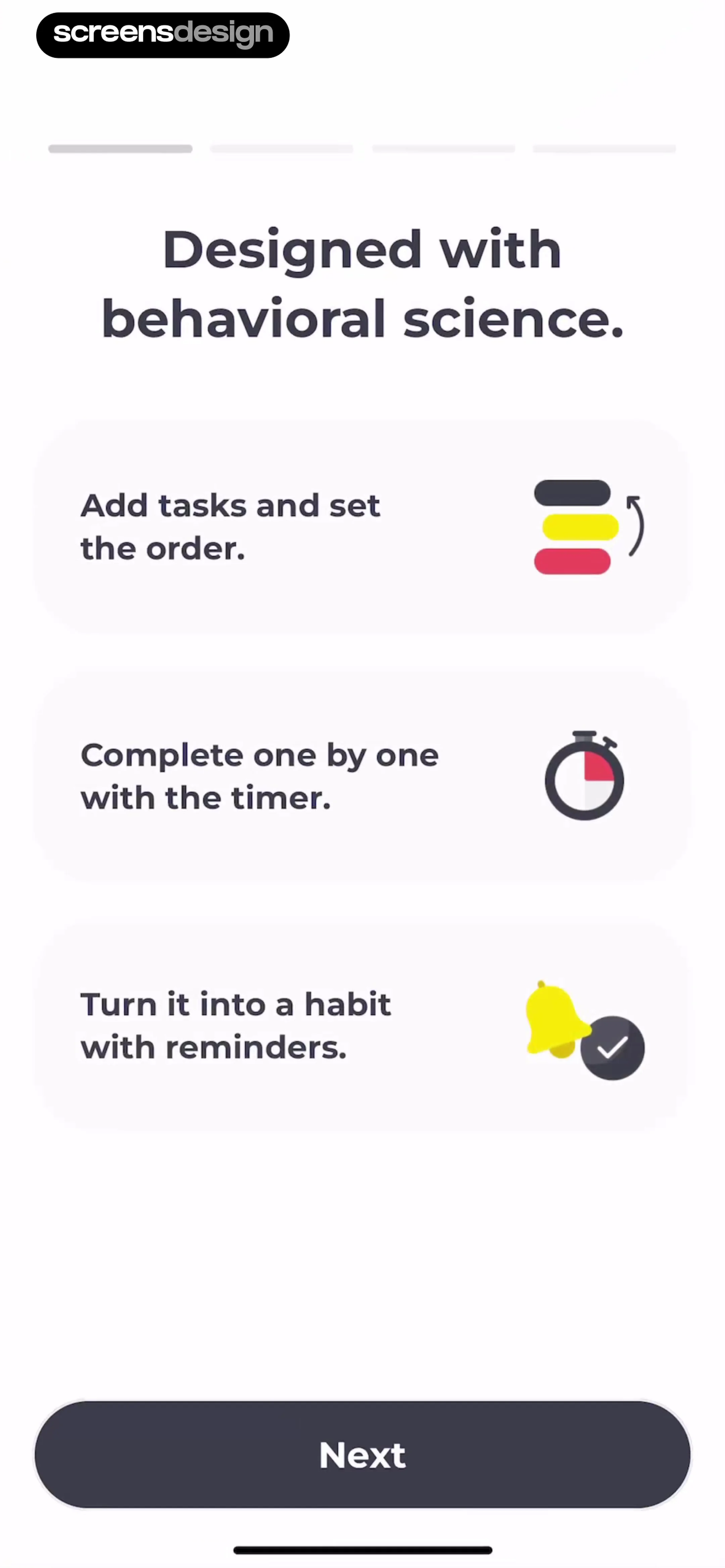
Do Habits: Get It Done presents “Say hi to your new habit tracker” with “Just know that you’re awesome for already haven taken the first step towards building better habits.” visible in the same state. Routine Planner, Habit Tracker frames the related decision through “Designed with behavioral science.” and “Add tasks and set the order.”. The pair makes how preset categories and custom entry can help users name a manageable first behavior. concrete in recorded products, but it does not establish which treatment performs better.
Offer examples with editable verbs, amounts, or contexts. Limit the initial set or explain the cost of adding many habits. Let users choose custom behavior without forcing it into a misleading template. Preserve their language in the main label.
Store behavior, target, unit, frequency, cue, and success rule separately where the product uses them. Validate only what is needed and allow later edits without erasing history.

03. Schedule and cue
Ask when the behavior is plausible, not simply when the app should notify.
Frequency, day, time, and context shape whether today has a meaningful completion state.
HelloHabit - Daily Planner presents “HelloHabit let's you...” with “check-in with widgets” visible in the same state. Dear Me: Daily Routine Tracker frames the related decision through “Here's your first personalized habit.” and “Today”. The pair makes how onboarding can connect a chosen habit to a repeatable cadence. concrete in recorded products, but it does not establish which treatment performs better.
Start with a simple cadence and progressive options. Explain whether missing a day breaks a streak, whether weekends differ, and which time zone controls the day boundary. A reminder is optional support, not the habit itself.
Generate occurrences from versioned schedule rules, preserve completed history when rules change, and handle travel and daylight-saving time. Avoid rewriting past expectations after an edit.


04. Reminders and permission
Configure useful timing before asking for push access.
The permission request makes sense only after the user sees which reminder they are enabling.
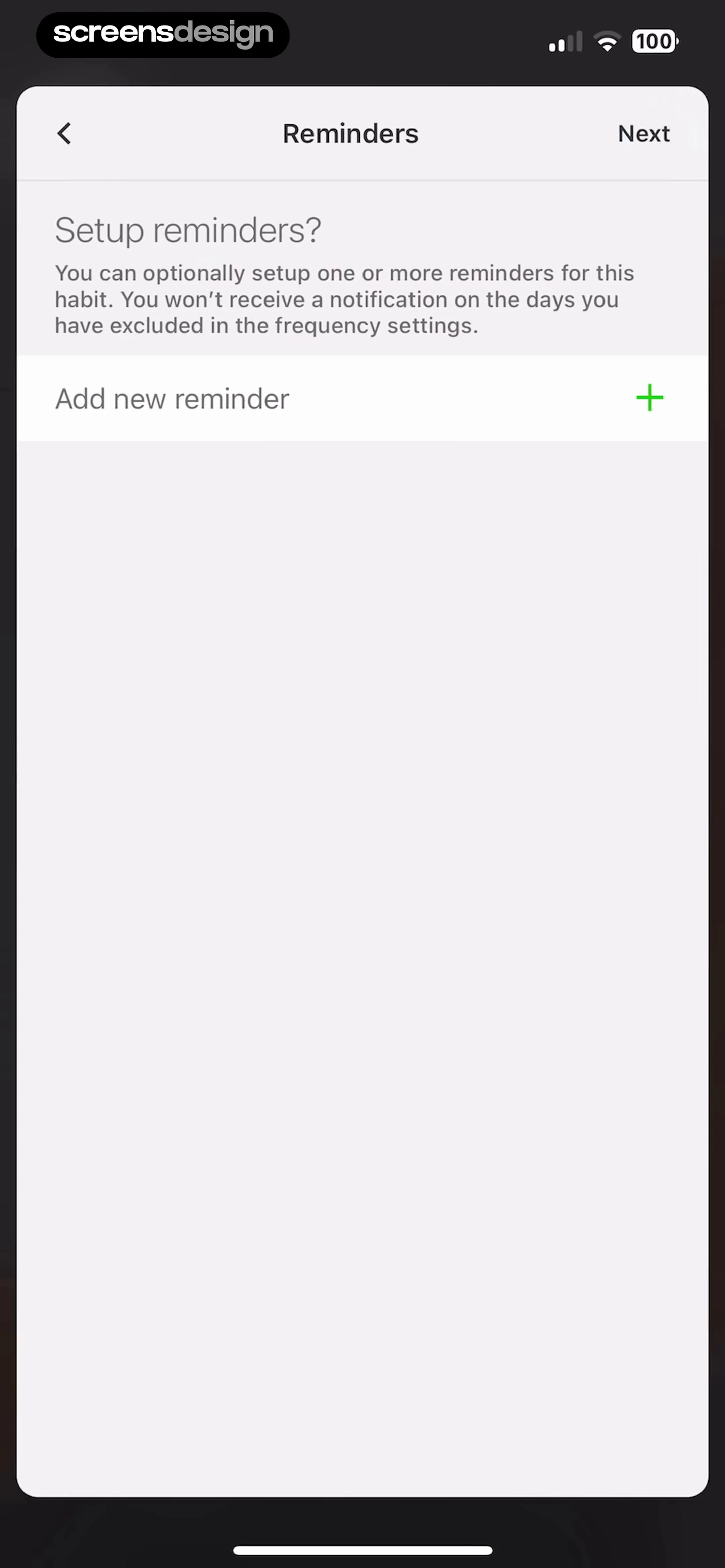
Today Habit tracker presents “Reminders” with “Next” visible in the same state. TeddyCare: Daily Routine Plan frames the related decision through “Get more structured routines by following your habits.” and “Helps you stick to your goals and boost productivity.”. The pair makes how reminder choices can provide a concrete reason for notification access. concrete in recorded products, but it does not establish which treatment performs better.
Let the person choose a meaningful reminder, preview the copy or category, then show a contextual pre-permission explanation. If denied, keep the habit usable and offer in-app cues, calendar integration, or later system-settings repair.
Store reminder intent independently from operating-system authorization and device tokens. Reconcile permission on foreground and suppress sends after preference changes.

05. First check-in
End onboarding inside the real habit loop.
A dashboard tour is weaker than completing, skipping, or scheduling the first actual occurrence.
Grit: Daily Habit Tracker presents “Here's what Grit can do for you:” with “Achieve all your goals! Choose from our list or create your own” visible in the same state. Habitify: Habit Tracker frames the related decision through “Good Evening, screensdesign” and “Start with a remarkably simple habit. Make it so effortless, it's impossible to refuse.”. The pair makes how product setup can transition into a tangible record and honest progress state. concrete in recorded products, but it does not establish which treatment performs better.
Show today’s habit, completion rule, and one clear Check in action. Explain Skip, partial progress, or undo according to the model. Keep streaks at zero until a real completion and avoid manufacturing progress from onboarding answers.
Create the habit and first occurrence atomically, then route to the live tracker. Make completion idempotent, support undo with history, and distinguish setup completion from behavior completion.


Implementation
Build onboarding directly on the production habit model.
A dependable habit onboarding screen needs a shared contract across the interface, backend, analytics, accessibility, and support.
Define behavior, target, unit, frequency, schedule, day boundary, reminders, occurrence generation, completion, skip, partial state, streak rule, editing, archive, and history. Every onboarding answer should configure one of these fields or be removed.
Design welcome, choosing, suggested, custom, scheduled, reminded, first-check-in, completed, skipped, edited, permission-denied, and returning states before polishing the default path. Preserve valid work and navigation context, make repeatable mutations idempotent, and return typed outcomes that map to reviewed product language rather than raw technical messages.
Test Dynamic Type, VoiceOver, keyboard focus, switch control, reduced motion, contrast, touch targets, localization, right-to-left layout, and long content. Dense data and visual hierarchy must remain understandable without color, gesture memory, or animation.
Review privacy, security, and entitlement at the data layer. Minimize sensitive fields, enforce audience and access on the server, avoid private payloads in analytics, and explain externally visible or irreversible consequences before confirmation.
Name the user’s job
Explain why this habit onboarding screen appears and what object, plan, or decision it controls.
Represent reality
Distinguish suggested, selected, scheduled, completed, skipped, edited, and returning states so the interface never invents a false success.
Clarify the result
Make one primary action dominant, accurately labeled, and safe from accidental repetition.
Preserve the journey
After success, cancellation, or repair, restore the exact task and context that led here.
Measurement
Measure activation in the real tracking loop.
Measure the real user outcome and its quality, not only a tap or screen view.
Track onboarding start, value step, habit choice, custom entry, schedule, reminder intent, permission result, habit creation, first occurrence view, check-in, skip, edit, day-two return, and sustained meaningful use. Use stable state names and safe identifiers, never raw health, location, payment, recipient, or private content.
Compare setup completion with first real check-in, next scheduled return, week-one active days, edits, reminder opt-out, impossible schedules, and habit deletion. Avoid claiming behavior change from app events alone; the tracker observes self-reported interactions, not the full real-world habit.
Combine quantitative events with moderated research, support cases, accessibility testing, and replayed failures. Define guardrails before launch so a faster or higher-converting path does not conceal more mistakes, weak downstream engagement, privacy concerns, refunds, or abandonment.
Review checklist
Review onboarding with a realistic first week.
Review the complete experience with realistic data and interruptions.
Test one-time and recurring habits, weekends, travel, denied notifications, edits after completion, skips, undo, and returning accounts.
- The habit onboarding screen explains the current task and object in plain language.
- One primary action dominates and its consequence is accurately labeled.
- Secondary actions remain available without competing with the main decision.
- Initial, loading, partial, success, empty, stale, offline, and error states are deliberate.
- Back and close preserve the context that opened the screen.
- Validation and errors appear beside the relevant control with a recovery action.
- Repeated taps and ambiguous timeouts cannot duplicate consequential work.
- Sensitive data is minimized in the interface, storage, logs, and analytics.
- Large text and assistive technology preserve reading and focus order.
- Localization, units, time zones, and right-to-left layout are tested where relevant.
- The pattern is reviewed inside its full journey, not as an isolated screenshot.
- Recorded examples are adapted to the product’s own audience, data, and constraints.
Questions and answers
Habit tracker onboarding questions
What should habit tracker onboarding include?
Explain the product’s practical method, help users choose one observable habit, define a realistic cadence, configure optional reminders, and finish inside the first real check-in.
How many habits should users create during onboarding?
Start with one or a very small number unless the product’s method requires a set. Too many initial commitments can create a setup that is difficult to understand or sustain.
When should notification permission be requested?
After the user chooses a reminder and understands its value. Keep tracking usable if permission is denied and store reminder intent separately from device authorization.
Should a streak begin during onboarding?
No. Begin progress after a real completed occurrence according to the documented streak rule. Do not manufacture progress from setup answers.
What habit information needs to be structured?
Common fields include behavior, target or unit, frequency, schedule, cue, success rule, reminder, time zone, and completion history. Preserve the user’s chosen label.
Which onboarding metrics matter?
Measure habit creation, first real check-in, next scheduled return, week-one use, reminder outcomes, edits, skips, and deletion rather than onboarding completion alone.
Apps referenced in this page
Open the products behind the examples.
 Habit TrackerGoal Tracker & ADHD Planner
 HabitMinder • Habit TrackerDaily Goal Planner, To Do List
 Do Habits: Get It DoneDaily Routine & Goal Planner
 Routine Planner, Habit TrackerDaily Time Management for ADHD
 HelloHabit - Daily PlannerTasks, Routines, & Streaks
 Dear Me: Daily Routine TrackerSelf Care & ADHD Habit Planner
 Today Habit trackerFor to-dos, routines & goals
 TeddyCare: Daily Routine PlanADHD Self Care & Habit Tracker
 Grit: Daily Habit TrackerGoal & Routine Planner, ADHD
 Habitify: Habit TrackerDaily Goals, Routine & Streaks
2,805 apps in the top charts.Ask them anything.
Compare recorded habit onboarding screens and use ScreensDesign Pro to inspect complete first-use flows before turning your own behavior-change promise into a daily product loop.