Mobile app signup flows
10 Mobile App Signup Flow Examples: From Account Creation to Verification
A signup flow should explain what the account preserves, collect only what the identity system needs, and return the new user to a useful first product state.
Registration is not automatically onboarding. It is an account transition that may appear before personalization, after a useful result, at a cross-device handoff, or when a user chooses to save work. The right timing depends on what would otherwise be lost and what the product can deliver without an identity.
Every added field creates data responsibility and another place to fail. Ask for email, phone, name, password, marketing choice, or profile information only when its purpose is clear and its downstream use is implemented. Separate required account terms from optional communication consent, and do not hide an account state behind a button that looks like ordinary continuation.
These recorded examples show visible signup choices in real mobile apps. They help compare timing, hierarchy, validation, and handoff. They do not prove a conversion outcome. Identity assurance, data retention, age requirements, security, and consent still need product-specific legal and engineering review.
01. Timing
Connect registration to the value the user is about to preserve.
The strongest reason to create an account is a concrete result, plan, or history that should remain available.
Joon labels the moment Save Your Result and says that creating an account will reveal a personalized plan. The requested email sits beside a visible reason for the account. That connection is stronger than interrupting the first launch with a generic Join us screen, but the product must preserve the quiz answers if registration is abandoned or temporarily fails.
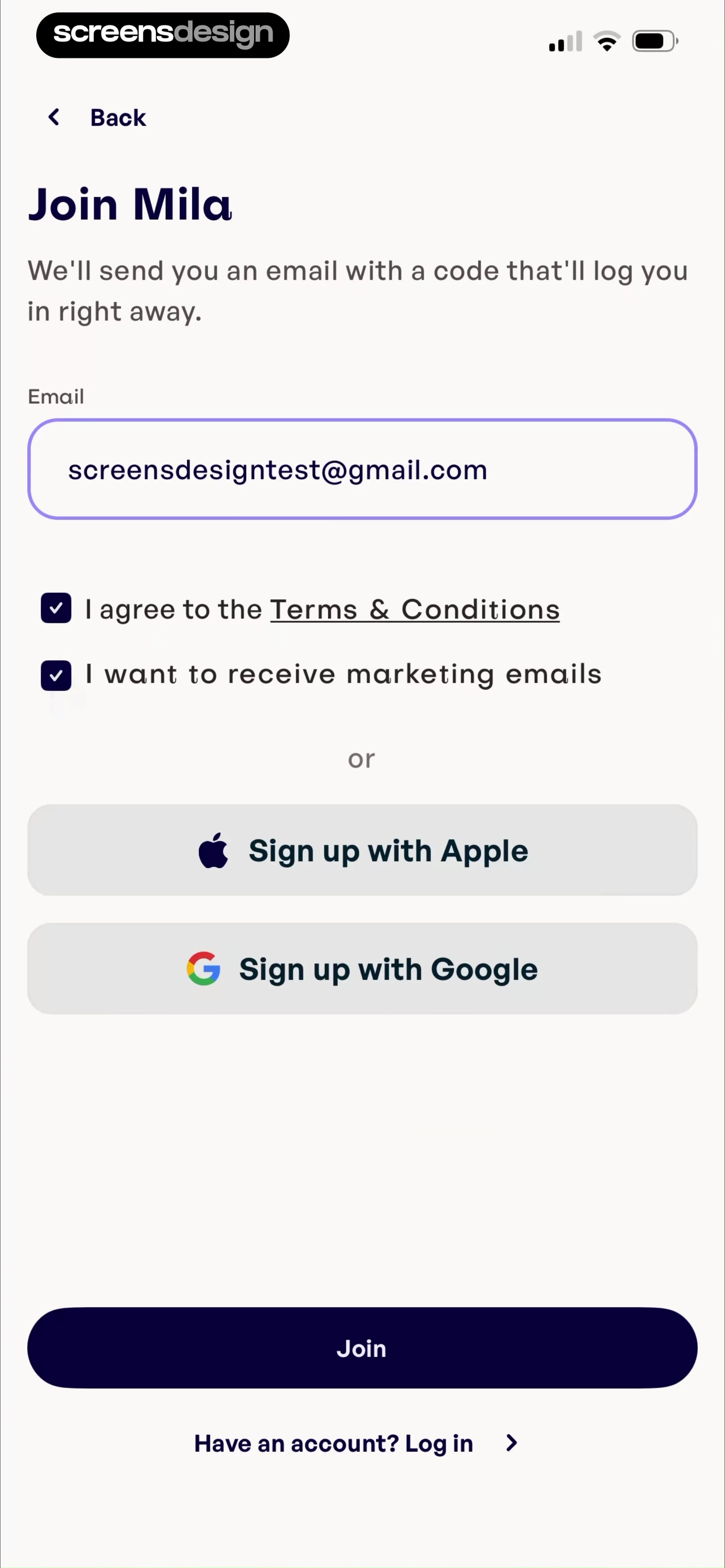
Mila frames email entry as Join Mila and explains that a code will be sent to log the user in. This passwordless route reduces credential creation, but it introduces delivery and cross-app handoff states. The user needs to know which address received the code, how long it remains valid, how to resend it, and how to return from Mail without losing position.
Delay registration only when the temporary state is safe. A health plan, uploaded file, or long assessment may require an earlier durable identity. A short preference can remain local until value is shown. State what will be saved, avoid claiming that an account is required when it is merely convenient, and keep a sign-in route for people who recognize that they already have one.

02. Fields and requirements
Show requirements where the user makes the decision.
People should understand what the form needs before submission, not discover one rule per failed attempt.
Filterly uses a compact create-account screen with an email field, agreement checkbox, Create account, and Apple and Google alternatives. The agreement text puts Terms and Conditions and Privacy Policy beside the action. The checkbox should represent a required agreement only when checking it is genuinely required, and optional marketing consent needs its own unbundled choice.
Carbon displays email and password fields under Create your account. A password flow should expose its real requirements before the person submits, work with password managers, allow paste, and avoid arbitrary composition rules that encourage predictable patterns. When the service supports passwordless or provider signup, explain how those paths differ rather than presenting them as interchangeable decoration.
Keep labels visible after typing, use the appropriate keyboard and content type, and make the submit label name the account action. Validate email formatting locally, then handle duplicate accounts and provider conflicts without revealing unnecessary identity information. If a name or demographic field is for personalization rather than identity, collect it later where its effect can be shown.


03. Provider choice
Let provider buttons reduce work without creating account ambiguity.
Apple and Google signup can be fast, but the system still needs predictable linking, cancellation, and recovery behavior.
eMeals leads with Continue with Apple and Continue with Google, then separates email entry with Or. This hierarchy makes provider signup a primary route. If a user cancels the provider sheet, return to the same screen with no error accusation. If the provider returns an email already attached to another method, explain the safe sign-in or linking route.
Learna titles its route Sign up with e-mail and keeps another Create Account action alongside the form. Precise verbs matter when login and signup share visual patterns. A user who chooses a provider must be told whether that action creates a new account, signs into an existing account, or resolves either state automatically.
Store a pending signup identifier so returning from a provider or email client restores the same flow. Never link identities only because unverified email strings match. Require appropriate proof from both identities for a merge, and keep account-switch and support paths available when the person chooses the wrong provider.


04. Continuity
Preserve onboarding work while the account is being created.
Signup often appears late in a personalized journey, so its failure should not erase the value already assembled.
90 Day Challenge asks for account creation after a long recorded setup and includes a Terms of Service agreement. This timing makes persistence critical. The selected goals and measurements should be stored in a recoverable draft before network submission, then attached to exactly one new account after success.
Campus Coach places Already have an account? Sign in above a create-account form. The existing-account route needs to carry the same pending onboarding context. Otherwise a returning user who recognizes their account may authenticate successfully but lose the plan or preferences that prompted the signup screen.
Use a stable anonymous journey identifier and an idempotent claim operation. If account creation succeeds but the response is lost, a retry should recover that account rather than create another. If the email already exists, offer sign-in or secure recovery while keeping the pending work. Set clear expiration rules for sensitive temporary data and explain when unsaved work cannot be retained.


05. Completion and verification
Make the account state clear before sending the user onward.
Create account, verify contact, authenticate session, and finish profile are different states even when the interface moves through them quickly.
YayTalk follows email entry with six code fields, names the destination address, and keeps Continue as the primary action. Its timed Resend code control explains why another message cannot be requested yet. The surrounding account-creation flow then moves into product onboarding, providing exact evidence that verification is a bridge rather than a substitute for the first useful session.
Epsy asks for the one-time code it sent by email and provides both Paste and Resend controls. Paste reduces transcription effort on a device where the message may already be in the clipboard, while Resend provides recovery without forcing the person back through registration. The recorded flow continues to goal selection, so the verified identity and the remaining setup stay part of one journey.
Define completion server-side. The UI should render states such as draft, submitting, provider handoff, verification sent, verified, profile incomplete, active, duplicate identity, blocked, and failed. Do not use animation time as proof that account creation finished. On relaunch, resume the correct state from durable account truth.


Implementation
Model signup as an identity state machine.
A reliable flow coordinates temporary work, account records, contact verification, providers, sessions, and the destination after success.
Define the entry context, pending work identifier, selected method, field values, validation state, consent records, request state, verification state, account state, and destination. Submit through an idempotency key. Prevent duplicate taps, but keep the form readable during the request and surface whether the user can safely leave.
For email signup, normalize only according to the identity system's documented rules. Store passwords with modern server-side hashing and support password managers and paste. For magic links or codes, bind the challenge to a destination, expire it, limit attempts and resends, and make returning from another app restore the pending flow.
For providers, validate tokens server-side and use stable provider identifiers rather than display email as identity. Handle cancellation as a neutral return. Link an existing account only after the required proof. Record required terms separately from optional marketing consent, with version and timestamp where needed.
After success, create the authenticated session, claim pending work once, verify entitlements, and open the intended next state. If any step fails after the account exists, recover the same account. Accessibility testing should cover field labels, error summaries, focus after provider return, larger text, localization, keyboard navigation, screen readers, and the complete verification handoff.
Preserve the reason
Carry the plan, result, draft, or protected feature that made signup useful.
Create once
Use idempotent account creation and deliberate provider-linking rules.
Verify clearly
Represent sent, expired, resent, verified, and failed contact challenges.
Return to value
Attach pending work and land in the first useful authenticated state.
Measurement
Measure the path from account intent to first authenticated value.
Form completion is only an intermediate state if verification, session creation, or continuity fails.
Track entry context, method selection, locally valid submission, account creation, challenge delivery, verification, session creation, pending-work claim, and first useful authenticated action. Separate provider cancellation, duplicate identity, invalid fields, agreement requirements, network failure, rate limit, expired challenge, and return-link failure.
Review the time and abandonment between contact submission and verification, as well as the share of existing users who mistakenly enter signup. Guardrails include duplicate accounts, support contacts, unclaimed drafts, consent mismatch, accessibility completion, and unnecessary personal-data collection. Do not record passwords, tokens, full provider payloads, or sensitive answer values in analytics.
Review checklist
Test account creation before, during, and after the handoff.
A complete review includes the anonymous state, identity challenge, successful session, and interrupted recovery.
Run the flow with an unused email, an existing email, every provider, a canceled provider sheet, slow and offline networks, expired codes, duplicate taps, app termination, and a returning deep link.
- The signup request explains what the account saves or unlocks.
- Existing users can reach sign-in without losing pending onboarding work.
- Every collected field has a current product or identity purpose.
- Required terms and optional marketing consent are separate and accurately recorded.
- Password requirements are visible before submission and work with password managers.
- Provider cancellation, identity conflicts, and deliberate account linking have safe states.
- Verification identifies the masked destination and supports resend, edit, expiry, and retry.
- Idempotent submission cannot create duplicate accounts or claim pending work twice.
- Success establishes the session and returns to the promised plan, result, or task.
- Analytics excludes passwords, codes, tokens, and unnecessary personal information.
Questions and answers
Mobile app signup flow questions
When should a mobile app ask users to sign up?
Ask when an account is needed to preserve a result, sync work, protect sensitive data, enable collaboration, or continue across devices. Delay it when a short local experience can demonstrate value safely without identity.
What fields should a signup form include?
Collect only what the identity system and immediate product state require. Email or phone, an authentication method, and required agreements may be enough. Move profile and personalization questions to the point where their effect is clear.
Should terms use a checkbox?
Use an explicit unchecked control when affirmative agreement is required and record the relevant version. Keep optional marketing permission separate. Do not use one bundled checkbox for unrelated purposes.
How should social signup handle an existing email?
Use the provider's stable verified identifier and a deliberate linking process. Do not merge accounts solely because display email strings match, and do not silently create a duplicate when the user intended to sign in.
How should email verification work?
Show the masked destination, delivery state, expiry, resend timer, edit-address route, and support fallback. Returning from Mail should restore the pending signup and consume the challenge only once.
What should happen after signup?
Establish the session, attach pending work exactly once, verify access, and return to the result or task that justified registration. Make any remaining verification or profile requirement explicit.
Apps referenced in this page
Open the products behind the examples.
 Joon: Kids ADHD Chore TrackerFamily Chores Organizer Chart
 Mila: Home Workout & FitnessBeginner, Yoga & Prenatal App
 Filterly - AI Photo EnhancerUnveil Your Best Self!
 Carbon - Macro Coach & TrackerCalories, Nutrition, & Diet
 eMeals - Healthy Meal PlansMeal Planner & Grocery List
 Speak & Learn English: LearnaAI Tutor for Language Learning
 90 Day ChallengeView recorded app flows
 Campus Coach-Running & TrailPace, Trail, and Road Plans
 YayTalk: Learn & Speak EnglishAI Language Learning Lessons
 Epsy: Seizure Log for EpilepsySeizure, Epilepsy, Medications
2,805 apps in the top charts.Ask them anything.
Compare recorded signup screens and complete account flows to see how mobile apps handle timing, providers, passwords, consent, verification, and the return to value.