Introductory offers
10 Introductory Offer Paywall Examples
The screen must make the opening period and the price that follows understandable as one commercial decision.
An introductory offer gives an eligible customer a temporary price or free period before standard billing begins. The interface has two obligations at once: explain what access starts now and make the later commitment as legible as the discount. A large opening price with an obscure renewal amount creates surprise even when the legal text is technically present.
These ten recorded screens show discounted months, reduced first years, free periods, annual commitments, tier-specific access, and subscriber sign-in. They also expose the design tension between a compelling offer and a stable source of truth. The displayed promotion must reflect current storefront eligibility, region, product, and account history.
Design the offer as a timeline with four facts: who is eligible, how long the opening term lasts, what is charged during it, and the exact amount and cadence afterward. Then explain what content or capability the selected product includes. Keep restoration and existing-subscriber sign-in separate from new-customer purchase.
For trials that begin at zero cost, review free-trial onboarding best practices.
01. Step-up price
Put the standard price beside the introductory price.
Customers should not have to calculate the commercial future from fragments.
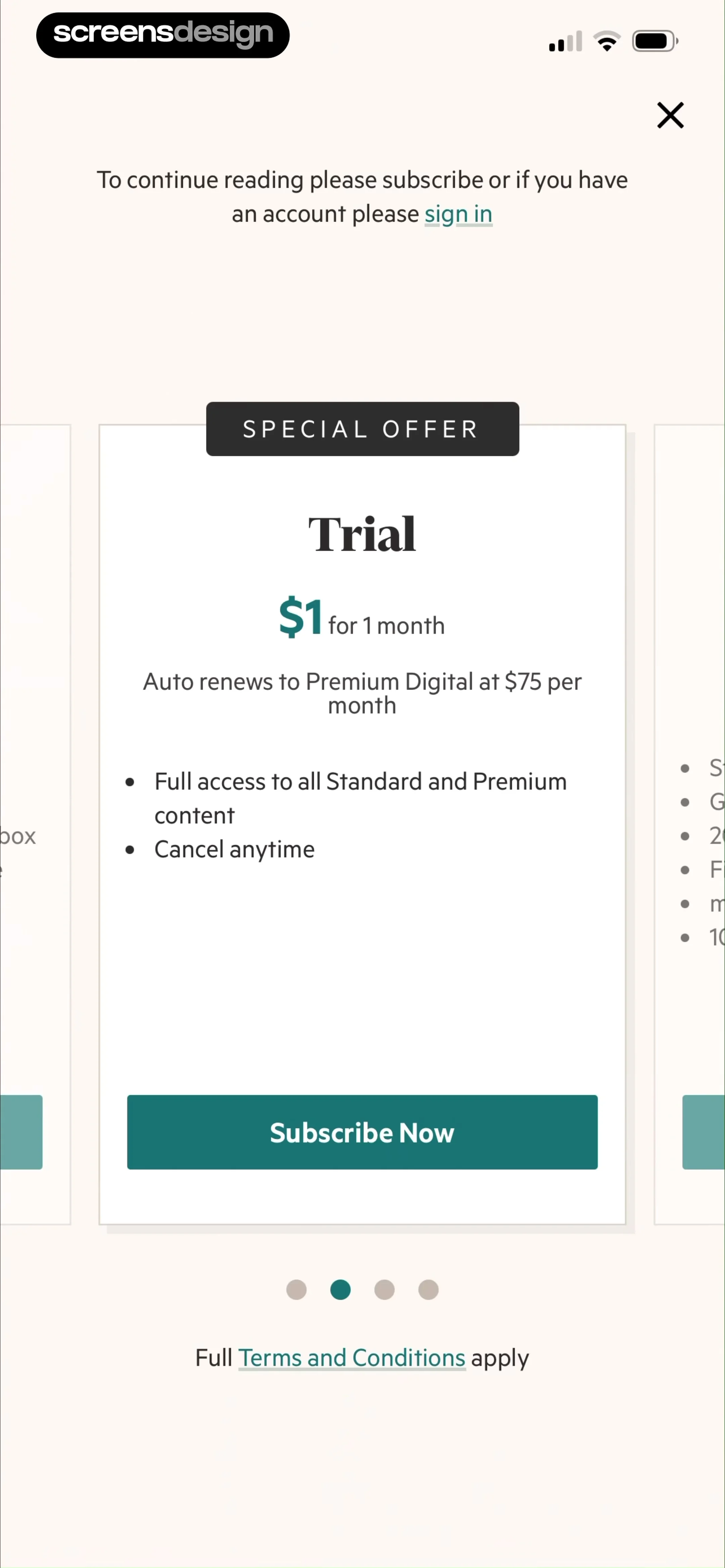
The Globe and Mail labels its introductory offer, shows a discounted monthly amount for the first six months, then names the standard monthly price. Financial Times presents a one-dollar first month and states the seventy-five-dollar monthly auto-renewal that follows. Both make the step-up visible on the decision screen.
Use a complete sentence: pay this amount for this period, then this amount every period until cancelled. Avoid slash notation when it could confuse the billed total. If the discount applies to an annual product, say whether the first charge covers the year and show the next annual renewal rather than only an equivalent monthly figure.
The product identifier, currency, tax treatment, discounted phase, and renewal phase should come from billing configuration. Do not assemble the standard price from a stale content string. If the storefront cannot confirm the later price, withhold the purchase action and present a retryable state.

02. Discount duration
State how long the saving lasts and what it is measured against.
A percentage has little meaning without its period and reference product.
BookCast marks its promotion for new users, displays fifty percent off, and says the reduced amount applies to the first year. USA Today leads with five dollars for one year and includes monthly and annual product information farther down the screen. These are substantial introductory periods, so the next renewal deserves equal prominence.
Name the standard plan used as the comparison, the normal price at the time of the decision, and the duration covered by the reduction. Avoid combining a monthly product with an annual reference merely to increase the displayed saving. A countdown should reflect a real, account-specific expiry rather than restart whenever the screen opens.
If an offer is limited to new users, define new in billing terms. Prior subscribers, family members, restored purchases, refunded purchases, and people moving between storefronts may have different eligibility. The interface should use the billing result, not guess from a locally stored first-launch flag.


03. Product scope
Explain which product receives the discount.
A cheaper opening price is not useful if the customer cannot tell what access it buys.
The Straits Times pairs its introductory-offer selector with app, website, e-paper, archive, analysis, and multimedia access. The Sydney Morning Herald separates Starter and Premium before presenting a reduced first three months. Both show why product tier and promotional phase must remain distinct dimensions.
List the few capabilities that change the decision: publications included, archive depth, audio, games, cross-device access, household use, or advertising. Do not use an introductory discount to distract from a narrower tier. If the standard renewal changes the tier as well as the price, say so explicitly.
Generate benefit copy from the entitlement catalog wherever possible. At minimum, test that the selected offer grants every named capability. A customer who upgrades from an existing plan needs a comparison of what changes, the effective date, credits, proration, and whether the promotional phase is available.


04. Free opening periods
Treat free as a zero-price introductory phase, not the whole offer.
The screen still needs the product, term, first charge, and cancellation route.
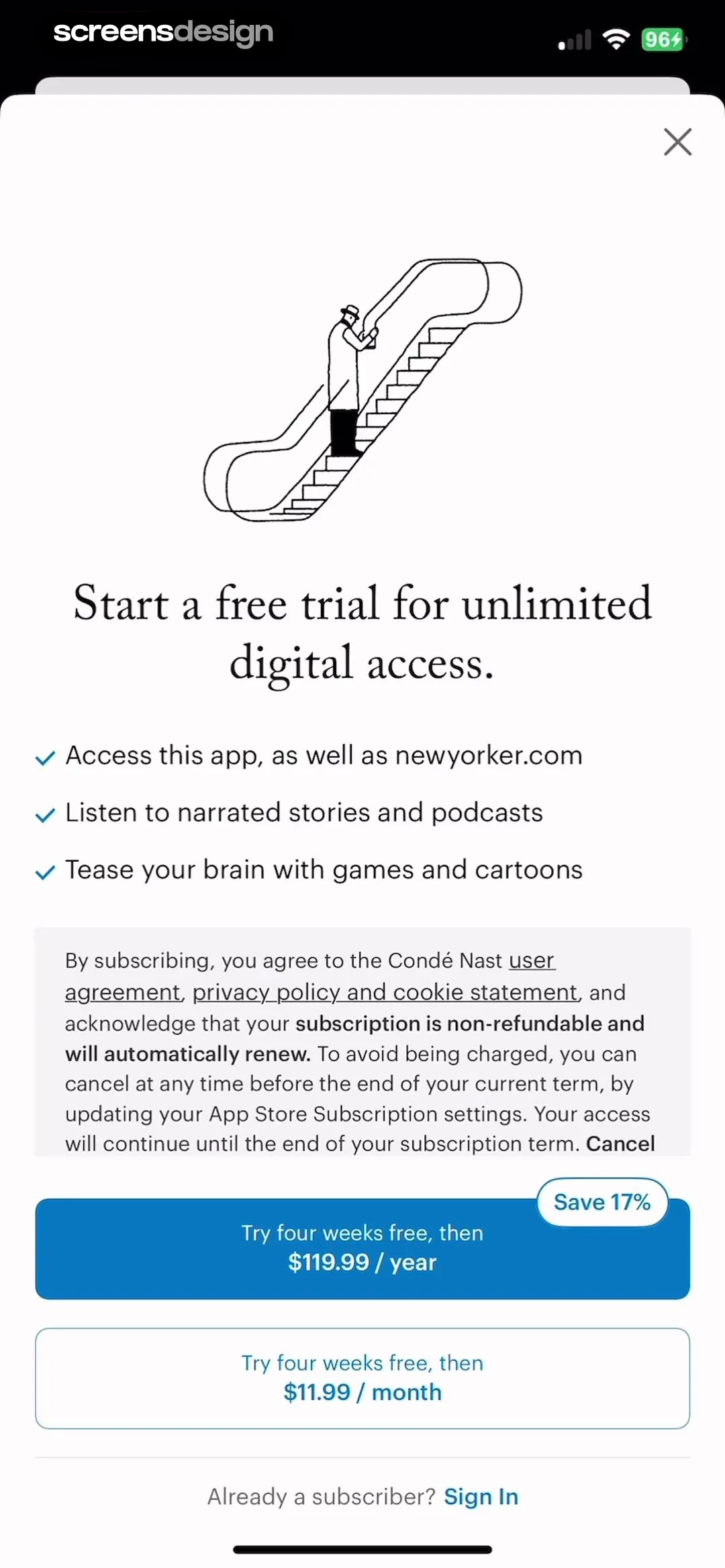
The New Yorker offers four weeks free with annual and monthly destinations, while Daily Mail states one free month followed by a monthly subscription and exposes sign-in and restoration for current subscribers. These examples make the free phase part of a continuing product rather than a detached button.
A free period should show what is unlocked immediately, the date or condition that ends it, the first paid amount, renewal cadence, and how to cancel. If a reminder is promised, make it a functioning preference. Keep eligibility accurate when a person has previously used a trial or already subscribes through another channel.
Free and discounted introductory offers can share an implementation model, but do not combine their analytics blindly. A zero-price start and a paid opening month create different consent, payment, and activation behavior. Observe both without claiming that one visible pattern caused a conversion result.

05. Entry context
Keep the interrupted content visible in the offer logic.
The customer should understand what becomes available and where they will return.
New York Daily News presents unlimited digital access with monthly and yearly routes after a content encounter. Bloomberg explicitly says the offer unlocks the article and connects the plan to newsletters, podcasts, radio, narrated articles, and television. The paywall answers why now as well as what the subscription contains.
Preserve the article, saved item, search, or other object that triggered the offer. After verified purchase, return to that object at the same position. If the person signs in or restores, do the same. If they decline a soft paywall, respect the product's free-access rule without looping immediately back to the offer.
ScreensDesign Pro can help teams inspect the recorded route before and after the pricing screen. That sequence often reveals whether the offer keeps its promise more clearly than another round of headline changes.


Implementation
Model eligibility and price phases as billing data.
Promotion copy should describe the offer returned for this account and storefront.
Use an offer record with product identifier, tier, opening price, opening duration, standard price, standard cadence, eligibility source, storefront, tax treatment, start and expiry, and the entitlements granted. The interface should format this record, not recreate it from campaign copy. Keep account and receipt state available before opening the native purchase sheet.
Define eligible, ineligible, offer expired, product unavailable, price refreshed, active subscriber, subscriber through another channel, purchase pending, purchase cancelled, purchase verified, delayed verification, restored, and refunded states. If eligibility changes between display and confirmation, return to an updated choice and explain the change.
Test time zones, app relaunch, family sharing, an offer opened from a deep link, repeated campaign exposure, multiple devices, and a customer changing tiers. Accessibility review should cover the spoken order of both prices, dynamic type, non-color selection, localized currency, long product names, and an explicit close or back route.
- Opening and standard prices appear together.
- The duration and eligibility rule are explicit.
- The discount compares the same product and billing basis.
- The selected offer grants the benefits named on screen.
- Sign-in and restore are separate from new purchase.
- The interrupted content resumes after verified access.
Measurement
Measure the transition after the promotional phase.
Offer starts alone cannot show whether customers understood the later price.
Track offer viewed, eligibility, entry context, product and both prices displayed, term selected, purchase sheet outcome, receipt verification, entitlement activation, content resumed, opening-period use, standard renewal, cancellation, refund, and support contact. Record the price-phase identifiers without sending private reading or account content.
Segment by offer, storefront, entry point, new or returning state, existing entitlement, and product tier. Compare activation during the opening period with behavior at the standard-price transition. Guardrails include early cancellation, refund, billing questions, repeated restore attempts, price mismatch, and customers unable to reach the content they expected.
An introductory screen can coexist with strong or weak commercial outcomes. Treat each layout as observed evidence, not proof of conversion. Use experiments to test one clear hypothesis at a time and keep access, price disclosure, and eligibility invariant unless those are the explicit subjects of the test.
Review checklist
Read the offer from today through standard renewal.
Create eligible, ineligible, active, lapsed, restored, expired-offer, and unsupported-storefront accounts. Verify the exact price sequence, entitlement, action, confirmation, and return destination for each.
Repeat with large text, a screen reader, long localized currency, slow product loading, cancelled purchase, delayed verification, and another device. No state should silently substitute a different product or price.
- The opening phase and standard phase form one readable sentence.
- The full charged amount remains visible beside equivalents.
- Eligibility comes from billing truth.
- Countdowns do not restart artificially.
- The renewal transition is measured with trust guardrails.
- The customer can sign in, restore, cancel, or leave.
Questions and answers
Introductory offer questions
What is an introductory subscription offer?
It is a temporary opening price or free period for eligible customers before the subscription moves to its standard price and cadence.
What should the paywall show?
Show eligibility, opening amount, duration, standard amount, renewal cadence, included access, cancellation, sign-in, and restoration.
How should an annual discount be displayed?
Keep the full annual charge and next annual renewal visible. A monthly equivalent can support comparison but should not replace the billed total.
Should a countdown be used?
Only when the offer has a real account-specific expiry. The timer must persist and must not restart when the screen reopens.
How should introductory offers be measured?
Follow verified access, product use, the standard-price transition, renewal, cancellation, refund, support, and content continuity, not only purchase taps.
Apps referenced in this page
Open the products behind the examples.
 The Globe and MailNews from Canada and the World
 Financial Times: Business NewsFinance, Politics & World News
 BookCast: 15-Minute InsightsCast Big Ideas in 15 Minutes
 USA TODAY: US & Breaking NewsBreaking News + eNewspaper
 The Straits TimesView recorded app flows
 The Sydney Morning HeraldView recorded app flows
 The New YorkerNews, Culture, Audio, Humor
 Daily Mail Newspaperand The Mail on Sunday
 New York Daily NewsView recorded app flows
 Bloomberg: Business News DailyStock Market & World Finance
2,805 apps in the top charts.Ask them anything.
Compare recorded introductory offer paywalls, inspect the complete purchase path, and study how apps present discounts, eligibility, standard pricing, and renewal.