

 See the flow
  SubPilot: Cancel Subscriptions
This screen displays the details of a specific subscription, Netflix, within a personal finance management app.
 See the flow
  EveryDollar: Budget Management
The first card contains list items for 'Manage Account' and 'Manage Subscription', both with chevron icons.
 See the flow
  Good Food: Recipe Finder
The options include 'Manage subscription', 'Link subscription', 'Update email', 'Update password', and a final 'Delete account' option in a distinct green color.
 See the flow
  The Wall Street Journal. News
The screen features a clean, minimalist list-based layout with three primary options: 'Unsubscribe: Email Alerts And Newsletters', 'Manage Apple Subscription Settings', and 'Delete My Account'.
 See the flow
  Fishbrain - Fishing App
The main body of the screen displays a list of frequently asked questions, each with a title and a category label underneath (e.g., 'Map & fishing waters', 'Pro Membership subscription & billing').
 See the flow
  v0
v0The screen is organized into four distinct sections: 'Account', 'Usage', 'Billing', and 'Notification Settings'.
 See the flow
  SunSafe: UV Index & Tanning
The screen is organized into three main sections: 'PLAN', 'APP SETTINGS', and 'HELP & SUPPORT'.
 See the flow
  Gaia GPS: Mobile Trail Maps
The content is organized into four sections: 'SYNC SETTINGS', 'PUSH NOTIFICATIONS', 'SUBSCRIPTION', and 'ACCOUNT'.
 See the flow
  Scroll The Bible
The top section, titled 'What can we help you with?', features a list of actionable items related to subscription management, billing, and account access, each represented by an icon and a chevron.
 See the flow
  Voice Recorder-Audio Memos Арр
The 'ABOUT US' section provides links for 'Contact us', 'Share App', 'Rate Us', 'Privacy Policy', 'Terms of Use', and 'Manage Subscription'.
 See the flow
  Windy.app — Wind, Tides, Radar
This screen is a modal overlay confirming a successful purchase within the Windy.app subscription flow.
 See the flow
  Precious - Baby Photo Art
Below this, a 'MORE' header introduces a second group containing 'Photo Scanner Settings', 'Rate Precious 5 Stars', 'Billing Information', and 'Other'.
 See the flow
  Map My Run GPS Running Tracker
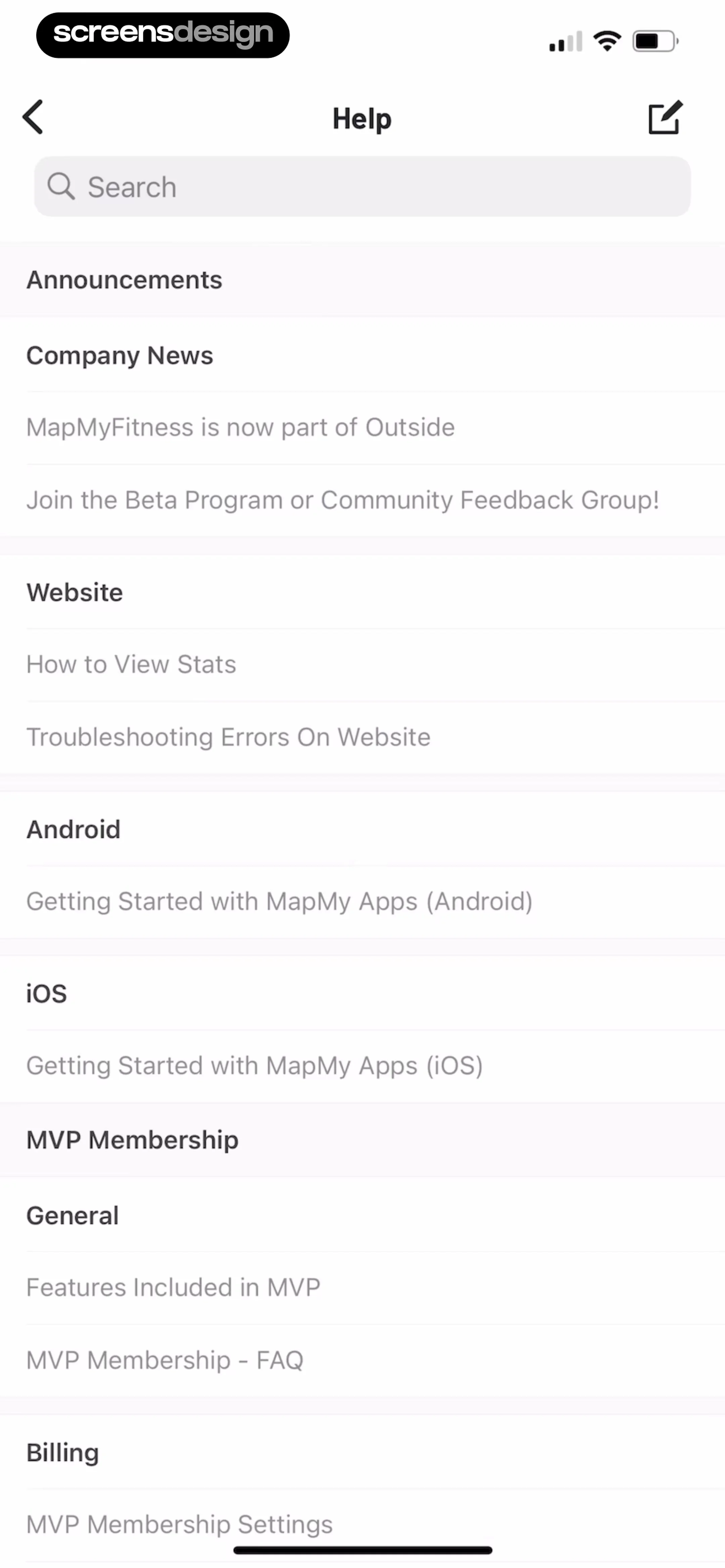
The content is structured into sections with bold headers including 'Announcements', 'Website', 'Android', 'iOS', 'MVP Membership', 'General', and 'Billing'.
 See the flow
  Tuner Pro: Guitar Tuner & Tab
The options include a 'Left-hand mode' toggle, followed by navigation links for 'App Bundle Offer', 'Access microphone', 'Manage subscription', and 'CGU'.
 See the flow
  Ascend: Bible Game
At the top of the modal is a prominent blue gradient card labeled 'Manage Subscription' with a subtext 'Cancel or manage your subscription' and a chevron icon.
 See the flow
  Wikiloc - Trails of the World
This screen displays the user's active premium subscription details within the Wikiloc app.
 See the flow
  CraftBook: Crochet Made Easy
The Account section provides options to 'Manage Subscription' and 'Logout'.
 See the flow
  Tiny Scanner - PDF Scanner App
The main body contains a list of settings options including 'Cloud Sync', 'Account' status (Premium), 'Current Subscriptions', 'Restore Purchased', 'Mail Me Address', and 'Sort By'.
 See the flow
  Zumba - Dance Fitness Workout
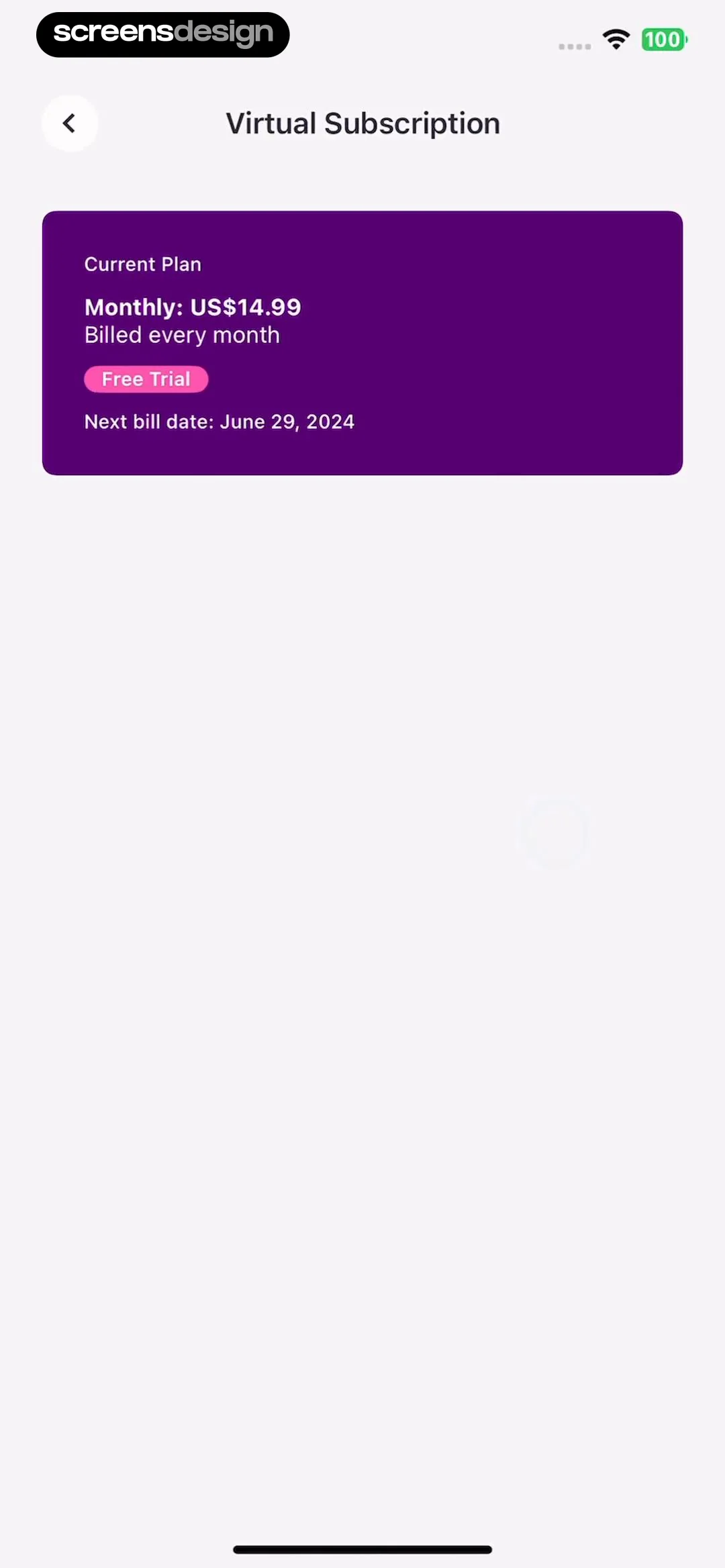
This screen displays the user's current virtual subscription status within the Zumba app.
 See the flow
  Eppika: Read & Learn Languages
Below this, a 'Manage Subscription' section displays the user's email, a 'Premium' badge with a crown icon, and a 'Premium Trial — 7 days remaining' status.


