Recipe app design examples
10 Recipe App Design Examples and UX Patterns
The design should reduce uncertainty from discovery through ingredients, active cooking, timing, substitution, and saving the result.
A recipe app helps people discover, evaluate, prepare, and repeat meals. Its primary interface may be a searchable library, personal recipe keeper, meal planner, pantry assistant, guided cooking product, or a combination.
Recipe decisions depend on time, servings, diet, ingredients, equipment, skill, and occasion. Cards should expose enough of that context for selection, while the detail page needs a dependable structure for ingredients and method.
The kitchen changes usability requirements. Hands may be wet, attention divided, timers running, and the device viewed from a distance. Cooking mode, large text, wake behavior, voice or hands-free controls, and clear step boundaries can matter more than decorative photography.
The recorded examples below span recipe keepers, meal planners, cooking publications, video recipes, pantry tools, and nutrition products. They show different parts of the cooking journey.
01. Recipe discovery
Show the constraints that decide whether a meal is practical.
A beautiful photo does not answer time, ingredients, diet, or difficulty.
Yoomla・Recipe Keeper & Planner presents “Instructions” with “Start Cooking” visible in the same state. ReciMe: Recipes & Meal Planner frames the related decision through “Edit” and “INGREDIENTS”. The pair makes how recipe lists balance appetite appeal with useful decision metadata. concrete in recorded products, but it does not establish which treatment performs better.
Prioritize title, image, time, meal type, diet, rating source, and saved state according to the product. Let filters reflect real constraints and keep active filters visible. Avoid overloading cards with the entire recipe.
Index structured ingredients, cuisine, diet, time, technique, and equipment. Treat editorial tags and user-generated metadata differently, and distinguish no matches from a failed search.


02. Recipe detail
Create a stable overview before the first cooking step.
Users need servings, time, ingredients, equipment, and method to judge readiness.
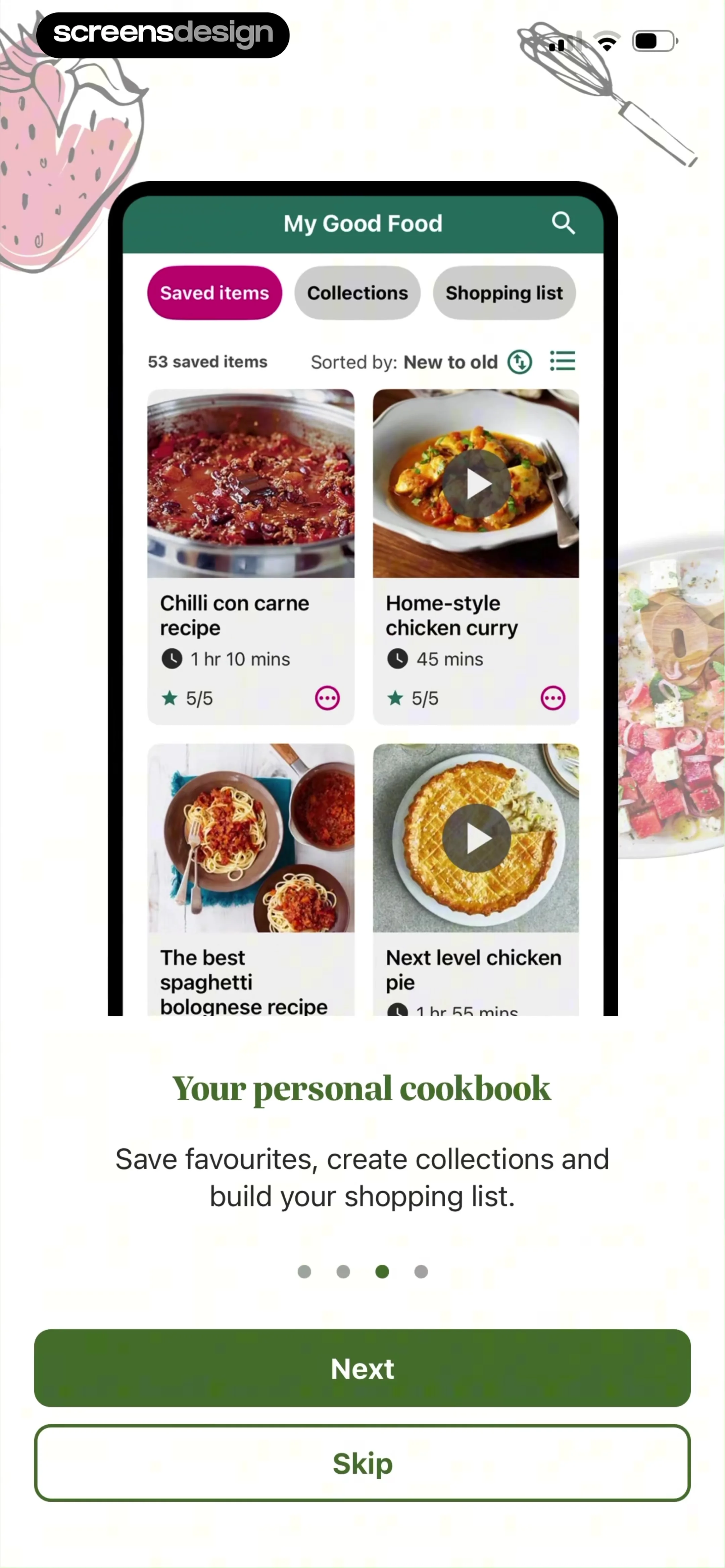
Mob: Meal Planner and Recipes presents “Search Ben's recipes” with “Add Ingredients” visible in the same state. Good Food: Recipe Finder frames the related decision through “My Good Food” and “Saved items”. The pair makes how recipe pages can organize summary, ingredients, instructions, nutrition, and source without losing hierarchy. concrete in recorded products, but it does not establish which treatment performs better.
Keep ingredients and method easy to reach, preserve source attribution, and show serving scale near quantities. Separate preparation time, cooking time, and total time when meaningful. Warn about marinating, chilling, preheating, or other hidden lead time.
Store quantities as structured values with original text, units, ingredient references, and optional groups. Scaling must preserve fractions, ranges, and non-linear items such as pan size or seasoning to taste.

03. Cooking mode
Design for divided attention and messy hands.
The active step should be readable at distance with reliable movement forward and back.
SideСhef: Easy Cooking Recipes presents “1hr” with “10min” visible in the same state. Tasty: Recipes, Cooking Videos frames the related decision through “Shrimp Pad Thai” and “Tips (1)”. The pair makes how guided states can focus on one instruction while retaining ingredient and timer context. concrete in recorded products, but it does not establish which treatment performs better.
Use large type, one clear step, visible progress, and previous or next controls. Keep quantities in the instruction or one tap away. Support multiple timers with labels. Prevent the device from sleeping only with clear user benefit and battery awareness.
Persist step and timer state locally, reconcile after backgrounding, and handle clock changes. Voice actions need confirmation for destructive timer or step changes and a touch fallback.


04. Saving and importing
Make personal recipes durable, attributable, and editable.
Users may save a library recipe, import a URL, scan text, or author their own version.
eMeals - Healthy Meal Plans presents “Saved Meals” with “Search Saved Recipes” visible in the same state. Cooklist: Pantry Meals Recipes frames the related decision through “BACK” and “Search my recipes”. The pair makes how recipe keepers turn external or discovered content into a personal collection. concrete in recorded products, but it does not establish which treatment performs better.
Explain what is copied, linked, or synchronized. Preserve source and author. Let users correct parsing errors and add notes without overwriting the original. Duplicate detection should offer merge or keep both rather than silently discarding a version.
Version imported content, store provenance, respect copyright and permissions, sanitize external HTML, and make background parsing recoverable. Sync personal edits across devices with conflict handling.


05. Meal planning and groceries
Carry the recipe into a date, serving count, and ingredient action.
The product creates more value when selection becomes an executable plan.
Osta: Save & Share Recipes presents “5.00” with “simplyrecipes” visible in the same state. Recipe Keeper frames the related decision through “Ingredients” and “Method”. The pair makes how recipe screens can connect saved meals to planning, pantry, and shopping tasks. concrete in recorded products, but it does not establish which treatment performs better.
Let users add a recipe to a date and meal, adjust servings, combine ingredients, mark pantry items, and review quantities before a grocery handoff. Keep substitutions and optional ingredients understandable. Avoid adding duplicates when the same ingredient appears in several recipes.
Normalize ingredients cautiously, preserve recipe-level quantities, and generate a reversible shopping-list projection. A calendar change should update the plan without destroying completed or manually edited grocery items.
![Osta: Save & Share Recipes mobile screen showing 5.00, simplyrecipes, [Budget] Pasta Carbonara Recipe, Prep: 10 mins, Cook: 20 mins](https://media.screensdesign.com/avs-pp/102bc01200ac401db9950b22cb4d860b.webp)

Implementation
Build recipes as structured content with durable cooking state.
A dependable recipe-app screen needs a shared contract across the interface, backend, analytics, accessibility, and support.
Define recipe identity, source, attribution, media, servings, times, ingredient groups, quantities, units, instructions, timers, diet tags, saved state, personal notes, meal-plan entries, pantry matches, and grocery projections. Preserve original text alongside normalized data.
Design discovering, searching, filtered, saved, imported, scaled, cooking, timed, completed, missing-ingredient, offline, empty, and failed states before polishing the default path. Preserve valid work and navigation context, make repeatable mutations idempotent, and return typed outcomes that map to reviewed product language rather than raw technical messages.
Test Dynamic Type, VoiceOver, keyboard focus, switch control, reduced motion, contrast, touch targets, localization, right-to-left layout, and long content. Dense data and visual hierarchy must remain understandable without color, gesture memory, or animation.
Review privacy, security, and entitlement at the data layer. Minimize sensitive fields, enforce audience and access on the server, avoid private payloads in analytics, and explain externally visible or irreversible consequences before confirmation.
Name the user’s job
Explain why this recipe-app screen appears and what object, plan, or decision it controls.
Represent reality
Distinguish discovery, selected, scaled, cooking, saved, completed, and failed states so the interface never invents a false success.
Clarify the result
Make one primary action dominant, accurately labeled, and safe from accidental repetition.
Preserve the journey
After success, cancellation, or repair, restore the exact task and context that led here.
Measurement
Measure completed cooking and useful return.
Measure the real user outcome and its quality, not only a tap or screen view.
Track discovery entry, search, filters, recipe open, ingredient view, serving change, save, import, correction, cooking start, step progress, timer use, completion, meal-plan add, grocery handoff, return, and error. Use stable state names and safe identifiers, never raw health, location, payment, recipient, or private content.
Review search-to-cook completion, time from detail to cooking, step exits, scaling corrections, timer recovery, import parsing edits, saved-recipe return, meal-plan execution, and grocery-list overrides. Treat nutrition or health claims separately and validate them with appropriate expertise.
Combine quantitative events with moderated research, support cases, accessibility testing, and replayed failures. Define guardrails before launch so a faster or higher-converting path does not conceal more mistakes, weak downstream engagement, privacy concerns, refunds, or abandonment.
Review checklist
Review the experience with an actual recipe in an actual kitchen.
Review the complete experience with realistic data and interruptions.
Test long ingredient lists, grouped steps, fractions, scaling, multiple timers, offline cooking, background return, import errors, and large text at arm’s length.
- The recipe-app screen explains the current task and object in plain language.
- One primary action dominates and its consequence is accurately labeled.
- Secondary actions remain available without competing with the main decision.
- Initial, loading, partial, success, empty, stale, offline, and error states are deliberate.
- Back and close preserve the context that opened the screen.
- Validation and errors appear beside the relevant control with a recovery action.
- Repeated taps and ambiguous timeouts cannot duplicate consequential work.
- Sensitive data is minimized in the interface, storage, logs, and analytics.
- Large text and assistive technology preserve reading and focus order.
- Localization, units, time zones, and right-to-left layout are tested where relevant.
- The pattern is reviewed inside its full journey, not as an isolated screenshot.
- Recorded examples are adapted to the product’s own audience, data, and constraints.
Questions and answers
Recipe app design questions
What should a recipe card show?
Show the information needed to judge the meal quickly, commonly title, image, time, diet or meal context, source, and saved state. Avoid putting the full recipe on the card.
What belongs on a recipe detail screen?
Include serving count, time, ingredient groups, method, important equipment or lead time, source attribution, saving, and a clear route into cooking mode.
How should serving scaling work?
Scale structured quantities while preserving fractions, ranges, groups, and original wording. Flag ingredients and equipment that do not scale linearly and let users review changes.
What makes a good cooking mode?
Use large readable steps, visible progress, easy previous and next actions, quantities near instructions, labeled timers, persistent state, and touch or voice controls suitable for divided attention.
How should recipe import work?
Show the source, parse in the background, let users correct ingredients and steps, preserve attribution, detect duplicates safely, and recover from unsupported or incomplete pages.
Which recipe app metrics matter?
Measure successful discovery, cooking starts and completion, scaling or parsing corrections, saved-recipe return, meal-plan execution, grocery handoff, and recurring use.
Apps referenced in this page
Open the products behind the examples.
 Yoomla・Recipe Keeper & PlannerPlan Meals & Shopping Lists
 ReciMe: Recipes & Meal PlannerGrocery Lists, Prep & Cookbook
 Mob: Meal Planner and RecipesPrep, Plan & Cook Healthier
 Good Food: Recipe FinderEasy Recipes & Meal Planner
 SideСhef: Easy Cooking RecipesMeal planner. Dinner ideas.
 Tasty: Recipes, Cooking VideosMeal Planner & Cook Book
 eMeals - Healthy Meal PlansMeal Planner & Grocery List
 Cooklist: Pantry Meals RecipesGrocery List & Dinner Planner
 Osta: Save & Share RecipesCooking Organizer & Cook Book
 Recipe KeeperMeal planner & shopping list
2,805 apps in the top charts.Ask them anything.
Compare recorded recipe screens and use ScreensDesign Pro to ask how leading food apps handle the exact discovery, cooking, and planning problem in your product.