Plant care products
10 Plant Care App Onboarding Examples
Plant-care onboarding should help the user identify or add one real plant, then turn that object into a transparent care plan. Camera guidance, diagnosis confidence, reminders, and manual correction are central product states.
This is for teams designing plant identification, garden planning, disease diagnosis, and recurring care products.
Showing a polished care calendar before the app knows the plant, environment, or confidence of the identification creates false precision. A strong plant care app onboarding decision should be reviewable as part of the complete flow: what caused the screen to appear, which state the product already knows, what the user can do next, and what happens when they decline, leave, or return.
The recorded examples below are useful because they show real product states, not isolated concept art. They do not prove that a pattern caused conversion, retention, revenue, or user satisfaction. Use them to inspect hierarchy, language, sequence, and implementation choices, then validate the decision with people using your product.
01. Begin with one real plant
Begin with one real plant.
An object gives onboarding immediate context.
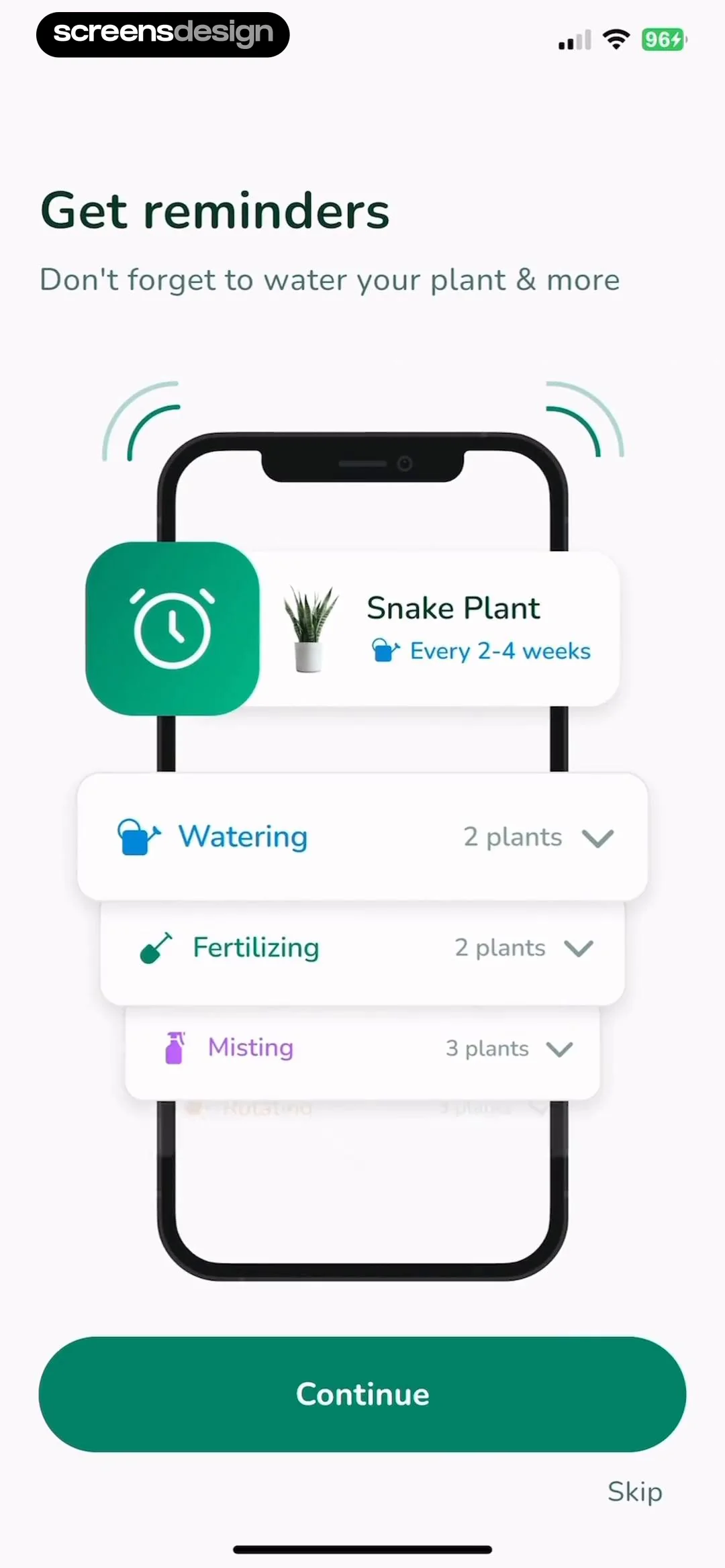
In Plant Identifier, Care: Planty, the recorded screen is an onboarding screen for a plant care app. In Plantify: AI Plant Identifier, the recorded screen is an onboarding screen for the Plantify app, designed to introduce the user to plant care reminder features. Placed side by side, they clarify why an object gives onboarding immediate context. Focus on the entry state, not the visual genre.
Plant Identifier, Care: Planty and Plantify: AI Plant Identifier arrive at this decision from different products, which helps separate the underlying rule from the visual styling. Camera scan, photo import, search, and manual entry are different routes to the same collection state. Now test the same decision with long copy, a small screen, prior state, and missing data.
Let users choose the route and preserve the image through identification. A tour of every feature delays the first useful record. Document the trigger, dismissal, saved state, and return path beside the design.

02. Guide image capture
Guide image capture.
Recognition quality begins in the camera.
In Plant Identifier: Plantiary, the recorded screen is an onboarding screen for the Plantiary app, showcasing the 'Care Reminder' feature. In PlantDaily: AI Plant Care, the recorded screen is an onboarding or feature-highlight screen for the PlantDaily app, showcasing its plant disease diagnosis capabilities. The useful difference is behavioral: recognition quality begins in the camera. Compare what the interface reveals before and after the action.
These Plant Identifier: Plantiary and PlantDaily: AI Plant Care screens show how much the surrounding task changes the right interface treatment. Framing, lighting, distance, plant part, blur, and multiple-species warnings can improve the input. Check the pattern again for a returning user, a failed request, and a device using larger text.
Provide live guidance and a review screen before upload. A silent failed scan makes the model look arbitrary. Connect the surface to source-of-truth state before polishing it.


03. Expose identification confidence
Expose identification confidence.
A suggestion is not always a fact.
In Plant Identifier, Care: Planty, the recorded screen is an onboarding screen for a plant care application. In Plant Identifier: LeafSnap, the recorded screen is an onboarding screen for a plant care app, featuring a light green gradient background and a central illustration of a potted plant. Both examples turn one principle into a concrete choice: a suggestion is not always a fact. The transferable detail is the relationship between message, control, and next state.
The contrast between Plant Identifier, Care: Planty and Plant Identifier: LeafSnap is useful because the same design principle appears in two different product contexts. Candidate species, distinguishing features, and correction controls help users evaluate the result. Review the boundary cases next: partial progress, stale data, interruption, and re-entry.
Store confidence and user confirmation separately. Presenting one label without uncertainty can lead to poor care decisions. Treat loading, failure, cancellation, and recovery as part of the same design review.


04. Build a plan from conditions
Build a plan from conditions.
Care depends on more than species.
In PlantDaily: AI Plant Care, the recorded screen shows an onboarding or feature-highlighting page for a plant care app, showcasing a calendar-based reminder system. In Plant Care Guide: PlantScope, the recorded screen is an onboarding screen for a plant care app. The pair is useful for one reason: care depends on more than species. Inspect the surrounding replay before borrowing the pattern.
PlantDaily: AI Plant Care and Plant Care Guide: PlantScope arrive at this decision from different products, which helps separate the underlying rule from the visual styling. Location, light, pot, season, climate, and user schedule can change recommendations. The design is ready only when it still reads clearly with realistic content and imperfect state.
Ask only the conditions that materially affect the plan and show the resulting schedule. Generic reminders can be actively unhelpful. Name the event that opens the screen and the state change that proves the action worked.


05. Make reminders recoverable
Make reminders recoverable.
Plant care does not happen exactly on schedule.
In PlantAI: Identifier & Diagnose, the recorded screen is an onboarding or instructional screen for a plant care app, guiding the user on how to capture photos for plant watering analysis. In Plant Care Guide: PlantScope, the recorded screen is an onboarding screen for a plant identification app. What carries across these products is simple: plant care does not happen exactly on schedule. The styling changes; the decision structure does not.
These PlantAI: Identifier & Diagnose and Plant Care Guide: PlantScope screens show how much the surrounding task changes the right interface treatment. Snooze, skip, completed late, weather changes, and vacation require meaningful states. Use the replay to inspect the lead-in and follow-through, then test the same path with accessibility settings enabled.
Record action history and recompute the next recommendation instead of stacking overdue alerts. A red backlog turns care into guilt. Give engineering the entry rule, every outcome, and the expected state after the user returns.


Build the behavior
Implement plant care app onboarding as product state.
Model identification candidates, confidence, user confirmation, plant location, care rules, completed actions, skips, and recalculation triggers.
Start by writing the state table before styling the surface. For each entry route, record what the product knows, what is still uncertain, which action is primary, which alternatives are valid, and where every outcome leads. Include new, returning, offline, loading, denied, failed, completed, and entitlement-changed states where they apply. This makes visual review more honest because the design is attached to executable behavior.
Keep business rules outside decorative components. Labels, eligibility, limits, dates, prices, permissions, and progress should come from the same domain state used by the action itself. When UI copy and backend truth are maintained separately, they eventually disagree. Add analytics identifiers to decisions and outcomes, not every tap, so the event model can explain whether the user completed the task or became stuck.
Accessibility belongs in the component contract. Test large text, screen-reader order, focus restoration, contrast, reduced motion, touch targets, and understandable error announcements. Localize with real strings rather than compressed placeholders. A robust implementation still works when the most important label wraps, an image is unavailable, or the network response arrives after the user has navigated away.
- Define every entry condition and destination.
- Keep a visible primary action and a valid alternative.
- Preserve user input across interruption and retry.
- Derive dynamic claims from current product state.
- Test large text, screen readers, and reduced motion.
- Log outcomes and recovery, not only button taps.
Validate the decision
Measure whether plant care app onboarding helps.
Track successful plant addition, correction, first care action, reminder usefulness, diagnosis follow-through, and deletion or notification changes.
Begin with a task-level baseline. Identify the people who legitimately reach this state, the decision they are trying to make, and the next meaningful outcome. Segment by entry route, account state, device conditions, and prior exposure where those factors change the experience. A single aggregate completion rate can hide a serious problem for first-time users, returning users, or people using accessibility settings.
Do not treat scan completion as proof that the identification or care advice was correct. Pair behavioral events with short comprehension questions, usability sessions, support themes, refunds or reversals where relevant, and checks of the resulting product state. The goal is to learn whether people understood the choice and could continue confidently, not merely whether they moved forward.
When running an experiment, change one decision structure at a time and keep the underlying entitlement or task stable. Define guardrails before exposure, monitor failure and exit paths, and retain enough time to observe downstream behavior. Document what the evidence can and cannot establish so a local improvement is not mistakenly described as a universal best practice.
Completion
Did the user reach the intended outcome with the correct product state?
Comprehension
Could the user explain the choice, consequence, and next step?
Resilience
Could the user leave, decline, retry, and resume without losing context?
Guardrails
Did complaints, reversals, privacy concerns, or accessibility failures remain healthy?
Before release
Review plant care app onboarding in the complete flow.
Use the screen as an entry, decision, and exit state rather than a static composition.
Walk into the screen from every real trigger, complete each action, dismiss or decline it, interrupt it, and return later. Confirm that headings and button labels match the next state. Compare the interface with empty, partial, long, localized, and stale data. If the screen references price, progress, permission, safety, privacy, or access, verify the source of truth directly.
Then inspect what happens after success. The next screen should acknowledge the completed decision and make the new state visible. If nothing changes, the user has little evidence that the action worked. Finally, review the full sequence against the original purpose. Remove explanations, fields, and persuasion elements that do not help the task.
- The screen appears only when its decision is relevant.
- Visible copy matches the actual next state.
- Every alternative action has a coherent destination.
- Loading, denial, failure, and retry preserve context.
- Dynamic values come from current authoritative data.
- Success is visible after the action completes.
- Every recorded example links to its exact source screen.
Questions and answers
10 Plant Care App Onboarding Examples questions
What makes plant care app onboarding effective?
It is effective when the user understands why the screen appears, what decision is required, what each action changes, and how to continue or recover. Visual polish matters after those behavioral relationships are clear.
How many screens should be compared?
Ten varied, relevant screens provide a practical starting set. Compare their surrounding sequences and product states instead of counting surface similarities. A smaller set of exact evidence is more useful than a large collection of loosely related images.
Can these examples prove conversion or retention?
No. The screens demonstrate interface choices used by real products. Revenue, downloads, ratings, and ranking are context, not causal evidence. Validate the pattern with your own users, product state, and controlled measurement.
What should be included in implementation?
Include eligibility, entry context, primary and alternative actions, saved state, data sources, accessibility behavior, analytics outcomes, and every loading, error, denial, dismissal, and return path that can occur.
How can ScreensDesign help with plant care app onboarding?
Use the exact links to inspect what happens before and after each screen. With Pro, you can search comparable recorded interfaces, study complete flows, and ask the app library about the decision you are designing.
Apps referenced in this page
Open the products behind the examples.
 Plant Identifier, Care: PlantyTree Identification, Ad- Free
 Plantify: AI Plant IdentifierDiagnose & Cure Diseases
 Plant Identifier: PlantiaryAd-free • Plant ID & Care
 PlantDaily: AI Plant CareIdentify, Diagnose,Reminders
 Plant Identifier: LeafSnapLeaf, Flower & Tree Scanner
 Plant Care Guide: PlantScopeSick Plant Diagnosis & Rescue
 PlantAI: Identifier & DiagnoseAI Plant Expert & Chatbot
2,805 apps in the top charts.Ask them anything.
Search recorded plant care app onboarding screens, compare complete flows, and apply the useful decisions to your own app.